
As Amazon Associates, we earn from qualifying purchases. This means we may receive a small commission at no extra cost to you if you click through and make a purchase.
Finding an office workhorse that balances volume, running costs, and everyday network convenience can quickly turn into an exhausting search. The HP OfficeJet Pro 8720 is engineered specifically for workgroups and busy home offices that need heavy document production without the overhead or power draw of an enterprise laser machine. If you are wondering whether this hp 8720 wireless printer can keep up with demanding daily queues, the short answer is yes. It delivers robust output capacities, automated double-sided workflows, and broad connectivity suited for multi-user demands.
Unlike an entry-level hp deskjet all-in-one printer designed for casual occasional printing, this unit is built to handle up to 2,000 pages per month across small teams of up to five people. In this guide, we break down what makes the hardware tick, examine the real-world utility of the hp 8720 print forward design, evaluate its duplexing speeds, and compare its operational strengths against other alternatives on the market.
What You Get With the HP OfficeJet Pro 8720

The device arrives as a complete office centerpiece intended to replace standalone copiers, scanners, and single-function desktop units. Out of the box, the hardware is geared toward rapid deployment in shared environments with minimal physical clutter.
- HP OfficeJet Pro 8720 All-in-One hardware unit in white finish
- Touchscreen control panel for walk-up operation
- Advanced HP Print Forward Design with enclosed paper management
- Automated single-pass duplex scanning and copying system
- High-capacity paper tray support with optional secondary tray compatibility
- Instant Ink ready and Amazon Dash Replenishment ready integration
- One-year limited hardware warranty with 24/7 web-based support
Key Specifications
Feature
Specification Details
- Primary Functions
- Print, copy, scan, wireless printing, AirPrint, two-sided duplexing
- Recommended Monthly Volume
- Up to 2,000 pages per month for workgroups of up to 5 users
- Hardware Dimensions
- 20.9 x 19.7 x 13.4 inches
- Device Weight
- 33 pounds
- Two-Sided Operation
- Automatic two-sided printing; single-pass duplex copy and scan
- Borderless Media Support
- Yes, up to US Letter (8.5 x 11 in) and A4 (210 x 297 mm)
- Mobile and Wireless Protocols
- HP ePrint, Apple AirPrint, Wireless Direct, Touch-to-Print
- Cost Management Features
- Color Usage Control; up to 50 percent lower cost per page than lasers
- Manufacturer Warranty
- One-year limited hardware warranty; 24/7 Web support
Copied from the Amazon listing. These figures were not measured here.
The HP Print Forward Design and Workspace Footprint
Office equipment frequently suffers from awkward output trays that jut out into walkways or droop under the weight of large multi-page jobs. The innovative architectural layout of the HP OfficeJet Pro 8720 addresses this problem directly through what the manufacturer designates as HP Print Forward Design. Instead of ejecting finished pages onto an extended plastic lip that can snap or clutter your desk, printed sheets feed face-down onto an integrated internal shelf. This structure maintains sheet alignment, prevents documents from falling onto the floor, and conceals confidential paperwork from immediate view in shared office settings.
Because the output mechanism is completely self-contained within the chassis, the footprint remains consistent before, during, and after printing. Measuring 20.9 x 19.7 x 13.4 inches and weighing a substantial 33 pounds, this is clearly not a lightweight portable unit like the hp officejet 250 mobile all-in-one printer. It demands dedicated desk or credenza space, but in exchange, it provides remarkable mechanical stability that minimizes vibration when producing large batches of text and color graphics.
The casing also accommodates expansion for expanding businesses. While the standard internal cassette manages routine business media, the unit supports an optional secondary paper tray that users can add to boost total input capacity. This capability allows small teams to keep distinct media loaded simultaneously, such as standard letter stock in one tray and legal or letterhead paper in the other, eliminating frequent reloading stops throughout the workweek.
Two-Sided Duplex Performance and Media Handling
Document workflow efficiency in high-volume environments relies heavily on how well a machine automates double-sided output. With hp officejet pro 8720 duplex printing, the system executes rapid two-sided paper handling designed to rival traditional office laser equipment. Automatic two-sided printing significantly cuts internal office paper consumption while delivering crisp presentation handouts, client reports, and professional correspondence without manual sheet flipping.
Where the machine truly stands apart from entry-level hardware is its single-pass duplex copy and scan functionality. Standard all-in-one printers often require a document feeder to scan one side of a sheet, pull it back in mechanically, flip it over, and scan the reverse side. The dual-sensor architecture inside this model reads both sides of an original document simultaneously in a single pass through the feeder. This drastically accelerates multi-page scanning tasks, reduces the mechanical friction that causes paper jams, and speeds up digital archiving.
Media versatility extends across an extensive selection of business and photography formats. The hardware supports Letter, Legal, Government Legal, Executive, Statement, 3×5 in, 4×6 in, 5×7 in, 8×10 in, 10×15 cm, 13×18 cm, L, and Photo 2L stocks. It also accepts #10, Monarch, and 5.5bar envelopes, alongside 3×5 in, 4×6 in, and 5×8 in cards. For marketing collateral and promotional flyers, it offers borderless printing up to 8.5 x 11 inches and A4 dimensions, giving small firms the flexibility to generate edge-to-edge materials in-house.
Wireless Connectivity and Mobile Workflow Integration
Modern office environments rarely connect printers via static desktop cables. Navigating hp 8720 wireless setup procedures is straightforward thanks to the integrated large touchscreen display, which walks administrators through network discovery and security configuration. Once joined to the local network, the machine functions as a shared resource for up to five simultaneous users across desktop PCs, laptops, and mobile hardware.
Mobile device integration is comprehensive. Through hp 8720 mobile printing protocols, team members can generate output from smartphones or tablets utilizing the free HP ePrint application, while iOS users can leverage native Apple AirPrint without extra drivers. For offices with visiting clients or external contractors who are not granted access to the internal Wi-Fi network, the device features Wireless Direct printing. This creates a secure peer-to-peer connection directly between the printer and the mobile endpoint, allowing guest printing without exposing private internal network resources.
The machine also features touch-to-print functionality, allowing compatible devices to initiate print tasks with minimal interaction. Digital document routing is equally competent: users can configure walk-up scanning shortcuts right on the touchscreen to send digitized files directly to designated network folders or pre-configured email addresses, streamlining invoice processing and document storage without needing a host computer running nearby.
Workgroup Volume and Cost Management
Evaluating an office printer requires looking beyond the hardware shell to its operational endurance. The hp 8720 for small office environments is rated for a recommended monthly volume of up to 2,000 pages, placing it squarely in the performance bracket needed by accounting departments, real estate agencies, and collaborative workspaces. It operates at sufficient internal speeds to keep multiple print queues moving smoothly without bottlenecking daily office operations.
Operational cost control is another significant advantage. According to manufacturer specifications, this OfficeJet platform can spend up to 50 percent less per page compared with color laser alternatives. Laser toners carry steep upfront replacement expenses, whereas this inkjet engine delivers comparable sharp black text and vibrant business charts with lower ongoing per-page expenditure. For firms looking for even broader cartridge-free ink reservoirs, comparing this setup to a tank-based unit like the hp smart tank 7303 all-in-one printer can help establish which ink supply philosophy aligns with your annual print load.
To further curb unnecessary waste, the machine incorporates Color Usage Control. This administrative setting allows office managers to restrict or monitor full-color printing privileges, preventing runaway overhead on non-essential tasks. Additionally, the device is Instant Ink ready and Amazon Dash Replenishment ready, giving teams the choice to automate ink cartridge orders before levels run completely dry, thereby eliminating unexpected downtime during critical project deadlines.
HP OfficeJet Pro 8720 Pros and Cons
Pros
- Fast single-pass two-sided scanning and copying
- Up to 2,000-page recommended monthly workgroup volume
- Innovative Print Forward Design with internal output
- Up to 50% lower page costs than laser
- Instant Ink and Amazon Dash Replenishment ready
Cons
- Heavy 33-pound hardware chassis
- Second paper tray sold separately as an option
- Borderless printing limited to Letter and A4 sizes
Check HP OfficeJet Pro 8720 on Amazon
Is the HP OfficeJet Pro 8720 Worth It
When considering whether is hp officejet pro 8720 worth it for your specific setup, the primary deciding factor is your monthly document volume. If your home office or small team regularly prints, copies, and digitizes contracts, multi-page packets, and marketing materials, this hardware provides an exceptional blend of commercial durability and low page expenses. The combination of single-pass duplex scanning and the forward-facing paper catcher solves genuine everyday workflow headaches that cheaper consumer printers exacerbate.
On the other hand, individuals who only print a handful of boarding passes or tax documents once a month will likely find the 33-pound footprint excessive. If your print volume is strictly personal and sporadic, investing in a mid-range consumer option like the hp 7955e printer may make more spatial sense. However, for a 2-to-5 person professional team that requires robust networking, expansive media support, and continuous unattended printing, this machine provides the necessary stamina.
Ultimately, the HP OfficeJet Pro 8720 bridges the gap between flimsy consumer inkjets and cumbersome enterprise laser towers. It delivers the speed and paper handling of a business copier with the color quality and economical running costs of modern high-yield inkjet engineering, making it a dependable, hard-working asset for any small office.
Other Options to Consider
Brother Work Smart 1360 is an appealing alternative for solo home offices that need automatic duplex printing, an auto document feeder, and mobile printing, but prefer a smaller footprint with its 1.8-inch display and smart home integration through Alexa compatibility.
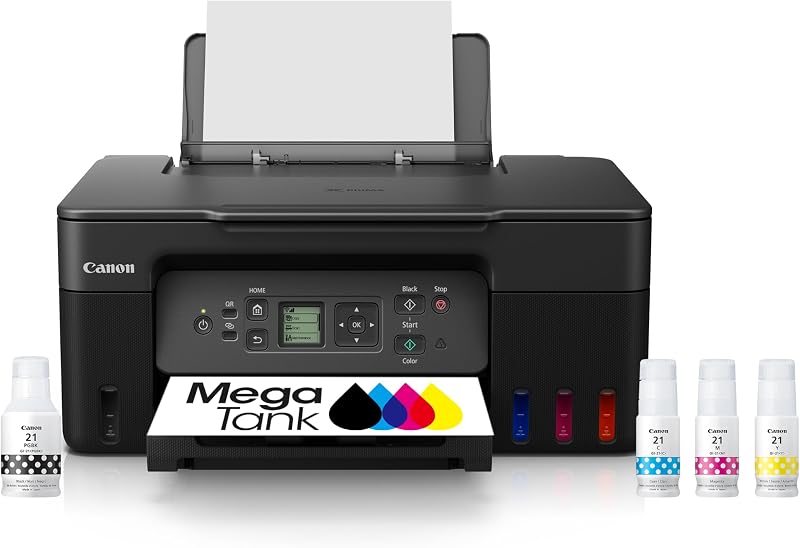
Canon MegaTank G3270 suits buyers prioritizing ultra-high-yield ink reserves over pure print speed, offering an integrated refillable tank system and compact desktop design geared toward everyday home and small office color copying and scanning.
Canon PIXMA TR7120 Wireless Color serves home office environments that desire a clean white aesthetic and intuitive control panel, providing duplex printing, an automatic document feeder, and copier/scanner capabilities in a noticeably lighter build.

FAQ
Can the HP OfficeJet Pro 8720 print on both sides of the page automatically?
Yes. The machine features automated two-sided duplex printing, allowing it to produce double-sided documents without requiring the user to flip sheets manually. It also supports single-pass duplex scanning and copying.
What is the benefit of the HP Print Forward Design?
The Print Forward Design encloses the output tray completely within the printer framework. Printed sheets are collected face down on an internal shelf, keeping them neatly aligned, private from casual observers, and off the floor without fragile tray extensions sticking out into your office.
Can I print directly from my smartphone without connecting to an office Wi-Fi network?
Yes. The unit supports Wireless Direct printing, which establishes a secure direct connection between your mobile phone or tablet and the printer without passing through your main office network router.
What is the maximum paper size supported for borderless printing?
The printer supports borderless photo and document printing up to standard US Letter size (8.5 x 11 inches) and international A4 dimensions (210 x 297 mm).
Can this printer hold more paper with an extra tray?
Yes. The listing notes that you can print longer without reloading by installing an optional second paper tray, which is supported by the hardware architecture.
While the HP OfficeJet Pro 8720 bridges the gap between inkjet efficiency and shared office demands, high-volume teams might still benefit from dedicated toner-based hardware. Reviewing our comprehensive Laser Printer Guide can help you determine whether traditional toner workflows better fit your monthly duty cycle and long-term operating costs. Matching your specific output volume to the right print technology ensures optimal speed, reliability, and cost-per-page over time.


