
As Amazon Associates, we earn from qualifying purchases. This means we may receive a small commission at no extra cost to you if you click through and make a purchase.
Homeowners and students shopping for an all-in-one inkjet often find themselves weighing crisp text reproduction against casual photo convenience and long-term ink policies. The HP Envy Inspire 7955e is an all-around color multifunction printer tailored for busy family living rooms and shared home workstations that need borderless photo output alongside daily school assignments. Because this specific unit is an Amazon Renewed model backed by a 90 days limited warranty, this hp 7955e printer gives budget-conscious households access to modern hardware features while keeping strict HP+ connectivity criteria and proprietary ink cartridge rules clearly in focus.
In this detailed hp envy inspire 7955e review, we examine whether this inkjet machine delivers the performance, color quality, and day-to-day usability needed for real household demands. We break down the published hardware specifications, inspect document output speeds, evaluate the dedicated photo tray, explain the hp 7955e setup process over wireless networks, and discuss ongoing cartridge requirements so you know exactly what ownership involves before placing an order.
What You Get With the HP Envy Inspire 7955e
HP Envy Inspire 7955e


Photographs published on the Amazon listing.
The HP Envy Inspire 7955e arrives configured as a versatile home printing hub built with over 45% recycled plastic, pairing document utility with dedicated photo handling hardware. Because this listing represents an Amazon Renewed package, the machine comes inspected and supported by a 90 days limited warranty, giving households access to modern multifunction features right out of the box.
- All-in-one print, copy, and scan functionality
- Print speeds up to 15 pages per minute black and 10 pages per minute color
- Automatic two-sided printing for efficient paper usage
- Automatic document feeder paired with a sheetfed scanner mechanism
- Dedicated photo paper tray for borderless photo printing
- Support for custom photo sizes including 5×5 square and 4×12 panoramic paper
- 2.7-inch capacitive touchscreen CGD display with customizable shortcuts
- Self-healing Wi-Fi connectivity and mobile printing via the HP Smart app
- HP+ smart feature integration for mobile productivity and automated security updates
- Amazon Renewed certification with a 90 days limited warranty
Key Specifications
Feature
Specification
- Printer Type
- Thermal Inkjet
- Output Color
- Color (Black, Cyan, Magenta, Yellow)
- Print Speed
- Up to 15 ppm black, up to 10 ppm color
- Maximum Print Resolution
- 4800 x 1200 dpi
- Display Type
- 2.7-inch Capacitive Touchscreen CGD
- Paper Trays
- 3 trays (includes separate photo tray)
- Duplex Printing
- Automatic duplex
- Scanner Type
- Sheetfed scanner with automatic document feeder
- Item Weight
- 17.9 pounds
- Maximum Media Size
- 10.50 x 7.25 inches
- Warranty
- 90 days limited warranty
Copied from the Amazon listing. These figures were not measured here.
Document Output and Daily Workload Performance
Day-to-day document output represents the core function for any family printer, and the hp 7955e all in one printer handles general correspondence with balanced throughput. Rated at print speeds up to 15 pages per minute for black text and up to 10 pages per minute for color, it produces crisp homework worksheets, permission slips, and multi-page forms without keeping you waiting by the output tray. The thermal inkjet engine delivers clean black text that remains easy to read across standard copy paper.
Handling multi-page paperwork is streamlined thanks to the integrated automatic document feeder and sheetfed scanner. Rather than forcing you to align each individual receipt or report card manually, the document feeder processes stacks automatically for copying and digitizing. For households that manage unusually high continuous page volumes, bulk-ink options like the hp smart tank 7303 all-in-one printer cater specifically to heavy non-stop runs, whereas the 7955e strikes a practical balance between periodic multi-page convenience and mixed media jobs.
Paper management is further simplified by the inclusion of automatic two-sided printing, which cuts household paper consumption in half without requiring you to flip sheets manually. At 17.9 pounds, the unit has enough physical substance to remain stable during active print cycles, ensuring that mechanical vibrations do not disrupt paper alignment or print consistency during longer print runs.
Photo Printing Versatility and Media Handling
One of the most notable hp 7955e specs is the inclusion of three separate paper trays, which features a dedicated photo tray designed to keep photographic media segregated from ordinary letter paper. This dedicated tray eliminates the frustration of unloading standard document paper whenever you want to create a quick photo print. Supporting glossy photo paper, the unit achieves a maximum color print resolution of 4800 x 1200 dpi for clean, true-to-phone color depth.
The system expands creative options with tailored support for unique media formats, making hp 7955e photo printing especially versatile for hobbyists and scrapbooking families. Beyond standard borderless snapshots, the device is optimized to feed HP 5×5-inch square photo sheets for social media pictures and 4×12-inch panoramic paper for landscape scenes. While commercial studios seeking expansive large-format work might opt for an art-centric platform like the epson ecotank photo et-8550 all-in-one supertank printer, this machine easily satisfies casual household photo needs right out of the box.
Color fidelity is tuned to mimic the saturation and clarity seen on mobile displays, translating digital snapshots into vibrant physical keepsakes. Working in tandem with the HP Smart app, users can apply custom photo enhancements, crop layouts, and send picture orders directly to the dedicated photo tray without reconfiguring primary feeder trays.
Wireless Setup and Mobile Connectivity
Completing the initial hp 7955e setup is designed to be accessible for non-technical users, relying heavily on automated wireless pairing tools. The printer incorporates dual-band self-healing Wi-Fi technology, which actively monitors the network link and resolves common connection interruptions by resetting the wireless channel automatically. This feature helps prevent the frustrating offline printer status errors that often plague older home hardware.
The companion HP Smart app serves as the primary software dashboard, orchestrating the hp 7955e wireless setup on iOS, Android, macOS, and Windows devices. Through the mobile interface, household members can print documents from cloud accounts, scan receipts directly to smartphone folders, and check remaining ink levels from anywhere with an active internet connection. Users needing extreme mobile portability for field operations might evaluate compact portable options like the hp officejet 250 mobile all-in-one printer, but for anchored residential use, the 7955e provides seamless network sharing across all family devices.
On the hardware side, direct device management runs through a 2.7-inch capacitive touchscreen CGD display. The screen provides responsive, swipe-friendly navigation and allows users to establish customizable shortcuts for frequent tasks, such as copying identity cards or sending scans to designated email accounts with a single touch.
HP Plus Policies and Cartridge Requirements
Understanding the printer ecosystem is essential before making an investment, particularly regarding hp 7955e ink replacement procedures. Activating the optional HP+ smart features unlocks enhanced mobile scanning tools, cloud printing capabilities, and automated security monitoring. However, the listing explicitly notes that HP+ operates exclusively when paired with an active HP account, a continuous internet connection, and the mandatory use of Original HP Ink cartridges for the entire operating life of the printer.
The physical printer incorporates strict dynamic security measures that restrict cartridge compatibility. The machine works solely with original HP chip cartridges, and the internal circuitry actively blocks cartridges utilizing non-HP microchips. Furthermore, periodic firmware updates delivered over the internet ensure these blocking measures remain effective over time, which means third-party or generic refill cartridges will not function in this hardware.
Environmental design plays a central role in the product construction, with the chassis containing over 45% recycled plastic. Opting for an hp envy inspire 7955e renewed unit extends the utility of existing manufactured electronics, pairing sustainable construction with the security of a 90 days limited warranty from Amazon Renewed.
HP Envy Inspire 7955e Pros and Cons
Pros
- Dedicated photo tray for borderless pictures
- Automatic two-sided printing
- Sheetfed scanner with automatic document feeder
- Responsive 2.7-inch capacitive touchscreen
- Self-healing dual-band Wi-Fi connection
Cons
- Requires original HP chip cartridges
- Firmware updates block third-party ink
- HP+ requires continuous internet connection
Check HP Envy Inspire 7955e on Amazon
Is the HP Envy Inspire 7955e Worth It
Determining whether is hp 7955e worth it comes down to how your household balances print volume, media variety, and cartridge preferences. If your family regularly prints school assignments, scans tax packets with the document feeder, and values having a dedicated photo tray ready for borderless snapshots, the hardware delivers strong day-to-day functionality. The combination of self-healing Wi-Fi, automatic duplexing, and crisp 4800 x 1200 dpi photo capability covers the broad requirements of a modern home.
Conversely, this unit is not suitable for buyers seeking complete freedom over consumable supplies. If your operating strategy relies on sourcing inexpensive third-party cartridges or using remanufactured chips, the dynamic security firmware and strict original HP chip requirements will prove restrictive. High-volume business users requiring thousands of pages each month should also look toward commercial office equipment rather than cartridge-based family inkjets.
For shoppers who are comfortable remaining within the Original HP Ink ecosystem and want a capable, sustainable all-in-one with touchscreen convenience, this renewed model presents a practical solution. The 90 days limited warranty provides reliable protection while you verify performance across documents, scans, and family photo projects.
Other Options to Consider
Cost Efficient Multi-Function Photo Printer suits home users looking for a straightforward, compact Canon PIXMA TS4320 wireless color inkjet printer that handles basic print, copy, and scan duties with an emphasis on easy setup and everyday multi-function home use.

Canon PIXMA TS6520 Wireless Color is better tailored for shoppers who prefer a compact white inkjet all-in-one featuring duplex printing, a copy and scan bed, and an integrated 1.42-inch OLED display for quick visual monitoring in tight home office setups.
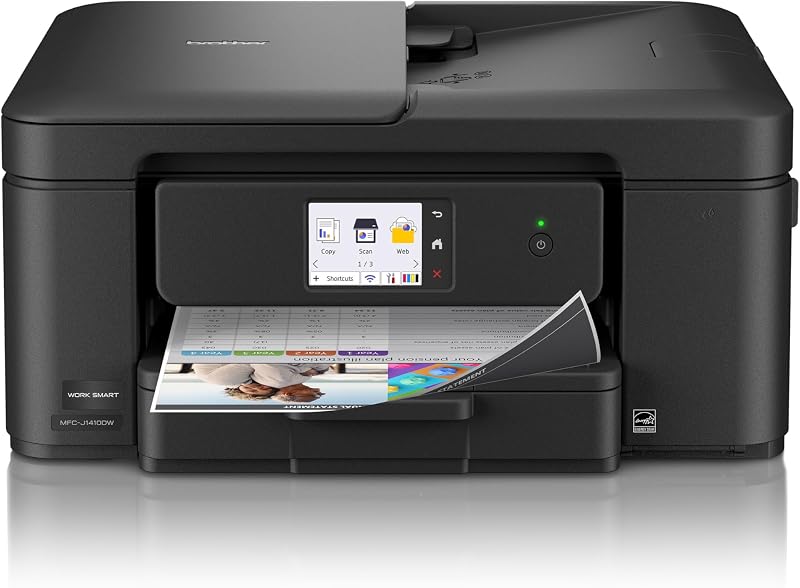
Brother Work Smart 1410 Wireless caters to individuals seeking an alternative office-focused ecosystem, offering a 2.7-inch touchscreen, automatic duplex printing, and access to a Brother Refresh subscription trial for automated cartridge replenishment.
FAQ
Does the HP Envy Inspire 7955e accept third-party ink cartridges?
No. The printer is engineered to function only with original HP chip cartridges and actively blocks non-HP chips. The manufacturer deploys periodic firmware updates over the internet to maintain these dynamic security restrictions.
What paper sizes does the dedicated photo tray support?
The separate photo tray supports standard glossy photo media as well as specialized creative paper sizes, including HP 5×5-inch square sheets and 4×12-inch panoramic paper formats.
Does this printer support automatic two-sided printing?
Yes. The printer features built-in automatic duplex printing, allowing you to print double-sided documents without having to flip or reload sheets manually.
What warranty coverage comes with this renewed printer?
Because this product is sold as an Amazon Renewed unit, it includes a 90 days limited warranty providing replacement or refund eligibility if the hardware fails to operate properly.
Can the automatic document feeder handle multi-page scanning?
Yes. The automatic document feeder works alongside the sheetfed scanner mechanism to feed and process multi-page paperwork automatically for scanning and copying jobs.


