As Amazon Associates, we earn from qualifying purchases. This means we may receive a small commission at no extra cost to you if you click through and make a purchase.
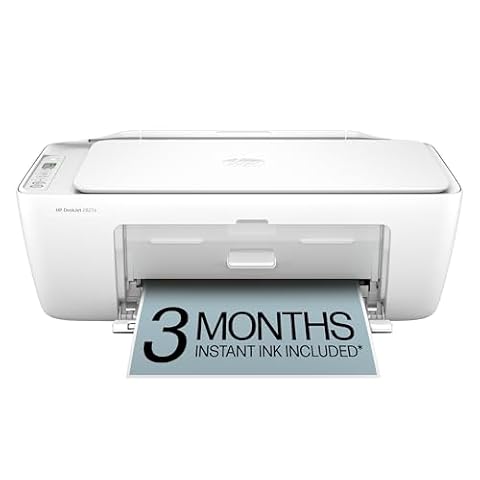
Finding a dependable home printer often comes down to balancing compact dimensions with essential document capabilities. The HP DeskJet 2955 is designed specifically for everyday household printing, offering a three-in-one setup that handles color printing, flatbed scanning, and standalone copying. Designed for light workloads such as recipe cards, school assignments, travel boarding passes, and basic financial records, this compact all-in-one inkjet keeps physical clutter down while providing modern wireless connectivity.
Before bringing any desktop machine home, shoppers need to know whether its operating pace, tray capacity, and cartridge system match their actual printing habits. This practical review examines the HP DeskJet 2955 for home use across real-world ownership factors, detailing everyday output speeds, wireless reliability, mobile controls, scanner utility, and recurring supply requirements so you can decide if it meets your household needs.
What You Get With the HP DeskJet 2955
HP DeskJet 2955
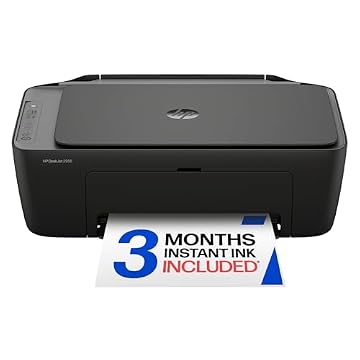


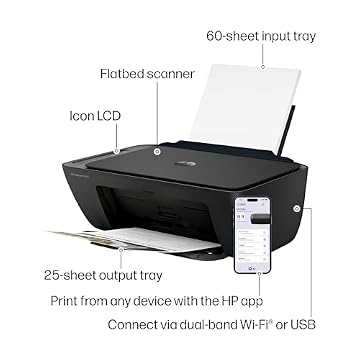
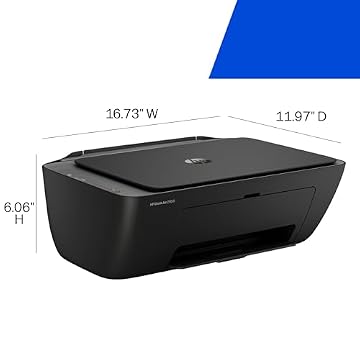
Photographs published on the Amazon listing.
The HP DeskJet 2955 package centers on a lightweight multifunction color printer engineered to handle routine personal documentation straight out of the box. HP pairs the core thermal inkjet hardware with connected services and automated layout intelligence to streamline simple home paperwork.
- Color thermal inkjet print engine capable of producing standard text documents, color graphics, and borderless recipes
- Integrated flatbed scanner and digital copier for digitizing letters, receipts, and identification cards
- Rear input paper tray with a maximum capacity of up to 60 sheets of standard paper
- Self-healing dual-band Wi-Fi engineered to detect and resolve network connectivity interruptions automatically
- HP Smart app integration enabling mobile printing, remote scanning, and mobile faxing from smartphones or tablets
- Built-in Icon LCD control panel providing straightforward status icons and quick-action buttons
- HP AI print formatting designed to eliminate unwanted web elements and prevent awkward layout waste
- Three-month included trial subscription to the HP Instant Ink delivery service
- Eco-conscious housing constructed using at least 70 percent post-consumer recycled plastic
- Official ENERGY STAR and EPEAT environmental certifications for reduced energy consumption
Key Specifications
Reviewing the published HP DeskJet 2955 specs reveals a compact desktop configuration focused squarely on personal convenience rather than office-grade volume.
Feature
Manufacturer Specification
- Print Technology
- HP Thermal Inkjet
- Core Functions
- Color Print, Copy, Flatbed Scan
- Print Speed (ISO)
- Up to 7.5 ppm black, up to 5.5 ppm color
- Maximum Copy Speed
- Up to 6 ppm black and white
- Copy Run Capacity
- Up to 9 copies in a single run
- Paper Tray Capacity
- Single input tray, up to 60 sheets
- Supported Media Sizes
- 8.5 x 11, 8.5 x 14, 8.27 x 11.7, 7.16 x 10.12 inches, envelopes
- Scanner Bed Type
- Flatbed (maximum media size 8.5 x 11.69 inches)
- Dimensions (D x W x H)
- 11.97 inches deep by 16.73 inches wide by 6.06 inches high
- Item Weight
- 7.6 pounds
- Wireless Connectivity
- Dual-band Wi-Fi, HP Smart app support
- Compatible Operating Systems
- Laptops, personal computers, smartphones, and tablets
- Compatible Cartridges
- HP 68 Black, HP 68 Tri-Color, HP 68e EvoMore Black
Copied from the Amazon listing. These figures were not measured here.
Everyday Document Quality and Print Speed
Understanding the realistic HP DeskJet 2955 print speed is critical for setting reasonable expectations in a busy household. The manufacturer rates this unit at up to 7.5 pages per minute for monochrome documents and up to 5.5 pages per minute for color pages. For single-page shipping receipts, short recipes, or two-page school permission slips, these speeds deliver finished pages promptly without keeping you waiting. However, if your family routinely outputs fifty-page manuals or extensive business packets, the modest engine pace requires patience compared to higher-throughput hardware.
Print quality relies on standard thermal inkjet technology, rendering legible dark text alongside balanced color charts and modest home graphics. While fine detail on full-page color presentations will not match commercial graphic studios, everyday color documents like educational worksheets, greeting letters, and web printouts look crisp and readable. The inclusion of HP AI formatting assists when printing directly from web browsers and email clients, automatically stripping out superfluous banner ads and awkward web formatting to keep pages clean and conserve ink.
Media handling supports essential stationery including standard letter sheets, legal dimensions, and mailing envelopes up to the maximum 60-sheet input tray capacity. Because the tray holds slightly more than a tenth of a ream, heavy users will find themselves reloading paper frequently. Buyers who anticipate generating substantial multi-page reports on a daily basis might examine a heavier-duty alternative like the hp 7955e printer, whereas light personal printing fits comfortably within the mechanical boundaries of the DeskJet 2955.
Wireless Connectivity and Setup Process
Connecting a home printer across multiple household computers used to involve frustrating driver installations and dropped local signals. Routine HP DeskJet wireless printing on this model is backed by dual-band Wi-Fi circuitry that automatically monitors connection integrity and resolves standard router pairing drops without manual resets. This stable wireless link allows laptops, desktop PCs, and smartphones across the living space to queue up jobs seamlessly without needing dedicated USB cables trailing across desks.
Executing the initial HP Smart app setup takes users through an intuitive on-screen onboarding workflow on iOS, Android, macOS, or Windows devices. The application guides you through unpacking, inserting the starter cartridges, loading paper into the rear feed, and linking the printer to your local 2.4 GHz or 5 GHz wireless network. Once paired, the app transforms mobile devices into full-fledged command terminals where family members can submit print jobs, initiate scans directly to mobile storage, or transmit mobile faxes.
Physical hardware management is equally straightforward thanks to the embedded Icon LCD panel on the printer chassis. Rather than relying on confusing multi-color flashing LEDs, the screen displays clear graphic icons indicating Wi-Fi signal strength, ink level estimations, copy counts, and system alerts. This hybrid interface ensures that anyone walking up to the printer can check operating status or run a fast photocopy without reaching for a phone or opening a laptop computer.
Color Scanning and Copying Practicality
An integrated HP DeskJet color scanner copier turns this unit into an administrative asset for managing family documents, medical records, and domestic paperwork. The flatbed glass accommodates materials up to 8.5 by 11.69 inches, making it easy to digitize standard letter-sized agreements, tax receipts, or handwritten notes. Because it utilizes a flatbed design rather than a feed slot, you can easily place thick booklets, bound passports, or fragile historic photographs directly onto the glass without risking paper jams or torn corners.
The copy engine operates at speeds up to 6 pages per minute for black-and-white documents, providing rapid duplicates of driver licenses, utility bills, or insurance identification cards. The physical control buttons allow you to request up to 9 copies in a single uninterrupted run, which is ideal for domestic needs like distributing chore charts or making duplicates of an agenda. Users should note that the listing does not specify an automatic document feeder, so multi-page contracts require manually placing each page onto the glass scanner bed one at a time.
Digital scanning through the companion mobile software expands the hardware flatbed capabilities into cloud storage workflows. Scans captured on the glass can be cropped, rotated, and converted into PDF or image files before being emailed directly from your smartphone or backed up to cloud folders. For occasional document archival, digital receipt tracking, and domestic record-keeping, the scanning hardware fulfills standard household requirements without unnecessary complexity.
Cartridge Economics and Ink Delivery
Operating costs represent the primary ongoing consideration for any inkjet hardware, making cartridge configuration an essential factor to examine. The HP DeskJet 2955 utilizes a dual-cartridge system: one dedicated HP 68 Black cartridge and one HP 68 Tri-Color cartridge housing cyan, magenta, and yellow ink reservoirs together. HP also supports the HP 68e EvoMore Black cartridge for users seeking extended page intervals between physical black ink replacements. The primary trade-off of a tri-color tank is that when any single color runs dry during heavy photo or graphic printing, the entire composite cartridge must eventually be renewed.
To mitigate running expenses, the printer includes an initial HP Instant Ink trial lasting three months from enrollment. Instant Ink operates as an automated subscription service where the printer monitors its own ink levels via Wi-Fi and prompts HP to mail replacement cartridges directly to your door before supplies run out. HP advertises savings of up to 50 percent on ink through this program, though after the initial three-month promotional period expires, a monthly subscription fee applies unless you choose to cancel the plan.
Understanding your household volume helps determine whether subscription billing or purchasing standalone cartridges at retail stores offers the best long-term fit. Light households printing five to twenty pages per month often benefit from the predictability of automated cartridge shipments, avoiding sudden ink depletion when urgent tasks arise. Conversely, buyers who produce massive document stacks every single week might prefer exploring continuous bottle systems like the hp smart tank 7303 all-in-one printer, which avoids cartridge swaps entirely in exchange for refillable liquid reservoirs.
HP DeskJet 2955 Pros and Cons
Pros
- Compact design suitable for limited desk spaces
- Dual-band Wi-Fi with automatic connection recovery
- Includes three-month trial of HP Instant Ink
- HP Smart app enables printing and scanning from phones
- Manufactured with at least 70 percent recycled plastics
Cons
- Modest print speeds of 7.5 ppm black and 5.5 ppm color
- Single paper tray limited to 60 sheets
- Maximum copy volume capped at 9 copies per run
Check HP DeskJet 2955 on Amazon
Is the HP DeskJet 2955 Worth It
Determining whether the HP DeskJet 2955 is worth it comes down to matching your monthly output volume against the printer mechanical design. For students, apartment dwellers, retirees, and families who only print a handful of pages per week, this compact all-in-one inkjet delivers tremendous practical utility. It provides color printing, clear flatbed scanning, basic walk-up copying, and modern dual-band wireless communication within a lightweight chassis that fits on a narrow bookshelf or corner workstation.
The trade-offs reflect its modest footprint and budget-friendly household design. With output speeds capped at 7.5 ppm for black text and 5.5 ppm for color graphics, a 60-sheet paper tray, a 9-copy multi-run ceiling, and no built-in automatic document feeder, it is distinctly unsuitable for paper-heavy home offices or commercial enterprises. Trying to process hundred-page manuscripts or high-volume business mailings on this hardware will lead to constant paper reloading and frequent cartridge replacements.
If your daily workflow involves true road mobility and battery-powered operation away from electrical outlets, specialized portable gear like the hp officejet 250 mobile all-in-one printer represents a purpose-built alternative. However, if your goal is an unobtrusive, eco-conscious home appliance that handles homework assignments, seasonal craft patterns, and occasional administrative documents without cluttering your desk, the DeskJet 2955 delivers a solid, well-rounded solution.
Other Options to Consider
Best-for-home suits buyers who handle larger multi-page packets and want duplex printing, an automatic document feeder, a 1.8-inch display, and voice integration with Alexa Brother Work Smart 1360 Wireless Color Inkjet All-in-One Print, Scan, Copy hardware.

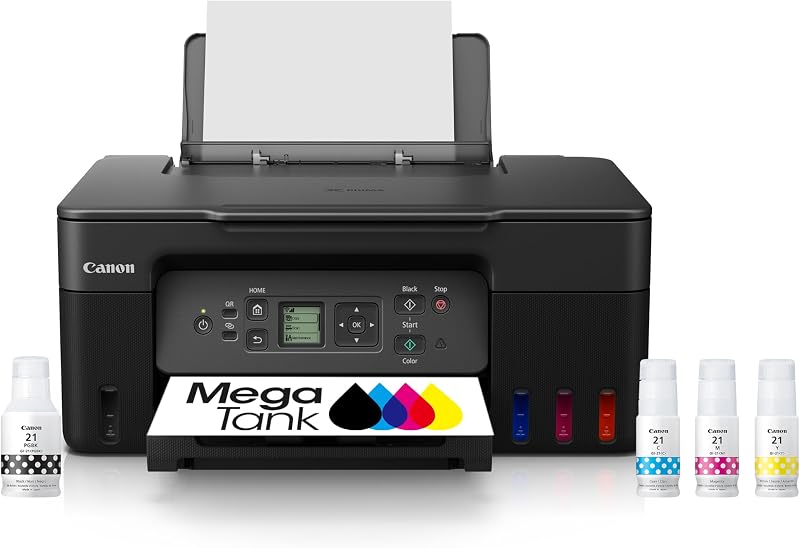
Print is designed for households seeking a refillable tank system to eliminate traditional cartridges, offering a compact desktop design built for combined home and office use Canon MegaTank G3270 All-in-One Wireless Color Printer tasks.
Canon PIXMA TR7120 Wireless Color serves shoppers looking for an aesthetic white compact housing equipped with automatic duplex printing, an auto document feeder, and an intuitive control panel for copying and scanning.

FAQ
How fast does the HP DeskJet 2955 produce documents?
The HP DeskJet 2955 outputs black-and-white text documents at speeds up to 7.5 pages per minute and color pages at up to 5.5 pages per minute under standard ISO testing conditions. Monochrome copying operates at up to 6 pages per minute, making it well-suited for brief everyday household jobs.
Does the HP DeskJet 2955 support automatic double-sided printing?
The listing does not specify automatic duplex printing for this model. Standard two-sided printing on this unit requires users to reload pages manually through the 60-sheet input tray to print on the opposite side of each sheet.
How does the included HP Instant Ink trial operate?
The printer comes with a 3-month trial of the HP Instant Ink delivery service. When enrolled, the printer monitors ink levels and automatically arranges ink shipments to your door before cartridges run out. HP states users can save up to 50 percent on supplies, with standard monthly subscription fees applying after three months unless cancelled.
Can you scan multiple pages automatically on this printer?
The HP DeskJet 2955 features a flatbed scanner glass supporting media sizes up to 8.5 by 11.69 inches. Because the listing does not specify an automatic document feeder, multi-page scanning tasks require placing each page onto the glass bed manually.
What devices can connect to the HP DeskJet 2955?
The printer connects wirelessly via dual-band Wi-Fi to personal computers, Windows laptops, MacBooks, and mobile devices including Android and iOS smartphones or tablets running the HP Smart application.