
As Amazon Associates, we earn from qualifying purchases. This means we may receive a small commission at no extra cost to you if you click through and make a purchase.
Choosing the right printer for heavy household or remote workplace demands often comes down to finding a machine that avoids expensive cartridge replenishments and constant maintenance. The HP Smart Tank 7303 is designed specifically for people who print frequent multi-page packets, work documents, and school assignments without wanting to constantly monitor cartridge levels. As a cartridge free tank printer that arrives with generous ink bottles straight out of the box, it targets buyers who need high capacity, dependable paper handling, and consistent color output. If your printing routines involve regular administrative paperwork or high-volume family projects, this hardware aims to eliminate the friction of traditional ink replacement.
Unlike a traditional cartridge-based unit such as an hp deskjet all-in-one printer, this tank model focuses on long-term convenience and low-intervention operation. In this comprehensive guide, we examine how the hp smart tank 7303 all-in-one printer performs across day-to-day office routines. We break down the bottle refill system, verify duplex handling and document feeding capabilities, evaluate wireless connectivity, and compare its overall feature set to relevant alternatives so you can determine if it fits your specific setup.
What You Get With the HP Smart Tank 7303
HP Smart Tank 7303


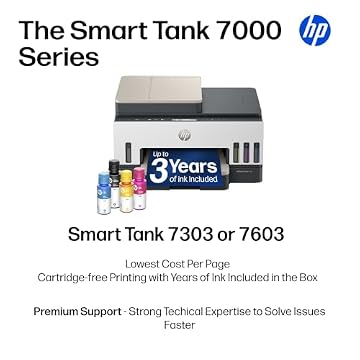
Photographs published on the Amazon listing.
The HP Smart Tank 7303 arrives ready for multi-function duty, pairing high-capacity ink reserves with core office productivity features. HP includes everything required to initiate full color and monochrome workflows immediately upon unboxing, focusing on eliminating recurring ink purchases for long stretches.
- HP Smart Tank 7303 Wireless All-in-One thermal inkjet printer unit
- Original HP ink bottles supplying up to 8,000 color pages or 6,000 black pages (up to 3 years of ink included based on manufacturer yields)
- Four-color ink setup including Black, Cyan, Magenta, and Yellow supply reservoirs
- Automatic document feeder with a 35-sheet capacity for batch scanning and copying
- Built-in automatic two-sided printing module
- Front-loading input paper tray holding up to 250 sheets
- Flatbed scanner supporting digital Scan to PDF outputs
- Support for plain paper, legal media, and glossy photo paper
- Standard power and connectivity integration with one year limited hardware warranty
Key Specifications
Understanding the hardware parameters helps establish whether this unit aligns with your physical workspace and operational volume. Here are the core hp smart tank 7303 specs derived from the manufacturer listing data:
Feature
Specification
- Printer Type
- HP Thermal Inkjet
- Print Output Type
- Color and Monochrome
- Functions Supported
- Print, Copy, Scan (All-in-One)
- Ink Delivery System
- Cartridge-Free Refillable Ink Tank (Black, Cyan, Magenta, Yellow)
- Included Ink Yield
- Up to 8,000 color or 6,000 black pages (up to 3 years included)
- Paper Input Capacity
- 250 sheets maximum (1 tray)
- Automatic Document Feeder
- 35-sheet ADF
- Duplex Support
- Two-sided printing
- Maximum Copy Speed
- Up to 13 pages per minute (Black and White)
- Scanner Architecture
- Flatbed with Scan to PDF functionality
- Maximum Copies Per Run
- Up to 99 copies
- Supported Paper Sizes
- 8.5 x 11, 8.27 x 11.7, 8.5 x 14 (Legal), 4 x 6, 7.25 x 10.5 inches
- Physical Dimensions
- 14.33 inches Deep x 16.83 inches Wide x 9.46 inches High
- Product Weight
- 17 pounds
Copied from the Amazon listing. These figures were not measured here.
Mess-Free Ink Tank System and Refill Convenience
The primary attraction of this unit is its freedom from traditional ink cartridges. The hp smart tank 7303 ink refill process relies on dedicated bottles that plug directly into the corresponding internal reservoirs without manual squeezing or pressurized dripping. Because the bottles mate securely to the intake valves, ink flows smoothly into the machine and cuts off automatically once full, preventing messy desktop leaks and stained hands. This streamlined replenishment addresses the major fear shoppers often harbor regarding bulk fluid systems.
Longevity is another central strength of this setup. The listing notes up to 3 years of Original HP Ink included directly in the packaging, rated to output up to 8,000 color pages or 6,000 black pages before additional fluid is required. For active households processing school reports or home businesses generating invoices and contracts, this vast out-of-the-box yield keeps maintenance intervals exceptionally long. You can verify ink levels visually through the transparent front-facing tank windows rather than relying solely on software approximations.
Compared to smaller reservoir units like a compact smart tank printer, having expansive internal wells means significantly fewer maintenance pauses during intense print cycles. The cartridge-free architecture provides steady fluid delivery to the HP Thermal Inkjet printhead, ensuring that document print runs finish reliably without unexpected mid-job dropouts.
Paper Handling, Duplex Printing, and Document Feeder Workflow
Paper management on this machine is geared toward moderate-to-heavy administrative workloads. The unit incorporates an internal paper tray with a maximum capacity of 250 sheets, allowing you to load half a standard ream of plain paper at a time. This generous capacity avoids the frustration of frequent reloading when printing extensive handbooks, tax packets, or multi-chapter academic papers. Supported media includes standard 8.5 x 11-inch letter paper, 8.27 x 11.7-inch A4, legal sheets measuring 8.5 x 14 inches, and photo media down to 4 x 6 inches.
Efficiency improves significantly with built-in hp smart tank 7303 duplex printing. The automatic two-sided engine flips sheets internally without requiring manual re-feeding, reducing overall paper consumption and producing professional double-sided manuals and agreements effortlessly. When copying large files, the machine handles runs of up to 99 copies at a maximum black-and-white copy speed of 13 pages per minute, providing solid throughput for routine business duties.
Managing multi-page originals is handled by the 35-sheet hp smart tank 7303 adf scanner. Instead of placing documents one by one onto the glass, you can set a stack of invoices, contracts, or reference pages into the feeder to copy or digitize them directly into PDF format. For delicate materials, bound books, or photo prints, the flatbed glass provides safe scanning without mechanical roller engagement.
Wireless Setup and Everyday Home Office Usability
A multi-user home office requires seamless device integration, and the hp smart tank 7303 wireless setup accommodates modern cross-platform networks. The hardware features wireless connectivity engineered to communicate smoothly with laptops, desktop PCs, and smartphones. Mobile printing allows family members or colleagues to send documents directly from handheld mobile devices, bypassing the need to transfer files to a dedicated computer first.
The system is designated as AI-capable, designed to intuitively adapt to ongoing office workflows while maintaining built-in security features that help keep the multifunction hardware protected and updated over time. Having automated connectivity management ensures the printer remains accessible across household network zones without frequent connection drops.
In terms of physical space, the machine measures 14.33 inches deep, 16.83 inches wide, and 9.46 inches high, weighing in at 17 pounds. While sturdier and broader than a lightweight photo-centric model like the hp 7955e printer, its self-contained paper cassette and low-profile vertical footprint allow it to sit comfortably on a credenza or secondary work table. Placing the hp smart tank 7303 for home office duties provides an all-in-one productivity hub that manages printing, scanning, and copying without sprawling cables.
Everyday Document and Photo Print Quality
Text crispness and color rendition remain pivotal for both professional documentation and personal home projects. Delivering output through HP Thermal Inkjet technology, the hp smart tank 7303 print quality produces sharp, legible monochrome typography suitable for legal contracts, school assignments, and detailed spreadsheet grids. Fine lines remain sharp, and small font sizes retain legibility without fuzzy edge bleeding on standard plain paper stocks.
Color rendering benefits from the dedicated four-tank system utilizing Black, Cyan, Magenta, and Yellow inks. The listing highlights richer colors and sharper text, making marketing presentations, charts, and educational graphics visually engaging. For creative tasks, the unit supports glossy photo paper and borderless printing, enabling edge-to-edge prints for family photos, craft flyers, and promotional handouts.
While dedicated commercial photo studios might opt for specialized pigment-based art engines, this thermal inkjet system strikes an effective balance for general household and small-business tasks. It handles everyday monochrome correspondence and colorful graphical handouts with equal competence, ensuring high visual clarity across all standard document formats.
HP Smart Tank 7303 Pros and Cons
Pros
- Up to 3 years of ink included in box
- High yield of 8,000 color or 6,000 black pages
- Automatic two-sided duplex printing engine
- 35-sheet automatic document feeder for multi-page scanning
- 250-sheet input paper tray capacity
- Mess-free bottle refill system without squeezing
Cons
- Heavier 17-pound frame requires dedicated space
- Monochrome copy speed limited to 13 ppm
- Single input tray restricts simultaneous media types
Check HP Smart Tank 7303 on Amazon
Is the HP Smart Tank 7303 Worth It
Determining whether this hardware makes sense for your space depends largely on your projected printing habits. If you consistently generate dozens of pages every week and dread the ongoing expense and waste of disposable cartridges, this model provides tremendous utility. The combination of up to 3 years of ink included in the box, an automatic document feeder, two-sided printing, and a 250-sheet paper cassette removes nearly every common printing friction point for high-volume users.
On the other hand, buyers who print only one or two pages a month may find the physical footprint and high-capacity tanks unnecessary. At 17 pounds and over 16 inches wide, it demands dedicated desk space, and its 13 pages-per-minute copy speed is optimized for steady home-office production rather than ultra-fast enterprise copy rooms. Evaluating if is hp smart tank 7303 worth it comes down to calculating how much you value unattended paper handling and bulk ink peace of mind.
For home offices, remote workers, students, and busy families, the machine represents a practical long-term printing workhorse. Once the initial tank reservoir is filled and connected to Wi-Fi, the low-maintenance architecture lets you focus on completing projects rather than monitoring supply gauges.
Other Options to Consider
Best-for-home suits buyers looking for a Brother Work Smart 1360 wireless color inkjet all-in-one that features duplex printing, an auto document feeder, mobile printing, a 1.8-inch display, and works with Alexa, making it an attractive alternative for users who prioritize smart home voice controls and a dedicated color screen.

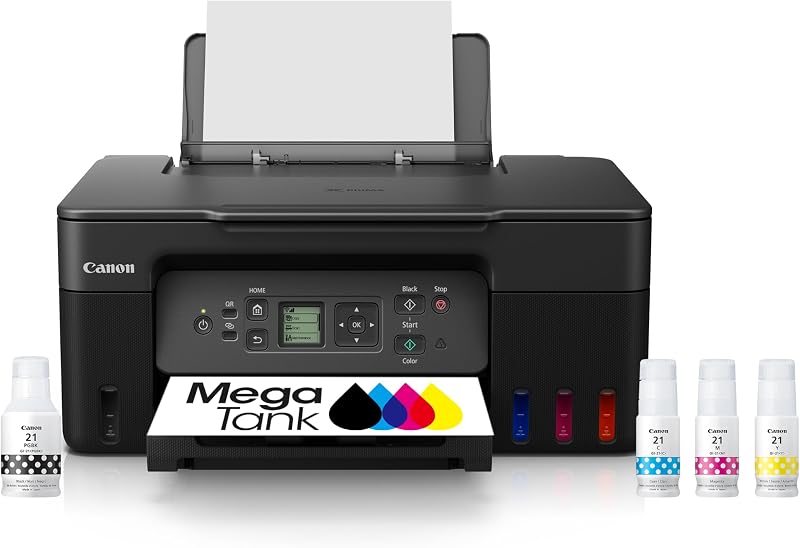
Print appeals to individuals seeking the Canon MegaTank G3270 all-in-one wireless color printer, which emphasizes a compact desktop design alongside its refillable tank system for print, copy, and scan tasks in smaller work areas.
Canon PIXMA TR7120 Wireless Color caters to users who prefer a white exterior finish with an intuitive control panel, duplex printing, copier/scanner capabilities, and an auto document feeder in a compact desktop form factor.

FAQ
How many pages can the HP Smart Tank 7303 print with the included ink bottles?
The printer comes loaded with Original HP Ink bottles yielding up to 8,000 color pages or up to 6,000 black-and-white pages right out of the box, which the manufacturer states provides up to 3 years of ink based on typical home usage patterns.
Does the HP Smart Tank 7303 support automatic two-sided printing?
Yes, the unit features built-in automatic two-sided printing, allowing you to print double-sided documents without having to manually flip and reload the paper.
How does the ink refill system prevent accidental spills?
HP utilizes an easy-access plug-in bottle system where the bottles dock directly into the tank openings and drain on their own. The system requires no bottle squeezing and seals securely to prevent drips and messes.
What paper sizes and types does this printer accept?
The printer handles plain paper and glossy photo paper across several sizes, including 8.5 x 11 inches, 8.27 x 11.7 inches, 8.5 x 14 inches (legal), 4 x 6 inches, and 7.25 x 10.5 inches.
What is the capacity of the paper tray and document feeder?
The primary front paper tray accommodates up to 250 sheets of paper, while the automatic document feeder on top holds up to 35 sheets for hands-free scanning and copying.
What operating devices can connect to the printer?
The printer features wireless connectivity compatible with modern laptops, desktop PCs, and smartphones, supporting mobile printing workflows across different operating environments.


