
As Amazon Associates, we earn from qualifying purchases. This means we may receive a small commission at no extra cost to you if you click through and make a purchase.
Finding a dependable home networking setup can be frustrating when dead spots, buffering video streams, and dropped calls disrupt your daily routine. If you subscribe to an internet service tier up to 1 Gbps and want seamless coverage across a multi-story home, the TP-Link Deco X55 AX3000 is built specifically to address those needs. This dual-band Wi-Fi 6 mesh kit replaces your existing standalone router and range extenders, deploying two identical nodes that work in unison to distribute a unified, stable signal without forcing you to switch between network names as you move from room to room.
In this detailed TP-Link Deco AX3000 review, we examine the real-world utility of its dual-band Wi-Fi 6 architecture, evaluate its port layout, explore its wired backhaul capabilities, and assess the included HomeShield security suite. You will learn what hardware arrives in the package, how the system behaves under heavy device loads, what to expect during initial installation, and whether this specific package provides the right balance of capabilities for your household or if an upgraded platform makes more sense.
What You Get With the TP-Link Deco X55 AX3000
TP-Link Deco X55 AX3000


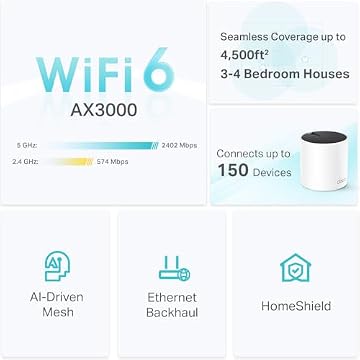


Photographs published on the Amazon listing.
The Deco X55 AX3000 package is designed as a direct upgrade over entry-level mesh hardware like the Deco X20, delivering increased throughput potential and expanded physical connectivity on every node. Inside the two-pack system, TP-Link includes the core hardware necessary to build a whole-home wireless mesh network right out of the box.
- Two identical Deco X55 AX3000 mesh units capable of operating as either a primary router or a mesh satellite
- Six total auto-sensing Gigabit Ethernet ports (three built into each node) supporting wired device connections and Ethernet backhaul
- Internal high-gain antenna arrays with integrated beamforming technology to focus signals directly toward client devices
- Access to the Deco mobile application for guided visual setup, cloud-based network management, and remote access controls
- TP-Link HomeShield software suite offering basic network security, Quality of Service (QoS) device prioritization, and parental controls at no ongoing subscription cost
- Support for WPA3-Personal encryption alongside backward compatibility with older WPA and WPA2 security protocols
- CISA Secure-by-Design pledge compliance ensuring security is treated as a fundamental requirement in hardware and firmware development
- Two-year hardware warranty and 24/7 technical support access
Key Specifications
Understanding the underlying hardware specifications helps clarify what kind of throughput, device density, and physical connections the system can support in daily use.
Feature
Specification Detail
- Wireless Generation
- Wi-Fi 6 (802.11ax), compatible with 802.11ac/n/g/b/a
- Band Architecture
- Dual-Band (2.4 GHz and 5 GHz)
- Maximum Speed Rating
- AX3000 (2402 Mbps on 5 GHz with HE160, 574 Mbps on 2.4 GHz)
- Coverage Rating
- Up to 4,500 square feet for the 2-pack
- Device Capacity
- Up to 150 connected devices
- Ethernet Ports
- 3 Gigabit (10/100/1000 Mbps) ports per unit (6 total in 2-pack)
- Operating Modes
- Wireless Router Mode and Access Point (AP) Mode
- Antenna Configuration
- Internal antennas with Beamforming support
- Security & Protocols
- WPA-Personal, WPA2-Personal, WPA3-Personal, High Router Firewall
- Management Platform
- Deco App (iOS and Android), Alexa voice assistant integration
Copied from the Amazon listing. These figures were not measured here.
Deco AX3000 Coverage and Real Home Range
The primary reason homeowners invest in a mesh system over a traditional standalone router is coverage uniformity. Traditional routers emit a signal from a single central location, which inevitably weakens as radio waves travel through drywall, brick, floors, and metal appliances. The Deco X55 2 pack range is rated by the manufacturer to cover spaces up to 4,500 square feet, which makes it suitable for medium to large single-family homes, multi-story townhomes, or ranch-style properties with sprawling layouts.
Instead of acting like a traditional repeater that merely catches and re-broadcasts a degraded Wi-Fi signal, the Deco AX3000 coverage is managed through an AI-driven mesh algorithm. This system continuously monitors connection quality between the nodes and your client devices. As you walk through your home carrying a smartphone, tablet, or laptop, the network automatically steers your device to the node providing the cleanest signal and strongest throughput. This transition happens without the noticeable disconnects, buffering spikes, or manual network-switching required by basic range extenders.
For homes with up to 150 active smart devices, the Wi-Fi 6 foundation provides substantial improvements in traffic efficiency over older Wi-Fi 5 gear. Technologies like OFDMA and beamforming allow the nodes to communicate with multiple endpoints simultaneously rather than queuing data sequentially. If you are comparing different setups across our tp deco mesh wifi system evaluations, this level of capacity easily accommodates modern households filled with smart plugs, video doorbells, smart thermostats, connected appliances, and multiple mobile screens.
Deco X55 Ethernet Backhaul and Port Flexibility
One of the most significant physical upgrades on the TP-Link Deco X55 Wi-Fi 6 mesh compared to earlier generations is the port configuration. Many entry-level mesh nodes provide only one or two network ports, forcing buyers to purchase external network switches if they have multiple wired devices. Each Deco X55 unit features three auto-sensing Gigabit Ethernet ports, yielding six usable ports across a two-node setup. Because any unit can serve as the primary router connected to your internet service provider’s modem, you retain two open gigabit ports on the gateway node and three fully available ports on the satellite node.
These ports allow you to implement Deco X55 Ethernet backhaul, which dramatically elevates system stability and speed. In a completely wireless mesh configuration, the dual-band radios must divide their available airtime between communicating with client devices and passing data back to the primary unit. Connecting the two Deco units together using a physical Ethernet cable removes that inter-node traffic from the airwaves entirely. This allows the full wireless spectrum on both the 2.4 GHz and 5 GHz bands to be dedicated purely to client devices like phones, tablets, and streaming sticks.
Even if running an in-wall Ethernet cable between rooms is not an option in your home, having three dedicated gigabit ports on each node provides immense utility. You can place the satellite node in an office, entertainment center, or gaming area, plugging your desktop computer, smart television, and console directly into the back of the node via patch cables. This delivers a more consistent connection than relying on weak internal Wi-Fi antennas built into desktop towers or televisions.
Deco AX3000 Setup and App Management
Setting up home networking equipment used to involve navigating confusing browser-based configuration menus, manual IP address entry, and frustrating reboot sequences. The Deco AX3000 setup process removes this friction through the visual Deco mobile application for iOS and Android. Once you connect your primary node to your modem using an Ethernet cable and power it on, the application uses Bluetooth to detect the node and walks you through naming your network and establishing a WPA3 security password within minutes.
Adding the second satellite node is equally straightforward. Once powered on in another room within range of the main unit, the app automatically detects the satellite and integrates it into the unified mesh network. Beyond initial onboarding, the app serves as a centralized management dashboard. It includes remote access capabilities, allowing you to monitor connected hardware, run diagnostic checks, or reboot units even when you are away from home. Voice control is also supported through Amazon Alexa integration, enabling basic actions like turning on guest Wi-Fi through voice prompts.
Security and parental management are integrated directly into the platform through TP-Link HomeShield. Out of the box with no mandatory subscription fee, HomeShield provides high router firewall security, basic network protection against unauthorized connections, a guest network mode, and robust parental controls. Parents can create individual profiles for household members, set daily screen time limits, block specific web domains, and pause the internet on demand. TP-Link is also a signatory of the CISA Secure-by-Design pledge, indicating that baseline cybersecurity considerations are integrated directly into the firmware architecture.
TP-Link Deco AX3000 for Gaming and Heavy Streaming
High-bandwidth home activities like 4K video streaming, teleconferencing, and competitive gaming place unique demands on a wireless router. When evaluating the TP-Link Deco AX3000 for gaming and multimedia, throughput numbers tell an important story. The system delivers up to 2402 Mbps on its 5 GHz band using wide 160 MHz channels (HE160) and 574 Mbps on the 2.4 GHz band. For a household on a standard 300 Mbps, 500 Mbps, or 1 Gbps internet connection, this wireless capacity easily handles multiple concurrent 4K video streams without buffering.
Gaming performance depends far more on latency and packet consistency than raw top-end download speeds. Because the Deco X55 uses a dual-band design rather than a dedicated tri-band wireless backhaul, heavy wireless traffic across the home can introduce slight latency fluctuations if both nodes are linked wirelessly. However, TP-Link addresses this through built-in Quality of Service (QoS) tools in the Deco app. By assigning high priority to your gaming console or primary PC, the router prioritizes gaming packets over less time-sensitive tasks like cloud file backups or background app updates.
For dedicated competitive gamers who require minimal ping, utilizing the wired backhaul feature or plugging your console directly into one of the three gigabit ports on either node provides the most reliable experience. While serious network enthusiasts with multi-gigabit fiber connections might look toward higher-tier tri-band solutions like the tp link deco xe75, the Deco X55 provides an exceptionally solid, cost-effective baseline for typical everyday gaming and streaming across multiple rooms.
TP-Link Deco X55 AX3000 Pros and Cons
Pros
- Covers up to 4500 square feet
- Three gigabit ports per unit
- Supports wired Ethernet backhaul
- Handles up to 150 connected devices
- CISA Secure-by-Design pledge compliant
- Built-in HomeShield security and parental controls
Cons
- Ports limited to standard 1 Gbps
- Dual-band lacks dedicated wireless backhaul band
Check TP-Link Deco X55 AX3000 on Amazon
Is the TP-Link Deco X55 AX3000 Worth It
When deciding whether the TP-Link Deco X55 AX3000 is worth the investment, the answer depends heavily on your home layout and the speed of your internet service tier. If you live in a multi-story house or a single-story dwelling with thick walls up to 4,500 square feet and subscribe to an internet plan up to 1 Gbps, this system hits an outstanding sweet spot. It delivers modern Wi-Fi 6 speeds, dependable dead-zone elimination, six total gigabit ports, and intuitive app-based parental controls without forcing you to pay for expensive enterprise features you will never use.
On the other hand, this system may not be the optimal fit for power users who have upgraded to multi-gigabit internet plans (such as 2 Gbps or 5 Gbps fiber tiers), because the physical ports on the Deco X55 top out at standard 1 Gbps speeds. Furthermore, homes with exceptionally heavy wireless traffic and no internal Ethernet cabling might benefit from a tri-band mesh system that reserves a dedicated third wireless band specifically for node-to-node communication. For households that want higher-end multi-gigabit capabilities or advanced commercial routing options, reading our tp link deco pro analysis can help illuminate those specialized alternatives.
Ultimately, for the average family, remote professional, or smart home owner seeking reliable whole-home Wi-Fi without complicated configuration routines, the Deco X55 AX3000 represents one of the most balanced, practical networking upgrades available. It delivers proven stability, strong cybersecurity practices, and the flexibility to expand with additional Deco units in the future if your square footage increases.
Other Options to Consider
Up to 6,600 Sq.Ft | 2X 2.5G Ports Wired Backhaul | VPN,MLO, AI-Roaming, HomeShield, Deco BE25 3-Pack Deco 7 Dual-Band BE5000 WiFi 7 Mesh Wi-Fi System 4-Stream 5 Gbps, 240 Mhz suits larger homes needing coverage across up to 6,600 square feet and users who want newer Wi-Fi 7 features, Multi-Link Operation (MLO), and dual 2.5 Gbps wired ports to support multi-gigabit backhaul connections.

4 x 2.5G Ports Wired Backhaul, 4 x Smart Internal Antennas, Up to 7,600 Sq.ft, VPN, HomeShield, AI-Roaming (BE63 3-Pack) Deco 7 Pro Tri-Band WiFi 7 BE10000 Whole Home Mesh System 6-Stream 10 Gbps is a superior match for very large properties up to 7,600 square feet and demanding network environments requiring tri-band Wi-Fi 7 connectivity, four 2.5 Gbps ports per node, and up to 10 Gbps aggregate wireless bandwidth.
FAQ
What internet speeds can the TP-Link Deco X55 AX3000 handle?
The Deco X55 is optimized for internet service provider plans up to 1 Gbps. Its physical ports operate at Gigabit Ethernet speeds (10/100/1000 Mbps), and its dual-band Wi-Fi 6 wireless radios support data transfer rates up to 2402 Mbps on the 5 GHz band and 574 Mbps on the 2.4 GHz band.
Can you use wired Ethernet backhaul with the Deco X55?
Yes. Each Deco X55 unit features three Gigabit Ethernet ports, and the system fully supports wired Ethernet backhaul. Connecting the units with an Ethernet cable frees up wireless airtime and delivers maximum speed and lower latency across the entire mesh network.
How many devices can connect to the TP-Link Deco X55?
The Deco X55 two-pack system is rated to handle up to 150 connected devices simultaneously. Wi-Fi 6 technologies like OFDMA and beamforming help manage simultaneous connections efficiently, making it well suited for homes with numerous smart home devices, phones, and computers.
Does the Deco X55 require a separate modem?
Yes. The Deco X55 works with all major internet service providers, such as Comcast, Spectrum, AT&T, Verizon, and Cox, but it is a router and mesh system, not a modem. You must connect the primary Deco unit to a separate standalone modem or an ISP-provided gateway using an Ethernet cable.
What security features are included with TP-Link HomeShield?
The included no-cost HomeShield features provide basic network security, a high router firewall, Quality of Service (QoS) device prioritization, and customizable parental controls that let you set screen time schedules, block specific websites, and pause internet access for specific family members.


