
As Amazon Associates, we earn from qualifying purchases. This means we may receive a small commission at no extra cost to you if you click through and make a purchase.
If you want to step into multi-color 3D printing without enduring manual bed leveling and tedious spool swaps, the ELEGOO Centauri 2 Combo is designed to solve those exact problems. This package integrates an enclosed CoreXY platform with the four-spool CANVAS multi-color system, providing automated filament management out of the box. For makers and hobbyists seeking vibrant, multi-hue models without constant babysitting, it promises a streamlined workflow powered by intelligent pre-print checks and automatic calibration.
Deciding whether this setup fits your workshop requires examining how its automated features translate to everyday printing. In this ELEGOO Centauri 2 Combo review, we examine the four-spool CANVAS system, motion speeds, auto calibration routines, and software ecosystem. We also explore practical trade-offs and compare it to existing market alternatives, helping you see whether upgrading from an older bed-slinger like the elegoo neptune 4 max 3d printer makes sense for your projects.
What You Get With the ELEGOO Centauri 2 Combo
ELEGOO Centauri 2 Combo
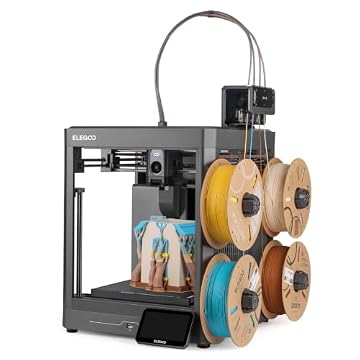



Photographs published on the Amazon listing.
The ELEGOO Centauri 2 Combo provides an all-in-one hardware package engineered to handle both standard single-material prints and multi-color builds with minimal manual intervention. According to the manufacturer listing, the package highlights the following components and core features:
- CANVAS four-color printing system equipped with independent feed motors
- RFID filament recognition and automatic spool refill functionality
- CoreXY motion architecture supported by a rigid aluminum metal frame
- Precision linear guides for smooth high-speed toolhead movement
- Full automatic calibration suite with built-in vibration compensation
- Sensor array featuring 22 intelligent sensors for real-time print monitoring
- Five-inch color touchscreen display for local machine operation
- Magnetic printhead cover and integrated nozzle wiper for simple maintenance
- Semi-automatic belt tensioner to maintain mechanical precision
- Integrated ecosystem support via Nexprint model library, ELEGOOSlicer, and ELEGOO Matrix app
Key Specifications
Attribute
Detail
- Brand
- ELEGOO
- Model
- Centauri 2 Combo
- Motion System
- High-speed CoreXY with precision linear guides
- Maximum Print Speed
- 500 mm/s
- Maximum Acceleration
- 20,000 mm/s²
- Multi-Color Module
- CANVAS 4-color printing with independent motors
- Structural Material
- Metal (rigid aluminum frame)
- Sensor Array
- 22 intelligent real-time monitoring sensors
- Dimensions
- 19.69"D x 18.9"W x 23.23"H
- Machine Weight
- 15 kg
Copied from the Amazon listing. These figures were not measured here.
Multi-Color Printing with the 4-Color CANVAS System
The standout feature of this package is the CANVAS multi-color printing unit, which automates material management across four separate spools. Instead of pausing prints to feed filament by hand, the CANVAS system utilizes independent motors for each channel. This dedicated mechanical setup enables instant color switching and reliable filament retraction without manual intervention. By taking the friction out of material transitions, the system allows hobbyists to produce complex, multi-shade models and functional parts with distinct colors on demand.
Material handling is made even simpler with integrated RFID filament recognition and an automatic refill function. When using compatible spools, the printer reads filament data directly, bypassing the need to input print temperatures and material profiles manually. If a spool runs out mid-print, the auto-refill feature automatically shifts feeding to an identical backup spool. While multi-color printing inherently generates purge material and extends print durations compared to single-color tasks, the automated feeding setup prevents unexpected spool runouts from ruining long, multi-hour projects.
Consistent multi-color output also depends on precise extrusion control. The Centauri 2 Combo regulates material flow during each color swap to deliver clean surfaces and sharp boundaries between contrasting filaments. This precise flow prevents unsightly color bleeding and oozing across perimeters, ensuring clean aesthetic models straight off the build plate without excessive post-processing.
Speed and Stability from the CoreXY Motion Platform
Printing quickly without degrading print quality requires solid motion mechanics, and the ELEGOO Centauri 2 Combo relies on a high-speed CoreXY layout. Unlike bed-slingers where the heavy print bed moves back and forth along the Y-axis, CoreXY kinematics keep the build platform moving strictly along the Z-axis. This reduces moving mass and enables the toolhead to achieve print speeds up to 500 mm/s and acceleration rates of 20,000 mm/s², significantly cutting overall print times.
Speed requires mechanical rigidity, which ELEGOO addresses with a full-metal aluminum frame and precision linear guides. Linear rails provide far superior stability and lower rolling resistance compared to traditional rubber wheels, preventing carriage deflection during rapid direction changes. The system also employs active vibration compensation to counteract resonance frequencies dynamically, eliminating surface imperfections such as ghosting and ringing on outer model walls.
High travel speeds also demand reliable hotend output and consistent deposition. The Centauri 2 Combo combines its rigid motion setup with precise extrusion control to maintain uniform layer lines even when transitioning from fast infill moves to delicate outer perimeters. If you have followed previous performance machines like the elegoo carbon 2, the structural stability and refined kinematics here reflect modern engineering built specifically for fast, repeatable production.
Setup, Auto Calibration, and Sensor Monitoring
Setting up a 3D printer historically required patience, manual bed leveling, and careful z-offset tuning. The Centauri 2 Combo eliminates these hurdles through full auto calibration and automated pre-print checks. Before each job begins, the printer automatically checks bed alignment and toolhead clearance, ensuring a consistent first layer without requiring manual paper tests or leveling wheels. This automated routine dramatically reduces failed prints, making the machine accessible for beginners who want reliable operation right away.
Operational reliability is reinforced by 22 intelligent sensors placed throughout the machine. These sensors monitor filament feeding, motion paths, and mechanical conditions in real time, alerting the system to feeding jams or mechanical resistance before severe damage occurs. This constant automated supervision provides peace of mind when running extensive overnight prints or leaving the printer unattended in a workshop.
Direct physical interaction is managed through a responsive 5-inch color touchscreen display. The menu layout is clean and straightforward, allowing operators to trigger calibration routines, select g-code files, inspect sensor statuses, and manage filament spools with a few taps. Combined with automated pre-flight checks, the interface ensures that getting started requires minimal technical onboarding.
Software Ecosystem and Routine Maintenance
A seamless printing workflow requires dependable software, and ELEGOO supports the Centauri 2 Combo with a dedicated digital ecosystem. Makers can browse ready-to-print models via Nexprint, prepare and slice multi-color projects inside ELEGOOSlicer, and control printing remotely using the ELEGOO Matrix application. With compatibility extending across laptops, desktop PCs, smartphones, and tablets, you can slice models on your workstation and monitor live print progress directly from your phone.
Routine maintenance is similarly streamlined through thoughtful physical engineering. The printhead features a magnetic cover that detaches without tools, giving instant access to the hotend and extruder assembly for routine inspection. The machine also includes an integrated nozzle wiper that removes excess plastic before critical printing sequences, preventing stray filament globs from attaching to fresh layers.
Maintaining proper belt tension is another common maintenance task that ELEGOO simplifies with a semi-automatic belt tensioner. Instead of manually adjusting tension bolts and guessing belt deflection, users can quickly retension the CoreXY drive belts to factory specifications. This feature prevents loose belts from causing layer shifts or dimensional inaccuracies over hundreds of hours of high-speed printing.
ELEGOO Centauri 2 Combo Pros and Cons
Pros
- CANVAS 4-color printing with independent motors and auto refill
- High-speed CoreXY motion up to 500mm/s and 20,000mm/s² acceleration
- Full auto calibration and 22 intelligent monitoring sensors
- Rigid aluminum frame with precision linear guides
- Semi-automatic belt tensioner and magnetic printhead cover
Cons
- Substantial 15 kg weight requires dedicated sturdy bench space
- Listing does not specify build volume dimensions
- Multi-color filament changes increase overall print times
Check ELEGOO Centauri 2 Combo on Amazon
Is the ELEGOO Centauri 2 Combo Worth It
For hobbyists, craftspeople, and designers looking for an approachable path to multi-color printing, the ELEGOO Centauri 2 Combo is well worth considering. The combination of an enclosed CoreXY frame, 500 mm/s speeds, and the automated 4-color CANVAS unit offers an impressive feature set that removes the traditional headaches of multi-material printing. Beginners will benefit from full auto calibration and 22 real-time monitoring sensors, which make achieving clean prints far easier than on traditional manual machines.
Workspace space is the primary practical trade-off to weigh before ordering. Measuring 19.69 inches deep, 18.9 inches wide, and 23.23 inches high, with a total weight of 15 kilograms, this combo machine requires a sturdy table and sufficient overhead clearance for the CANVAS unit. In addition, the listing does not specify the exact build plate dimensions, so users with requirements for oversized single-piece prints should verify that standard mid-size build volumes suit their work.
If your goal is to spend less time troubleshooting bed leveling and more time producing multi-color models, decorative designs, and rapid functional prototypes, this printer delivers a capable, modern platform. It effectively balances fast mechanical motion with accessible automation, making high-speed multi-color printing practical for everyday makers.
Other Options to Consider
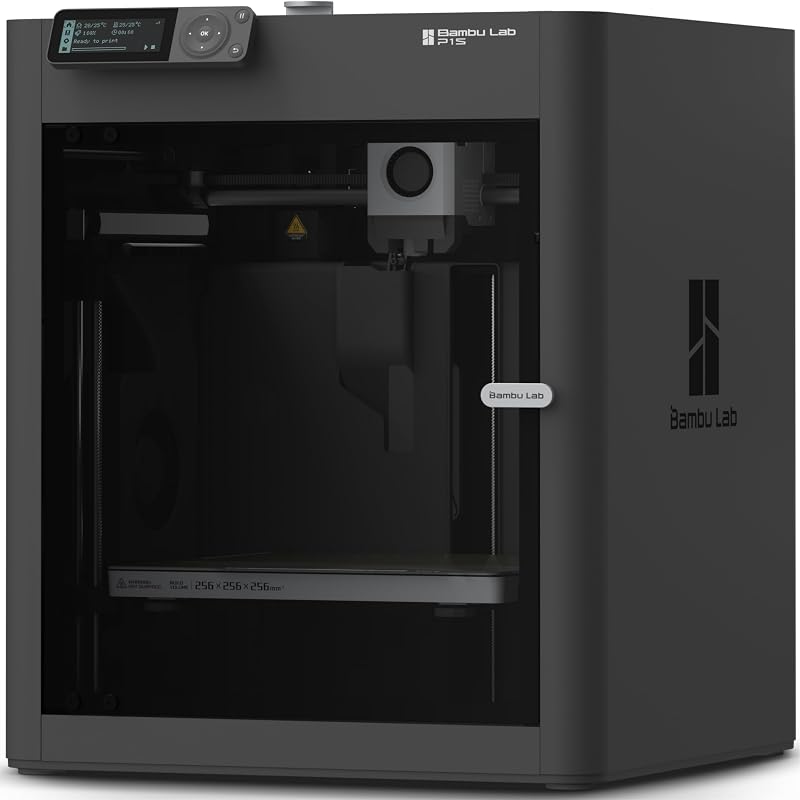
The MakerWorld Model Library Bambu Lab P1S Combo includes an enclosed CoreXY printer and the AMS multi-color system, making it an excellent alternative for users who want deep integration with the established Bambu printing ecosystem and MakerWorld community models.

The FLASHFORGE Adventurer 5M 3D Printer offers a high-speed CoreXY layout capable of 600 mm/s with a quick-swap 3-second detachable nozzle and fully auto leveling, appealing to makers who prioritize rapid single-color utility and nozzle flexibility over multi-color printing.
The Beginner-Friendly Ecosystem with MakerWorld Model Bambu Lab P1S provides the enclosed high-speed CoreXY printing base without an included multi-material module, serving as a solid option for buyers who prefer a proven standalone printer with the option to expand later.
FAQ
How does the 4-color CANVAS system switch filaments?
The CANVAS module uses independent feed motors for each of its four filament lines to control feeding and retracting automatically. It supports instant color switching and includes RFID recognition to detect spool settings without manual configuration.
What are the maximum speed and acceleration specs?
The printer reaches maximum print speeds of up to 500 mm/s and acceleration rates up to 20,000 mm/s², supported by a rigid aluminum metal frame, precision linear guides, and active vibration compensation.
Is manual bed leveling required on the Centauri 2 Combo?
No, the machine features full auto calibration and automated pre-print checks that inspect the print bed and nozzle gap automatically, eliminating the need for manual leveling knobs or paper adjustments.
Which devices work with the ELEGOO Matrix app?
The ELEGOO ecosystem is compatible with laptops, personal computers, smartphones, and tablets, allowing users to slice models in ELEGOOSlicer and monitor jobs remotely via the ELEGOO Matrix mobile application.
What does the semi-automatic belt tensioner do?
The semi-automatic belt tensioner allows users to quickly reset and maintain correct tension on the CoreXY drive belts without complex manual measurements, ensuring consistent motion accuracy over long-term use.


