
As Amazon Associates, we earn from qualifying purchases. This means we may receive a small commission at no extra cost to you if you click through and make a purchase.
If you are deciding whether to purchase the Creality Ender 3 V3 SE, you are likely wondering if this updated model finally resolves the tedious manual calibration and assembly challenges of earlier budget units. The short answer is yes: by integrating an automated CR Touch sensor with a strain gauge for automated vertical offset adjustments, this machine removes the manual paper-leveling routine that once frustrated new users. As a modern entry in the 3d printer creality ender 3 series, it delivers an accessible, dependable desktop tool ready to print right out of the box.
In this guide, we evaluate what comes in the box, how the motion components perform under higher speeds, and what to expect during physical setup and long-term use. We also examine extruder reliability across different filament types, review hardware specifications, and compare this printer with other current market alternatives to help you choose the right model for your workspace.
What You Get With the Creality Ender 3 V3 SE
Creality Ender 3 V3 SE




Photographs published on the Amazon listing.
The machine ships in pre-assembled modular segments, providing the core hardware, print head assembly, and electronic controls necessary to start printing without sourcing separate components.
- Integrated lower base unit housing the mainboard, internal wiring, and dual Y-axis linear shafts.
- Vertical gantry assembly equipped with synchronized dual Z-axis lead screws.
- Upgraded Sprite full-metal dual-gear direct drive extruder.
- Automated sensor system combining a CR Touch leveling probe with a nozzle strain sensor.
- Digital interface screen with automatic filament loading and unloading routines.
- Manufacturer after-sales coverage providing 12 months of service with 24-hour response support.
Key Specifications
Feature
Manufacturer Specification
- Item Model Number
- Ender 3 Upgrade V3 SE
- Manufacturer
- Creality 3D
- Maximum Print Speed
- 250 mm/s
- Maximum Acceleration
- 2500 mm/s²
- Print Dimensions
- 8.66 x 8.66 x 9.84 inches
- Product Dimensions
- 13.9"D x 13.9"W x 18.9"H
- Machine Weight
- 7.12 kg
- Extruder Mechanism
- Sprite Direct Extruder (Dual-Gear)
- Supported Materials
- PLA, PETG, TPU(95A)
- Leveling Technology
- CR Touch Auto Leveling with Strain Sensor Auto Z-Offset
Copied from the Amazon listing. These figures were not measured here.
Assembly and Initial Setup Time
When assessing creality ender 3 setup time, older generations required users to spend several hours assembling bare aluminum extrusions, installing belts, and routing loose motor cables. The V3 SE bypasses those hassles by arriving mostly pre-built from the factory, condensing the initial mechanical construction into three primary steps that take roughly 20 minutes from unboxing to starting your first print.
This streamlined process makes the Creality Ender 3 for beginners far less intimidating than legacy open-frame kits. The upright gantry simply bolts into the cast base unit, the display module mounts to the side rail, and the spool holder fastens to the top. The electrical connections use pre-loomed, keyed wiring harnesses that prevent incorrect motherboard connections and eliminate the need for wire-stripping or soldering.
After bolting the mechanical pieces together, the onboard firmware handles initial hardware self-checks automatically. Owners transitioning from an older creality ender 3 v2 will notice that there is no need to manually square the frame with carpenter tools or mess with loose eccentric nuts just to get the printer operational.
Automated Leveling and Calibration Accuracy
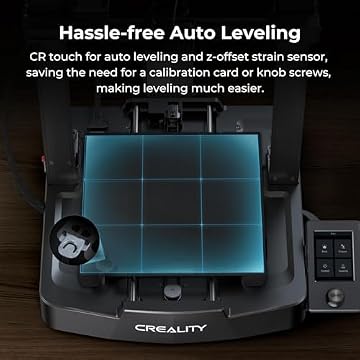
Achieving a reliable first layer has historically been the most challenging hurdle for entry-level 3D printer operators. The creality ender 3 auto leveling system on this model solves that issue by combining a physical CR Touch probe with an integrated nozzle strain sensor, working together to automate both horizontal leveling and vertical nozzle clearance.
During the calibration sequence, the strain sensor detects the exact moment the nozzle tip touches the build platform, setting the initial Z-axis offset without user intervention. Once that vertical baseline is locked, the CR Touch optical sensor probes multiple points across the heated bed to construct an accurate internal topographical mesh that compensates for subtle surface deviations.
Because the printer manages bed tilt and nozzle spacing entirely in firmware, you do not have to slide paper beneath the nozzle or adjust manual thumbwheels under the heated platform. This automated routine ensures clean first-layer squish and reliable bed adhesion directly from the factory settings, significantly reducing failed starts.
Print Speed and Structural Stability
Fast fabrication speeds represent a primary selling point in the official creality ender 3 v3 se specs. The printer achieves a maximum creality ender 3 print speed of 250mm/s paired with an acceleration limit of 2500mm/s², which the manufacturer notes can save up to 73 percent of printing time compared to conventional printers running at 50mm/s.
Moving a print head and bed rapidly generates vibration that can degrade print accuracy if the frame lacks rigidity. To preserve clean creality ender 3 print quality at elevated paces, the chassis features dual synchronized Z-axis lead screws that keep the horizontal X-axis gantry completely level, eliminating the gantry sag common to single-screw designs.
The Y-axis motion assembly is built on two 8mm wear-resistant steel linear shafts rather than standard rubber V-slot wheels. These rigid steel guide rails prevent side-to-side bed play, keeping layer lines straight and consistent across the 8.66 by 8.66 by 9.84 inch build envelope. Users looking to expand monitoring or command options frequently connect an external module like the creality sonic pad to take full advantage of these motion components.
Extruder Reliability and Ongoing Maintenance
Material feeding reliability depends heavily on the drive mechanism, and the upgraded creality ender 3 sprite direct extruder provides a notable improvement over Bowden-tube systems. By positioning a compact, dual-gear drive directly over the hotend, the extruder grips filament firmly from both sides, generating consistent pushing force with minimal risk of grinding or under-extrusion.
Because the distance between the drive gears and the melting chamber is very short, retraction distances are minimal. This configuration easily feeds standard rigid filaments like PLA and PETG while also handling soft, flexible TPU(95A) that often jams inside long Bowden tubes. In addition, the screen features automatic filament loading and unloading, letting you tap Extrude to feed material smoothly or Retract to back it out cleanly during color swaps.
Long-term creality ender 3 v3 se maintenance is straightforward compared to older platforms. Because the bed is fixed and calibrated via sensors, you avoid constant wheel adjustments. Upkeep centers on wiping dust from the dual steel linear shafts, checking belt tension occasionally, and keeping the dual Z-axis lead screws free of debris. For networking, external adapters like the creality wi-fi box can add wireless convenience, as the base unit operates independently using local memory media.
Creality Ender 3 V3 SE Pros and Cons
Pros
- Automatic CR Touch leveling with auto Z-offset
- Max 250mm/s print speed with 2500mm/s² acceleration
- Dual-gear Sprite direct extruder handles TPU
- Rigid dual Z-axis screws and steel Y-axis shafts
- Fast 20-minute setup with 3-step pre-assembly
- Convenient automatic filament loading and unloading
Cons
- Open frame lacks enclosure for high-temperature filaments
- Listing does not specify built-in Wi-Fi connectivity
- Standard 8.66×8.66×9.84 inch build volume limits large projects
Check Creality Ender 3 V3 SE on Amazon
Is the Creality Ender 3 V3 SE Worth It
When considering whether is creality ender 3 worth it, this model delivers an exceptional balance of usability, modern automated features, and reliable mechanical construction. By solving the two traditional pain points of affordable 3D printing—tedious frame assembly and manual bed leveling—it functions as a practical tool rather than a constant maintenance project.
It is an excellent match for beginners, hobbyists, students, and prop makers looking to produce household items, replacement brackets, and artistic models using PLA, PETG, or flexible TPU. The combination of 250mm/s maximum velocity, direct-drive feeding, and dual Z-axis stability ensures high success rates on everyday print jobs.
However, users who need to print high-temperature engineering plastics like ABS or nylon will find the open-frame design restrictive, as those materials require an enclosed heated chamber to prevent warping. For general-purpose desktop fabrication using standard filaments, the Ender 3 V3 SE remains one of the most practical and accessible workhorses available.
Other Options to Consider
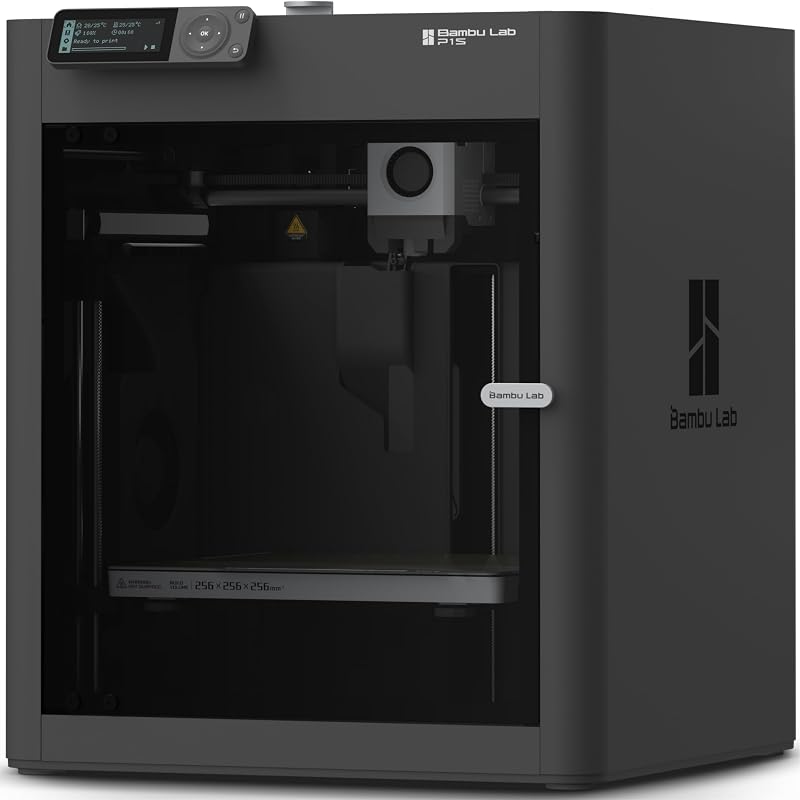
MakerWorld Model Library suits buyers who want multi-color printing capabilities and a high-speed enclosed CoreXY setup, offering an all-in-one Bambu Lab P1S Combo package with an AMS unit for multi-filament projects.

FLASHFORGE Adventurer 5M 3D Printer caters to makers prioritizing extreme printing speeds and rapid maintenance, featuring a maximum 600mm/s velocity, fully automatic leveling, an all-metal CoreXY frame, and a 280°C direct extruder with a 3-second detachable nozzle.
Beginner-Friendly Ecosystem with MakerWorld Model appeals to users seeking a fully enclosed CoreXY platform focused on high-precision output and seamless integration with the MakerWorld model library in a pre-assembled FDM package.
FAQ
Does the Creality Ender 3 V3 SE require manual bed leveling?
No, the printer features a fully automated calibration system combining a CR Touch sensor with a nozzle strain gauge. The strain sensor sets the baseline vertical Z-offset automatically, while the CR Touch maps bed surface variations without requiring manual thumbwheel adjustments.
How fast does this printer operate?
The manufacturer listing states a maximum printing speed of 250mm/s with an acceleration rate of 2500mm/s², saving up to 73 percent of production time compared to traditional 50mm/s desktop 3D printers while maintaining clean layer alignment.
What filaments can you use with the Ender 3 V3 SE?
The printer officially supports PLA, PETG, and flexible TPU(95A). Its Sprite direct drive extruder uses a dual-gear mechanism that handles flexible materials smoothly without the feeding jams common in Bowden setups.
How long does the physical assembly take?
Assembly takes roughly 20 minutes across three main steps. Because the base, gantry, and extruder come pre-assembled from the factory, you only need to secure the upright frame, mount the screen, and install the spool holder.
Does the printer come with built-in Wi-Fi?
The official listing does not specify integrated Wi-Fi connectivity on this base model; prints are standardly launched through onboard interface controls and local memory media.


