
As Amazon Associates, we earn from qualifying purchases. This means we may receive a small commission at no extra cost to you if you click through and make a purchase.
Finding a dependable, compact printing solution for family paperwork often feels unnecessarily complicated when high-volume office machines overwhelm your desk. If you are researching the HP DeskJet 2827e, the primary question is whether this modest entry-level all-in-one can handle household routines like homework, recipes, and travel documents without introducing constant technical headaches. Designed explicitly for casual home users, this model bundles color printing, flatbed scanning, and basic copying into a lightweight frame that easily tucks onto a bookshelf or small desk. It targets users who print sporadically rather than in bulk, delivering core document functionality alongside mobile management through a companion application.
In this comprehensive hp deskjet 2827e review, we take a direct look at what living with this compact inkjet actually entails. We examine how the hardware holds up during regular weekly printing, evaluate the flatbed scanning bed, and look closely at the manufacturer cartridge policies that dictate long-term ink purchases. We also explore the automated Wi-Fi features and outline practical comparisons with alternative models in the category so you can determine if this device aligns with your specific printing habits.
What You Get With the HP DeskJet 2827e
HP DeskJet 2827e
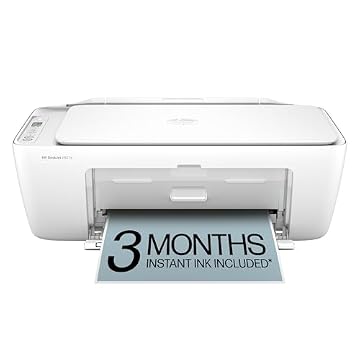


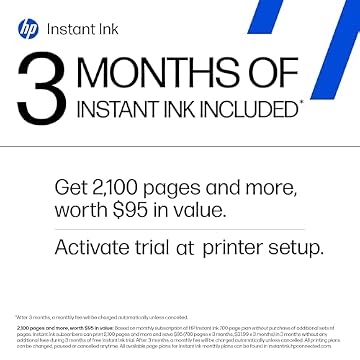
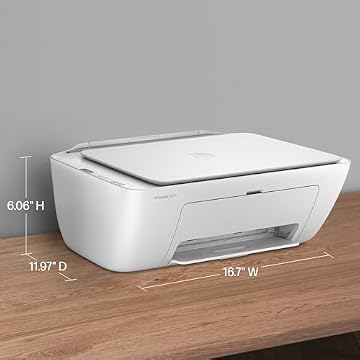
Photographs published on the Amazon listing.
The HP DeskJet 2827e arrives with essential core hardware tailored to modest home tasks, emphasizing space-saving convenience and streamlined physical controls. The manufacturer focuses the out-of-box experience on straightforward wireless operation and basic digital management.
- All-in-one functionality providing color printing, monochrome copying, and digital scanning
- A compact rear-loading paper tray supporting up to 60 sheets of plain paper
- Up to 4800 x 1200 dpi optimized color print resolution for crisp text and graphics
- Integrated flatbed scanner capable of direct scan-to-PDF output
- Automated self-healing Wi-Fi engineered to detect and resolve network dropouts
- HP App compatibility for remote printing, copying, scanning, and mobile faxing
- Built-in HP AI print formatting to strip unwanted web page clutter and layout errors
- Top-mounted Icon LCD panel with intuitive LED indicators and control buttons
- Three-month trial subscription to HP Instant Ink upon HP+ activation during initial configuration
- Chassis constructed from at least 60% post-consumer recycled plastic
Key Specifications
Specification Category
Manufacturer Hardware Detail
- Printer Model Number
- 6W7F5A
- Print Technology
- HP Thermal Inkjet
- Supported Print Media
- Paper (plain)
- Color Capabilities
- Color (Black, Cyan, Magenta, Yellow)
- Maximum Print Resolution
- 4800 x 1200 dpi
- Rated Print Speed
- Up to 7.5 ppm black, up to 5.5 ppm color
- Maximum Copy Speed
- Up to 6 ppm black and white
- Copy Limit Per Session
- Up to 9 copies
- Scanner Hardware
- Flatbed with scan-to-PDF support
- Dimensions and Weight
- 11.97"D x 16.7"W x 6.06"H; 3.42 kg (7.54 lbs)
Copied from the Amazon listing. These figures were not measured here.
Print Speeds and Daily Document Handling
When evaluating the hp deskjet 2827e specs, the print speed figures immediately signal the printer’s intended role. Delivering up to 7.5 pages per minute for monochrome black documents and up to 5.5 pages per minute for color pages, this machine moves at a measured pace. For a household generating occasional school worksheets, return shipping labels, or financial forms, the hp deskjet 2827e print speed is adequate. Waiting twenty seconds for a short document will not disrupt your routine, but attempting to run extensive multi-page contracts will test your patience.
The paper handling aligns with these moderate speed ratings. Equipped with a single 60-sheet input tray, the printer requires periodic reloading if your household experiences intermittent spikes in document output. If you are comparing this device against larger hardware, such as an epson ecotank et-3843 printer, the difference in paper capacity and raw print velocity is stark. The 2827e is built for intermittent tasks rather than high-volume productivity runs, making it an ideal companion for desks where printing is an occasional chore rather than an all-day demand.
Text output quality benefits from a maximum resolution of 4800 x 1200 dpi, ensuring that monochrome letters and color charts appear sharp and readable. The inclusion of HP AI formatting features specifically assists when printing web pages and emails directly from your devices. The AI feature automatically recognizes awkward layouts and web clutter, removing extraneous ads or blank trailing pages so that the physical sheet contains only the intended content.
Wireless Setup and Mobile Application Features
The hp deskjet 2827e wireless setup is designed around the HP App, directing users to configure the printer through a smartphone, tablet, or PC rather than an elaborate on-device touchscreen. The onboard interface consists of an Icon LCD panel paired with physical buttons that display fundamental status icons such as network connectivity, ink levels, and basic error prompts. While this display keeps the physical design simple and clean, it means detailed operational settings and initial pairing must take place inside the mobile app.
Wireless stability is supported by self-healing Wi-Fi technology, which actively monitors the wireless connection to detect signal interruptions and automatically reset the link without requiring a manual power cycle. For households where family members send print jobs from laptops in the living room or smartphones in the kitchen, this automated recovery minimizes the dropped connections that frequently plague basic home printers. If you frequently need mobile utility outside of a static home setup, an ultra-compact unit like the hp officejet 250 mobile all-in-one printer offers battery portability, whereas the 2827e focuses strictly on stable stationary Wi-Fi coverage.
Through the HP App, users can manage daily tasks with minimal fuss. In addition to triggering print runs, the app provides tools to capture documents using your phone camera, manage digitized scans, send mobile faxes, and monitor consumable levels in real time. The integration allows smooth cross-device operation across PC and mobile operating systems, ensuring anyone in the house can print without wrestling with complicated local network configurations.
Flatbed Scanning Capabilities and Copying Limits
Digitizing physical documents and preserving paper records is handled by the integrated flatbed scanner. The hp deskjet 2827e scanner is positioned beneath the top lid, offering a completely flat glass platen that accommodates standard documents, receipts, school drawings, and sensitive items like passports or identification cards. Because the unit relies solely on a flatbed rather than an automatic document feeder, multi-page scanning requires manually placing each page onto the glass surface one after another. For households that scan bills or signed forms every few weeks, this manual operation is completely manageable.
Direct copy operations can be initiated locally from the top control panel without booting up a computer or opening the mobile application. The monochrome copy function operates at up to 6 pages per minute, allowing you to generate quick duplicates of recipes or financial paperwork on demand. However, the machine enforces a maximum copy limit of up to 9 copies per run. If your routine requires mass duplication of event flyers or study packets, this hard ceiling means you will need to re-trigger copy cycles manually.
For paperless filing, the scanner system supports direct scan-to-PDF output through the companion software, making it simple to archive tax receipts, signed permissions, and family records into clean digital folders. When examining standard hp deskjet all-in-one printer designs, this flatbed arrangement represents the standard balance between compact exterior sizing and versatile optical digitizing.
Cartridge Firmware Policies and Instant Ink Terms
One of the most crucial elements to understand before buying this printer is how HP handles ink management and cartridge compatibility. The printer is built with dynamic security measures that restrict operation strictly to cartridges featuring original HP chips or circuitry. The listing explicitly states that cartridges utilizing non-HP chips or circuitry will be blocked from operating, and periodic firmware updates deployed over your internet connection will continue to maintain and reinforce these restrictions over time. Buyers who prefer purchasing generic or third-party remanufactured cartridges from unauthorized vendors should understand that this hardware actively prevents that approach.
To help offset the initial ink burden, the unit includes 3 months of Instant Ink with HP+ activation during initial setup. Under the hp deskjet 2827e instant ink trial, the printer monitors ink levels automatically and ships replacement cartridges to your door before the current cartridges run dry. After the introductory three months conclude, a monthly fee applies unless you cancel the subscription plan. This automated delivery model provides peace of mind for families who dislike unexpected ink outages, though it requires linking a payment method and maintaining continuous cloud connectivity.
The printer utilizes four primary colors across its thermal inkjet system: Black, Cyan, Magenta, and Yellow. If you decide not to continue with the subscription service after the trial, you must purchase genuine HP replacement cartridges to keep the printer operational. Factoring in these ongoing consumable rules will help ensure that you choose a printing workflow that fits your long-term household supply habits.
HP DeskJet 2827e Pros and Cons
Pros
- Compact footprint fitting tight home office desks
- Automated self-healing dual-band wireless connectivity
- All-in-one color printing, copying, and flatbed scanning
- HP AI formatting to eliminate unwanted web content
- Built with 60% post-consumer recycled plastic
Cons
- Dynamic security blocks non-HP cartridge chips and circuitry
- Modest print speeds of 7.5 black and 5.5 color ppm
- Single 60-sheet paper tray requires frequent refilling
Check HP DeskJet 2827e on Amazon
Is the HP DeskJet 2827e Worth It
Determining whether the hp deskjet 2827e for home use represents the right hardware investment comes down to your expected printing volume and your tolerance for cartridge firmware policies. If your household prints only a few pages every week—such as boarding passes, quick recipes, school permission slips, and occasional homework assignments—this all-in-one provides an uncomplicated, space-efficient solution. The wireless self-healing system prevents common network headaches, while the flatbed scanner and app integration give you essential digital office capabilities without cluttering your desk.
On the other hand, is hp deskjet 2827e worth it for users with heavier daily workloads? The combination of a 60-sheet paper tray, modest 7.5 ppm black print speeds, a 9-copy single session cap, and strict OEM-only cartridge restrictions makes it poorly suited for home businesses, busy students writing lengthy research papers, or anyone producing dozens of pages per week. For light, casual tasks where small hardware size and straightforward wireless operation take priority over raw speed and aftermarket cartridge flexibility, this hp desk jet 2827e printer delivers precisely what its design intends.
Other Options to Consider
Cost Efficient Multi-Function Photo Printer is a competitive wireless color inkjet printer offering print, copy, and scan functions in a compact chassis. It suits home users who prioritize simple everyday photo and document output without enrolling in a brand-specific ink subscription ecosystem.

Canon PIXMA TS6520 Wireless Color steps up hardware convenience by providing automatic duplex two-sided printing and a 1.42-inch OLED display panel. This model fits individuals who frequently print double-sided study packets or multi-page documents and prefer navigating printer settings on a crisp built-in screen.
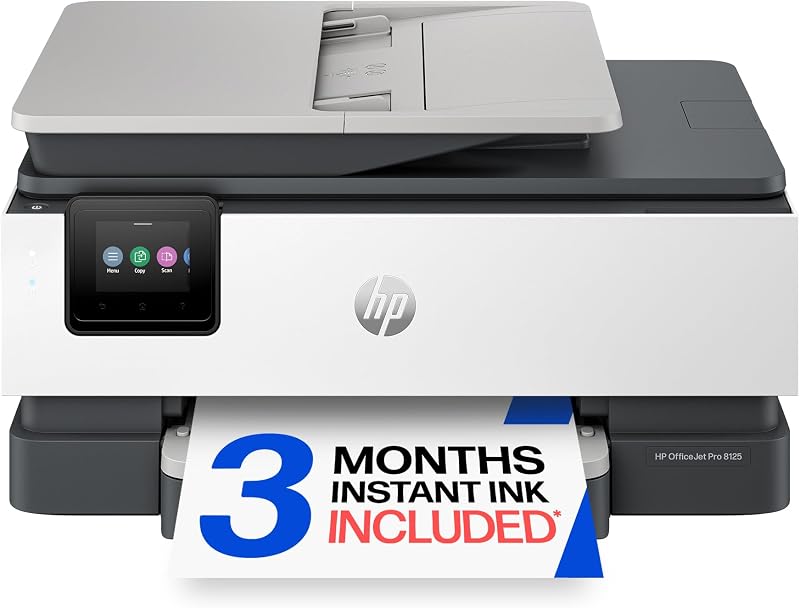
HP OfficeJet Pro 8125 Wireless is designed specifically for demanding home office environments, adding an automatic document feeder (ADF), rapid duplex printing, and AI capabilities alongside its Instant Ink trial. It is the better choice for professionals handling multi-page contracts, legal forms, and heavy weekly scan queues.
FAQ
How does the wireless setup work on the HP DeskJet 2827e?
The setup process is performed through the HP App on your smartphone, tablet, or computer. Once powered on, the printer communicates with the app over Wi-Fi, which guides you through connecting the device to your local network. The printer features self-healing Wi-Fi that automatically detects and resolves connection drops to keep your devices linked reliably.
Does the HP DeskJet 2827e accept third-party or refilled ink cartridges?
No, the hardware is equipped with dynamic security technology designed to block cartridges that use non-HP chips or electronic circuitry. The manufacturer specifies that periodic firmware updates will continue to enforce these chip checks, meaning only cartridges featuring original HP chips and circuitry are supported.
What is the paper capacity of the HP DeskJet 2827e?
The printer features a single rear-loading input tray that holds up to 60 sheets of standard plain paper. It does not include secondary paper cassettes, making it ideal for low-to-moderate paper handling rather than high-volume bulk jobs.
Is an Instant Ink subscription mandatory to use this printer?
No, an Instant Ink subscription is not mandatory. While the printer includes a 3-month trial with HP+ activation during initial setup, you can cancel before the trial ends or opt to buy standard original HP cartridges individually at retail stores as needed.
Can the HP DeskJet 2827e handle double-sided printing automatically?
The manufacturer listing specifies a standard thermal inkjet printing path with a 60-sheet tray and does not list automatic duplexing hardware. Double-sided printing on this model requires manual paper reinsertion.


