As Amazon Associates, we earn from qualifying purchases. This means we may receive a small commission at no extra cost to you if you click through and make a purchase.
Shoppers researching the Epson EcoTank ET-3843 printer are usually aiming to solve a persistent home office problem: running out of ink unexpectedly and spending excessive time buying small replacement cartridges. This wireless color all-in-one supertank model replaces disposable cartridges with high-capacity ink reservoirs that you refill directly from keyed bottles. If your household or workstation regularly produces administrative documents, homework assignments, multi-page packets, or records, this refillable tank design supplies an enormous volume of ink immediately. Buyers can expect consistent text clarity, integrated scanning, and automatic two-sided printing tailored for moderate to heavy home document production.
Finding the right machine requires looking closely at whether an investment in tank-based hardware matches your actual output volume and physical desk space. In this review, we examine the core specifications, genuine ink yield expectations, everyday paper handling, scanner functionality, and wireless network setup. We will also explore how the unit manages routine workflows, evaluate where its boundaries lie compared to alternative choices, and answer common questions so you can decide if this supertank belongs in your workspace.
What You Get With the Epson EcoTank ET-3843
Epson EcoTank ET-3843



Photographs published on the Amazon listing.
The retail package provides the core multifunction hardware along with the necessary supplies to set up the tank system right away. Epson includes an extensive starter ink supply designed to last through lengthy print runs, eliminating the need to shop for supplies immediately after unboxing.
- Epson EcoTank ET-3843 wireless color all-in-one supertank printer
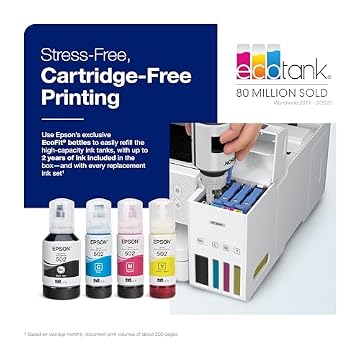
- Complete set of EcoFit ink bottles including pigment black and color inks providing up to 2 years of ink in the box
- Built-in flatbed and sheetfed scanner assembly with an automatic document feeder
- Integrated automatic two-sided printing engine for paper savings
- 250-sheet front paper tray alongside a secondary feed path for two total paper trays
- Onboard 2.4-inch color display for standalone walk-up navigation
- Standard power cable and setup documentation backed by an Epson limited warranty
Key Specifications
The hardware specifications reflect a balanced all-in-one printer engineered for domestic office tasks and sustained document handling.
Feature
Specification
- Printer Type
- Inkjet All-in-One Supertank
- Print Media
- Plain paper
- Ink Compatibility
- Epson T502 EcoFit ink bottles
- Print & Scan Resolution
- 1200 x 2400 dpi
- Black Copy Speed
- Up to 14 pages per minute
- Paper Capacity
- 250-sheet paper tray (2 trays total)
- Duplex Capability
- Automatic two-sided printing
- Scanner Mechanism
- Flatbed and sheetfed Auto Document Feeder
- Display
- 2.4-inch color display
- Product Dimensions & Weight
- 19.8" D x 16.4" W x 10" H; 14.8 pounds
Copied from the Amazon listing. These figures were not measured here.
Setup and EcoFit Tank Filling
Getting the machine operational revolves around filling the front-facing reservoirs using Epson’s proprietary EcoFit ink bottles. Rather than snapping miniature plastic cartridges into a carriage, you uncap the physical reservoirs on the front right of the chassis and invert each bottle over its corresponding port. The EcoFit design is mechanically keyed, meaning each color bottle fits solely into its designated tank to prevent accidental cross-contamination. The filling process stops automatically once the chamber fills completely, avoiding pressurized leaks or accidental mess. This physical configuration makes the epson ecotank et-3843 setup straightforward even if you have never handled liquid ink before.
Ongoing maintenance and ink management represent the standout operational strengths of this supertank system. Replacement T502 ink bottles supply enough ink to produce up to 7,500 pages in black or 6,000 pages in color. When translating that volume into everyday usage, the listing notes that each replacement bottle set equals roughly 80 individual cartridges. For anyone accustomed to buying ink every few months, an epson et-3843 ink replacement cycle can stretch across months or even years under standard domestic workloads. Epson notes that using genuine ink ensures optimal print quality and prevents internal damage that is not covered under the limited warranty.
Monitoring your remaining ink supply is completely visual, as transparent front-facing windows display liquid levels directly to the user. You do not need to rely on software estimates or guess how many pages remain before a tank runs dry; glancing at the front panel confirms whether a specific color requires topping off. If you have spent time researching smaller models like the epson – ecotank et-2800 wireless all-in-one supertank inkjet printer – white, you will notice that the ET-3843 maintains this clear visual approach while offering larger internal capacities suited for heavier regular output.
Print Quality and Everyday Speed Expectations
Print clarity is driven by Epson’s PrecisionCore Heat-Free technology combined with a dedicated pigment black ink formula. In home office settings where legibility is paramount, this configuration creates sharp, dark text edges that resist bleeding on plain copy paper. Pigment black ink is well known for producing crisp character definitions that hold up against highlighting markers and everyday handling. Color graphics, charts, and school assignments reproduce with even coverage and balanced tone transitions, meeting the demands of standard administrative and domestic presentations.
While the hardware reaches a scanning and output resolution of 1200 x 2400 dpi, understanding its niche is essential. The epson ecotank et-3843 print quality is optimized for general administrative tasks, correspondence, forms, and color charts rather than fine-art photography. It reproduces colorful family snapshots and classroom handouts cleanly, but dedicated visual creators needing specialized photo dyes might consider dedicated creative hardware like the epson ecotank photo et-8550 all-in-one supertank printer instead. For general office reports and household filing, the ET-3843 provides dependable, balanced rendering.
Pacing is anchored by a maximum black-and-white copy speed rated at 14 pages per minute, driven by an integrated single processor. Heat-Free technology helps bypass prolonged warm-up cycles, enabling the first sheet to start printing without the wait times often associated with thermal fusers. While it does not mirror high-volume commercial laser photocopiers in raw output speed, the printer moves through multi-page household contracts, school packets, and forms at a steady, reliable pace that avoids desktop bottlenecks.
Paper Handling and Document Workflow Automation
Managing paper stacks in a busy home workstation requires capable tray capacities, and the ET-3843 provides a bottom-loading cassette that holds up to 250 sheets of plain paper. This substantial capacity means you can load an entire half-ream at once, avoiding the frequent reloading required by compact rear-feed machines. Having two total paper trays allows users to manage their media feed cleanly. This generous internal paper volume makes the epson ecotank et-3843 for home office environments where multiple family members or remote workers send jobs throughout the week.
Document digitization is further streamlined by the epson ecotank et-3843 auto document feeder sitting atop the flatbed scanner assembly. When processing multi-page agreements, financial forms, or tax packets, feeding loose sheets through the top feeder saves you from placing and lifting every single page on the glass. Coupled with a maximum black-and-white copy rate of 14 pages per minute, the sheetfed scanner acts as a reliable helper for digitizing or duplicating multi-page records quickly without constant manual intervention.
Another practical productivity asset is epson ecotank et-3843 duplex printing, which handles automated two-sided paper handling natively. Instead of requiring you to flip sheets manually and guess which orientation keeps the text right-side up, the internal duplexer reverses the sheet automatically before ejecting it. This feature cuts paper consumption directly in half for long draft packets and creates clean, professional-looking double-sided packets. For anyone tracking office utility or seeking to reduce paper waste, automated duplexing is one of the most practical mechanical inclusions on the machine.
Wireless Connectivity, Mobile App, and Voice Control
Modern home office network setups demand versatile pairing options, and the ET-3843 addresses this through integrated Wi-Fi and hardwired Ethernet connectivity. Having an RJ-45 Ethernet port ensures that stationary desktop setups can maintain an uninterrupted wired link, while epson et-3843 wireless printing accommodates laptops, tablets, and mobile phones across living spaces. Wireless pairing eliminates cable clutter, letting you position the 14.8-pound unit on a dedicated credenza, utility shelf, or filing cabinet away from your main desk.
Day-to-day operation is anchored by the Epson Smart Panel app, which allows full administrative and printing control directly from your Android or compatible mobile device. Through the mobile interface, users can initiate print runs, preview digitized scans, monitor tank levels, and perform maintenance functions like head cleanings without touching the printer. The onboard 2.4-inch color display provides an intuitive physical navigation alternative, giving you clear menu options when copying or scanning standalone documents without waking a computer.
For added flexibility, the ET-3843 also incorporates voice-activated printing compatibility when paired with supported voice assistant devices. This enables users to request quick everyday print jobs, such as shopping lists or lined paper templates, using straightforward vocal prompts. While voice control remains a secondary utility for most offices, having robust wireless protocols combined with Ethernet networking ensures reliable device discovery across mixed household hardware setups.
Epson EcoTank ET-3843 Pros and Cons
Pros
- High-capacity refillable ink reservoirs
- Up to two years of ink included
- Automatic two-sided duplex printing
- Integrated automatic document feeder
- Generous 250-sheet front paper tray
Cons
- Optimized primarily for plain paper media
- Moderate 14 ppm maximum black copy speed
- Larger physical desktop footprint
Check Epson EcoTank ET-3843 on Amazon
Is the Epson EcoTank ET-3843 Worth It
Deciding whether this machine fits your workspace comes down to an honest evaluation of your monthly print volume. If you print only an occasional single page every couple of months, the hardware investment and physical dimensions of a supertank machine may exceed what your space requires. However, for households and home offices managing steady homework assignments, client forms, business invoices, and project packets, the high-capacity refillable reservoirs eliminate ink run-out anxiety. The inclusion of up to two years of ink in the box immediately addresses ongoing replacement concerns.
Beyond its raw ink capacity, the balance of office productivity tools gives the machine genuine utility. The combination of an automatic document feeder, automatic two-sided printing, a 250-sheet paper tray, and Ethernet support makes it a true administrative hub. Comparing its epson ecotank et-3843 specs against entry-level models like the epson eco tank et 4800 highlights how the ET-3843 focuses squarely on larger paper capacity and reliable duplexing. For anyone producing moderate to high volumes of routine documentation, this printer delivers real workflow efficiency.
Other Options to Consider
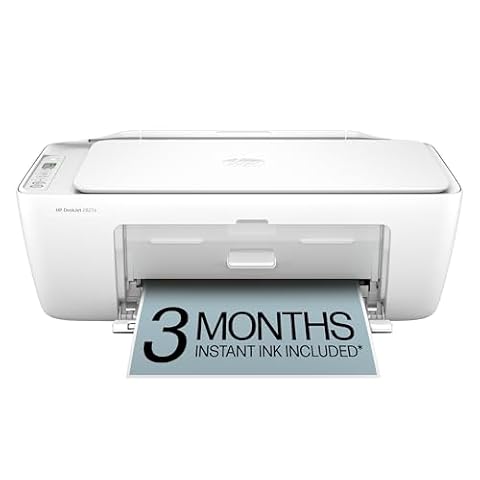
HP DeskJet 2955 Wireless All-in-One is a color inkjet printer, scanner, and copier designed for home use that includes a 3-month trial of Instant Ink and AI-capable features. This option suits light-duty users who prefer traditional cartridge-based printing with an ink subscription service over filling high-capacity tanks with bottled ink.

Cost Efficient Multi-Function Photo Printer offers an all-in-one wireless printing, copying, and scanning setup centered around a compact design and simple installation. This model is ideal for casual users who want a smaller desk footprint for light home copying and photo rendering rather than managing large 250-sheet document runs.
Print, represented by the HP Color LaserJet Enterprise 4701dw wireless printer, is built for corporate workspaces prioritizing fast speeds and advanced security protocols. It is a superior fit for demanding commercial office fleets that need enterprise-grade network protection and laser performance rather than a consumer inkjet supertank.
FAQ
Which ink bottles does the Epson EcoTank ET-3843 use?
The printer uses genuine Epson T502 EcoFit ink bottles. Replacement sets provide up to 7,500 pages in black or 6,000 pages in color, matching the factory refill ports.
Does the ET-3843 support automatic two-sided printing?

Yes, the printer features built-in automatic duplex printing, allowing you to print double-sided documents without having to manually flip and reload pages.
What type of scanner is built into the ET-3843?
The unit includes both a flatbed scanner and a sheetfed automatic document feeder, offering optical scanning resolutions up to 1200 x 2400 dpi for copying and digitizing paperwork.
Can I use non-genuine ink bottles in the ET-3843?
Epson strongly recommends using only genuine ink. The manufacturer notes that non-genuine ink formulations could lead to internal damage that is not covered under the printer’s limited warranty.
How many paper sheets does the main tray hold?
The front paper tray holds up to 250 sheets of plain paper, and the machine includes two total paper trays to support steady document workflows.