
As Amazon Associates, we earn from qualifying purchases. This means we may receive a small commission at no extra cost to you if you click through and make a purchase.
Buying a home printer often feels like signing up for an endless cycle of dried-up ink cartridges and surprise replacement expenses. If you are evaluating whether to step away from disposable cartridges, the Epson EcoTank ET-2800 provides an entry into high-capacity reservoir printing designed specifically for everyday household demands. This review examines the white all-in-one unit, detailing what to expect from its refillable bottle system, daily operational pace, and overall ownership experience.
Rather than relying on tiny proprietary plastic cartridges, this color inkjet utilizes large integrated ink reservoirs that you fill directly from keyed bottles. In the sections below, we break down the hardware specifications, examine how the print quality holds up across standard documents and photos, analyze the wireless setup process, and evaluate whether this supertank model justifies a permanent spot on your desk compared to standard cartridge alternatives.
What You Get With the Epson EcoTank ET-2800
Epson EcoTank ET-2800


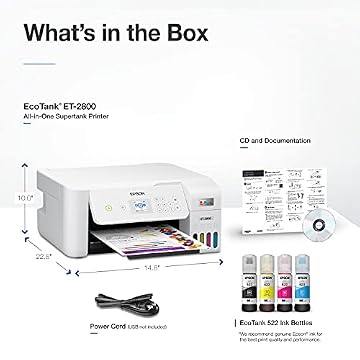
Photographs published on the Amazon listing.
The epson ecotank et-2800 white all in one is configured out of the box as a complete cartridge-free printing station tailored for family documents, school assignments, and light administrative tasks.
- Integrated high-capacity ink tanks designed to eliminate traditional cartridge replacements
- Up to two years of ink included in the box based on typical household printing volumes
- EcoFit keyed ink bottles designed for clean, spill-free refilling of each individual reservoir
- High-resolution flatbed scanner for digitizing documents, receipts, and family photos
- Built-in copier capable of running up to 99 copies in a single operation
- Color display paired with physical push-button controls for straightforward menu navigation
- Single rear paper feed tray supporting plain paper, glossy photo sheets, and envelopes
- Wireless connectivity alongside mobile app integration and voice-activated printing support
Key Specifications
Attribute
Detail
- Printer Type
- Inkjet
- Print Output
- Color
- Print Technology
- Micro Piezo Heat-Free Technology
- ISO Print Speed
- 10 ISO pages per minute
- Maximum Copy Speed
- 10 pages per minute (black and white)
- Maximum Copies Per Run
- 99 copies
- Scanner Type
- Flatbed
- Paper Trays
- 1 tray
- Supported Media
- Plain paper, glossy photo paper, envelopes
- Item Dimensions
- 14.8"D x 22.8"W x 10"H
- Item Weight
- 11.6 pounds
Copied from the Amazon listing. These figures were not measured here.
Supertank Versus Cartridge Printing for Everyday Tasks
The central debate for most household shoppers comes down to a supertank vs cartridge printer workflow. Standard budget printers often rely on miniature cartridges that hold only a few milliliters of liquid, leading to frequent interruptions and high maintenance requirements. With epson et-2800 cartridge free printing, the system shifts the supply into front-facing, visible fluid reservoirs. The listing indicates that the included ink set delivers up to 4,500 black pages and 7,500 color pages, which is equivalent to roughly 80 to 90 individual cartridges. For anyone tired of monitoring dwindling levels before every school project, this reservoir volume provides genuine peace of mind.
Managing these tanks is handled through Epson’s EcoFit bottle design. Each color bottle has a unique nozzle key that fits only its corresponding reservoir port, preventing you from accidentally pouring cyan into the magenta chamber. The bottles fill automatically without requiring forceful squeezing, and they stop when the reservoir reaches full capacity. This eliminates the messy leaks and stained fingers historically associated with manual refill kits. Choosing this setup also delivers zero cartridge waste, reducing the quantity of spent plastic shells sent to landfills over the operating life of the device.
When considering the epson et-2800 for home use, this reservoir capacity changes how freely you can print. Families no longer need to ration color printing or switch documents to grayscale to conserve dwindling reservoirs. While users looking for specialized gallery art production might research an advanced model like the epson ecotank photo et-8550 all-in-one supertank printer, the ET-2800 is tuned specifically for general domestic utility, handling recipe printouts, tax filings, permission slips, and greeting cards without ink anxiety.
Print Quality and Output Performance
Evaluating epson ecotank et-2800 print quality begins with Epson’s proprietary Micro Piezo Heat-Free Technology. Unlike thermal inkjet heads that rely on heat pulses to boil and eject droplets, piezoelectric actuators use mechanical pressure to deposit ink precisely. This creates clean, sharp edges along text characters on standard copy paper. Black text appears dark and legible down to small font sizes, making it well-suited for legal paperwork, homework packets, and general reading material.
Color output across graphics and imagery is punchy and consistent, rendering charts, school presentations, and basic visual layouts with clear color separation. The listing specifies media support for plain paper, glossy photo paper, and envelopes. When printing family snapshots on compatible glossy stock, the ink creates vibrant, detailed images suitable for scrapbooking, framing, or refrigerator displays. While it does not substitute for dedicated six-color photo studio equipment, everyday photo output easily meets typical domestic expectations.
Output speed aligns directly with standard home document needs. Reviewing the epson ecotank et-2800 specs reveals an ISO rating of 10 pages per minute, allowing small-to-medium print runs to complete in a reasonable timeframe. It is not an enterprise workhorse built for churning out hundred-page corporate reports in minutes, but for standard multi-page school essays or utility bills, the pacing is steady and predictable. Because heat-free printheads require no pre-heating cycle before dispensing ink, the printer begins laying down droplets quickly after receiving a print command.
Wireless Setup and Multi-Device Connectivity
Completing the epson ecotank et-2800 wireless setup is an important first milestone for any multi-device household. The hardware connects to your local Wi-Fi network, allowing family members to send print jobs directly from laptops, desktop workstations, and mobile devices. Modern connectivity features also include voice-activated, hands-free printing commands for supported smart home assistants, which can be useful when you need to print a lined checklist or calendar without sitting down at a computer.
The device is operated through a push-button controller layout next to a small color display, but day-to-day interactions are frequently handled via mobile app integration. Epson’s mobile application allows you to monitor ink levels, run maintenance checks, and execute print jobs directly from your smartphone. If you have files stored on a cloud drive or photos saved on your mobile camera roll, sending them to the printer takes just a few taps inside the mobile interface, bypassing the need to transfer files over to a laptop.
Hardware placement within your living space is straightforward thanks to its 11.6-pound weight and footprint measuring 14.8 inches deep by 22.8 inches wide by 10 inches high. The listing notes laptop compatibility, ensuring students and remote workers can seamlessly print over the local network without physical cabling. For shoppers comparing home wireless options against other entry-level devices such as the hp deskjet all-in-one printer, the ET-2800 stands out by combining cable-free convenience with voluminous reservoir storage.
Scanning and Copying Convenience
Everyday administrative work often requires more than just printing, which is why the epson ecotank et-2800 scanner copier integration is a key asset for family utility. Built into the top of the chassis is a high-resolution flatbed scanner capable of capturing crisp digital reproductions of documents, photos, identification cards, and book pages. Because it features a flatbed design rather than a motorized feed roller, delicate or thick documents like laminated certificates, passport pages, and fragile keepsakes can be digitized without risking paper jams or tearing.
For quick duplication tasks, the onboard copier operates independently of a personal computer. You can place a document on the glass platen, specify your settings using the color display and push buttons, and generate up to 99 copies in a single run. The maximum black-and-white copy speed reaches up to 10 pages per minute, making it sufficiently brisk for duplicating consent forms, homework sheets, or recipe cards on demand.
It is worth noting the operational boundaries of this design. The listing specifies a single input paper tray and push-button navigation rather than a high-capacity multi-tray layout or an automatic document feeder. If you need to scan a multi-page double-sided contract, you must lift the lid and position each page manually. However, for households that only scan utility bills, tax documents, or school artwork occasionally, this flatbed arrangement offers reliable utility without mechanical complexity. Those exploring other compact multifunction options might also review the canon pixma ts3722 wireless all-in-one inkjet printer for home office to see how entry-level multifunction devices balance scanning features against footprint.
Epson EcoTank ET-2800 Pros and Cons
Pros
- High-capacity refillable ink tanks
- Up to two years of ink in box
- Keyed EcoFit bottles prevent spills
- Yields up to 7,500 color pages
- Micro Piezo heat-free technology
- Built-in flatbed scanner and copier
Cons
- No automatic duplex printing specified
- Modest 10 page-per-minute print speed
- Single input paper tray
Check Epson EcoTank ET-2800 on Amazon
Is the Epson EcoTank ET-2800 Worth It
Determining whether the epson ecotank et-2800 is worth it depends largely on your family’s printing frequency and your tolerance for cartridge maintenance. If you currently print dozens of pages every month and dread the routine chore of purchasing replacement ink cartridges that run dry after a few hundred sheets, this supertank design solves that pain point definitively. The inclusion of up to two years of ink in the box eliminates the recurring friction of traditional cartridge printing right from day one.
Conversely, shoppers who print only one single-page document every three or four months might find the high fluid volume unnecessary for their minimal output. Additionally, the listing does not specify automatic two-sided (duplex) printing, and paper handling is restricted to a single tray. If your daily workflow demands automated duplexing or high-volume multi-page scanning via an automatic feeder, you may find the manual flipping and single-sheet flatbed scanning restrictive over time.
For the typical family, student, or home office user printing moderate volumes of homework, forms, shipping labels, and occasional photos, the value equation leans strongly in favor of the ET-2800. The combination of clean EcoFit refills, reliable 10 ppm output, heat-free printing technology, and built-in flatbed copying delivers an exceptionally low-maintenance everyday printing experience.
Other Options to Consider
HP DeskJet 2955 Wireless All-in-One: Designed as an all-in-one color inkjet printer, scanner, and copier, this model is built for home users who prefer a cartridge subscription route, coming with a 3-month trial of Instant Ink and AI-capable features.

Cost Efficient Multi-Function Photo Printer: Represented by the Canon PIXMA TS4320, this compact wireless color inkjet printer handles print, copy, and scan tasks, offering an easy setup option for users seeking multi-function photo output in tight spaces.
Canon PIXMA TS6520 Wireless Color: This compact white wireless color inkjet printer includes integrated duplex printing, a copier/scanner, and a 1.42-inch OLED display, making it preferable for shoppers who specifically require automatic two-sided printing out of the box.

FAQ
How many pages can the Epson EcoTank ET-2800 print with the included ink?
According to the product specifications, the included ink supply provides enough volume to print up to 4,500 black pages and up to 7,500 color pages, which is equivalent to roughly 80 to 90 standard ink cartridges.
Does the Epson EcoTank ET-2800 support automatic double-sided printing?
The product listing does not specify automatic double-sided (duplex) printing. Producing two-sided documents generally requires manual page refeeding through the single paper tray.
What print media types are compatible with the ET-2800?
The listing explicitly lists compatibility with plain paper, glossy photo paper, and envelopes, loaded via the unit’s single input tray.
How fast does the Epson EcoTank ET-2800 print and copy?
The printer achieves a rated speed of 10 ISO pages per minute, and the built-in copier delivers a maximum copy speed of up to 10 pages per minute for black-and-white documents.
Can I print directly from my smartphone or tablet?
Yes, the printer supports mobile printing capabilities and app-based control, allowing wireless printing directly from mobile devices and laptops.


