
As Amazon Associates, we earn from qualifying purchases. This means we may receive a small commission at no extra cost to you if you click through and make a purchase.
The UniFi Cloud Gateway Ultra addresses a clear demand for modern home networks: an all-in-one routing engine, firewall, and network controller packed into an ultra-compact desktop footprint. If you need a reliable gateway capable of handling multi-WAN load balancing, traffic inspection, and centralized device management without managing a separate server or Cloud Key, this device delivers exactly what you need. As an Amazon Renewed unit, it offers an accessible entry point into the Ubiquiti ecosystem for home users and small offices seeking professional-tier network control on standard gigabit internet connections.
In this evaluation, we break down what you can expect from the hardware specifications, routing performance, and intrusion prevention capabilities. We also look closely at real-world deployment concerns, including ucg ultra setup procedures, multi-WAN failover mechanics, renewed unifi gateway reliability, and how it compares to alternative gateway devices on the market.
What You Get With the UniFi Cloud Gateway Ultra
UniFi Cloud Gateway Ultra

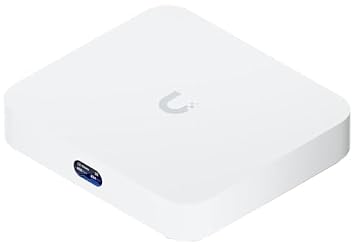


Photographs published on the Amazon listing.
The listing outlines a dedicated tabletop routing solution built to handle moderate to heavy home network traffic while hosting the UniFi Network application locally. Inside the package and featured on the device chassis, you receive the core routing hardware along with essential hardware capabilities:
- Ubiquiti UniFi Cloud Gateway Ultra console in a compact polycarbonate enclosure
- Quad-core ARM Cortex-A53 processor running at 1.5 GHz
- 3 GB DDR4 system memory and 16 GB eMMC onboard storage
- One 2.5 Gbps RJ45 WAN port for high-speed incoming connections
- Four 1 Gbps RJ45 LAN ports for wired client and switch connectivity
- Integrated 0.96-inch LCM status display for real-time network telemetry
- USB Type-C power input requiring a 5V power supply with a maximum draw of 6.2W
- Pre-installed Ubiquiti Linux operating system hosting the UniFi Network controller
Key Specifications
Attribute
Detail
- Processor
- Quad-Core ARM Cortex-A53 at 1.5 GHz
- System Memory
- 3 GB DDR4
- Onboard Storage
- 16 GB eMMC
- WAN Connectivity
- 1x 2.5 Gbps RJ45 Port
- LAN Connectivity
- 4x 1 Gbps RJ45 Ports
- Security Throughput
- Up to 1 Gbps (IPS/IDS enabled)
- Device Capacity
- 30+ UniFi devices, 300+ connected clients
- Status Display
- 0.96-inch LCM screen
- Power Requirements
- 5V via USB Type-C (6.2W maximum consumption)
- Dimensions and Weight
- 141.8 x 127.6 x 30 mm; 520 g
Copied from the Amazon listing. These figures were not measured here.
Routing Performance and Traffic Inspection Under Load
Evaluating ubiquiti ucg ultra routing performance requires examining how the processor handles security features alongside baseline packet forwarding. The inclusion of a quad-core ARM Cortex-A53 clocked at 1.5 GHz paired with 3 GB of DDR4 memory gives this unit enough computational headroom to operate the UniFi Network controller and maintain line-rate gigabit routing simultaneously. For homes with standard gigabit fiber or cable connections, the gateway manages standard inter-VLAN routing, network address translation, and quality of service prioritization without introducing latency spikes or bottlenecking local traffic flows.
The standout metric in the unifi cloud gateway ultra specs is its intrusion detection and prevention system (IPS/IDS) capability. Ubiquiti rates this gateway for up to 1 Gbps of threat inspection throughput. Many entry-level security routers throttle internet speeds down to 200 or 300 Mbps the moment deep packet inspection and signature-based threat detection are switched on. The unifi cloud gateway ultra ips ids engine allows you to run application-aware firewall rules, malicious domain blocking, and content filtering while still saturating a full 1 Gbps downstream link. This ensures strong perimeter security without sacrificing the download speeds you pay your internet service provider to deliver.
When planning a network around this console, consider how it coordinates with downstream infrastructure. If you deploy high-capacity wireless access points like the unifi u7 pro max, the gateway acts as the central brain, applying firewall rules, traffic shaping, and guest isolation policies seamlessly across your wireless SSIDs. While the gateway itself handles the control plane and routing logic effortlessly, high-bandwidth local transfers between multiple wireless clients will rely on the gateway’s 1 Gbps backplane or an external switch.
Multi-WAN Failover and Port Flexibility
Reliable internet access is essential for remote work and smart home operations, making unifi cloud gateway ultra multi wan support one of its most attractive capabilities. The unit features five total RJ45 Ethernet ports: one dedicated 2.5 Gbps port and four 1 Gbps ports. In standard deployments, the 2.5 Gbps port serves as your primary WAN interface, connecting directly to an optical network terminal or cable modem, while the four gigabit ports serve local wired devices. However, the UniFi Network software permits port remapping, allowing you to assign a secondary LAN port to act as an alternate WAN connection.
Once dual WAN is established, the gateway supports two primary operational modes: automated failover and load balancing. Failover mode monitors connection health through continuous ping checks, automatically shifting all local traffic to your backup link (such as a 5G cellular modem or secondary DSL line) if your primary provider suffers an outage. Distributed load balancing divides outgoing requests between both connections based on configurable traffic weights, maximizing total network availability across multiple active services. This redundancy ensures uninterrupted operation for smart home hubs, workstations, and security cameras.
The physical port configuration does present an architectural trade-off. While the incoming WAN port supports up to 2.5 Gbps, all four downstream LAN ports are limited to 1 Gbps. If your ISP plan exceeds 1 Gbps, a single wired device connected directly to the gateway cannot pull more than 1 Gbps on its own. To distribute that extra bandwidth effectively, you must balance traffic across multiple LAN ports or connect an aggregation switch, such as a unifi switch flex, to fan out connections across several rooms or high-demand client devices.
Setup Process and Real-Time Device Monitoring
The ucg ultra setup workflow is designed around the integrated UniFi Network application, removing the need for a separate physical Cloud Key or an always-on desktop computer. Initial deployment requires connecting the WAN port to your internet source, plugging in the 5V USB Type-C power feed, and opening the UniFi mobile app on a smartphone or personal computer. The gateway advertises itself for configuration, prompting you through initial internet discovery, administrator account creation, and baseline network naming in a matter of minutes.
Once active, the gateway manages up to 30 UniFi access points and switches while supporting more than 300 connected client devices. This capacity is more than adequate for expansive smart homes with dozens of IoT sensors, streaming devices, and mobile clients. The UniFi interface provides centralized control over network segmentation, enabling you to build isolated VLANs for smart devices, guest networks with captive portals, and prioritized channels for home office workstations.
A practical physical feature during and after setup is the 0.96-inch LCM status display located on the front panel. Rather than relying solely on flashing status LEDs, the LCM display provides immediate visual feedback regarding connection status, WAN IP assignment, device boot progress, and live upload and download throughput. If your network suddenly drops offline, a glance at the screen confirms whether the gateway has lost its upstream internet link or if a local cabling issue is the culprit, saving time during troubleshooting.
Renewed Hardware Reliability and Thermal Behavior
When purchasing an Amazon Renewed gateway, understanding renewed unifi gateway reliability is a critical consideration. Networking hardware runs continuously, meaning power efficiency, component health, and thermal dissipation determine long-term stability. The gateway is constructed within a sleek polycarbonate chassis measuring 141.8 x 127.6 x 30 mm and weighing 520 g. Despite its compact footprint, it operates with a maximum power consumption rating of only 6.2W, which keeps internal heat production remarkably low compared to larger rack-mounted security appliances.
Renewed units sold through Amazon Renewed are inspected, tested, and cleaned to ensure full hardware functionality. For a router, this inspection includes verifying port link negotiation on all five Ethernet interfaces, confirming stable operation of the 16 GB eMMC onboard flash memory, and checking the clarity of the LCM display. The 1.5 GHz Cortex-A53 processor and 3 GB of DDR4 RAM operate well within their design parameters under a 6.2W power envelope, reducing the likelihood of thermal throttling or premature capacitor wear over years of tabletop deployment.
Stable power delivery is equally vital for uninterrupted uptime, particularly if you integrate smart monitoring hardware. Powering the gateway via standard USB Type-C makes it easy to integrate into battery backup systems or monitor overall energy usage through an inline device like a shelly plus 1pm power monitor. Because this unit relies on a 5V supply, using a clean, steady power adapter prevents unexpected reboots and protects the integrity of the local database storing your network telemetry.
UniFi Cloud Gateway Ultra Pros and Cons
Pros
- Integrated UniFi Network controller runs on-device
- Full 1 Gbps IPS/IDS threat inspection throughput
- Compact tabletop footprint with 0.96-inch status display
- Multi-WAN support with failover and load balancing
- Low power consumption topping out at 6.2W
Cons
- LAN ports capped at 1 Gbps speeds
- No integrated Wi-Fi requires separate access points
- Renewed unit condition varies by seller
Check UniFi Cloud Gateway Ultra on Amazon
Is the UniFi Cloud Gateway Ultra Worth It
Answering whether the unifi cloud gateway ultra is worth it depends on your current internet speeds and your desire for unified network administration. If you are building out an ecosystem using Ubiquiti access points and switches, this gateway is arguably the most practical, cost-effective entry point available. It consolidates the router, firewall, and network controller into a palm-sized chassis without requiring extra subscription fees or dedicated hosting hardware, making a unifi cloud gateway ultra for home deployment an outstanding choice for standard gigabit connections.
However, this console is not the right fit for every deployment scenario. If you subscribe to an internet service tier faster than 1 Gbps and expect a single desktop computer to utilize that full multi-gigabit bandwidth over a wired connection, the 1 Gbps limitation on the LAN ports will be restrictive. Furthermore, the unit does not include built-in Wi-Fi radios; it is strictly a wired security gateway, meaning you must factor in the cost and placement of external access points to provide wireless coverage.
For home prosumers, remote professionals, and small business operators who want enterprise-grade firewall filtering, dual-WAN redundancy, and seamless device adoption in a clean tabletop package, the gateway hits the sweet spot. It provides robust protection and complete network visibility while sipping minimal electricity, making it an excellent investment for modern gigabit-tier networks.
Other Options to Consider
Remote App Access is a dedicated G2 gateway engineered specifically for TTLock and DDLock smart door locks operating on 2.4 GHz Wi-Fi frequencies. Unlike the broad routing and firewall capabilities of the UniFi gateway, this product is solely designed to bridge compatible Bluetooth door locks to home Wi-Fi networks for remote unlocking and voice assistant integration through Alexa and Google Home, making it suitable only for smart lock access management.

is another G2 Wi-Fi gateway built specifically for smart deadbolts running the DD Lock or TT Lock applications. It enables remote lock management, status monitoring, and compatibility with Google Assistant and Amazon Alexa over 2.4 GHz networks, fitting users who need dedicated smart lock bridging rather than whole-home network routing.
FAQ
Does the UniFi Cloud Gateway Ultra have built-in Wi-Fi?
No, the gateway does not feature integrated wireless radios. It is a dedicated wired router, firewall, and controller console. To provide wireless coverage in your home or office, you must connect external access points to one of its four 1 Gbps LAN ports or through a downstream network switch.
What is the maximum throughput with IPS/IDS enabled?
The gateway supports up to 1 Gbps of routing throughput with full intrusion prevention and detection systems (IPS/IDS) active. This allows you to enforce deep packet inspection, application-aware firewall policies, and content filtering without reducing speeds on standard gigabit internet connections.
How does multi-WAN work on the UniFi Cloud Gateway Ultra?
The gateway features a dedicated 2.5 Gbps WAN port and allows you to reassign one of the four 1 Gbps LAN ports to act as a secondary WAN interface. Through the UniFi Network software, you can configure these dual connections for automated failover during internet outages or active load balancing to share traffic across two providers.
Can the UniFi Cloud Gateway Ultra run UniFi Protect or other UniFi OS apps?
The listing specifies that this device runs the UniFi Network application on its Ubiquiti Linux operating system for managing switches, access points, and routing policies. It is designed specifically for network management and does not host UniFi Protect, UniFi Access, or other camera storage applications due to its compact hardware profile and 16 GB eMMC storage.
Is buying a renewed UniFi Cloud Gateway Ultra safe?
Amazon Renewed networking devices are inspected, tested, and verified to operate according to original hardware specifications. Because the gateway features low power consumption of just 6.2W, it experiences minimal internal thermal stress, making a properly inspected renewed unit a dependable, cost-effective way to secure your network.


