
As Amazon Associates, we earn from qualifying purchases. This means we may receive a small commission at no extra cost to you if you click through and make a purchase.
If you are deciding whether the Ubiquiti UniFi U7 Pro Max is the right access point for your network, the short answer is that it targets demanding, high-density environments where multi-gigabit wireless traffic and signal congestion are daily realities. As a tri-band Wi-Fi 7 access point supporting 2.4 GHz, 5 GHz, and 6 GHz spectrums, this device is engineered to handle massive data throughput across dozens of connected clients simultaneously. If your environment consists primarily of basic smart home gear and standard browsing devices, this unit may offer far more capability than your local network can actually exploit. However, if your setup includes contemporary wireless clients capable of utilizing wider spectrum allocations alongside heavy local file transfers or streaming, it provides a very clear performance trajectory.
In this ubiquiti u7 pro max review, we break down every technical aspect of the hardware to help you determine if the investment matches your physical infrastructure. We will examine the comprehensive unifi u7 pro max specs, analyze how the unit handles interference in busy spaces, evaluate the physical installation and power demands, and discuss the unifi u7 pro max setup process within the broader UniFi ecosystem. We will also explore whether deploying the unifi u7 pro max for home use is practical or unnecessary overkill, inspect the u7 pro max ethernet speed, and present relevant alternatives to ensure your network design fits your operational needs.
What You Get With the Ubiquiti UniFi U7 Pro Max
Ubiquiti UniFi U7 Pro Max


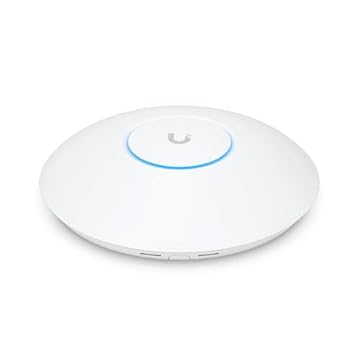
Photographs published on the Amazon listing.
The product package focuses strictly on deployment hardware, providing the core networking equipment alongside the physical mounts needed for standard professional installations in residential or commercial settings.
- Ubiquiti U7 Pro Max wireless access point
- Ceiling mounting plate and hardware
- Wall mounting bracket and fasteners
- Support for tri-band Wi-Fi 7 wireless standards across 2.4 GHz, 5 GHz, and 6 GHz
- Dedicated spectral scanning engine hardware
- Single 2.5 Gigabit Ethernet uplink interface
Key Specifications
Attribute
Detail
- Item Model Number
- U7-PRO-MAX-US
- Wireless Networking Standard
- Wi-Fi 7 (IEEE 802.11a/b/g/n/ac/ax/be/k/r/v)
- Operating Frequency Bands
- 2.40 GHz, 5 GHz, 6 GHz
- Maximum Theoretical Speed
- Up to 8.60 Gbit/s aggregate
- Spatial Streams
- 8 spatial streams
- Antenna & Processing Tech
- MIMO, Multi-User MIMO (MU-MIMO)
- Wired Interface
- 1 x 2.5 Gigabit Ethernet (RJ-45) / Gigabit Ethernet
- Power Consumption
- 25 W maximum
- Operating System / Management
- UniFi OS (requires Network version 8.2.93 or later for real-time analysis)
- Physical Dimensions & Weight
- 1.8 x 1.8 x 2.6 inches; 1.5 pounds
- Mounting Configurations
- Ceiling mountable, Wall mountable
Copied from the Amazon listing. These figures were not measured here.
Coverage and Wireless Performance Across Bands
Wireless reach and signal stability are core considerations when assessing unifi u7 pro max coverage across multi-room houses or open-floor corporate spaces. Operating across three distinct wireless frequencies allows the access point to separate legacy hardware from high-bandwidth gear. The standard 2.4 GHz band maintains compatibility with common household gadgets, while the 5 GHz band accommodates everyday laptops and mobile hardware. The addition of unifi u7 pro max 6ghz support provides clean, uncongested airwaves free from legacy protocol interference. Because 6 GHz frequencies naturally attenuate faster when passing through solid materials like drywall, brick, or heavy timber, placement strategy becomes critical. Users planning a full deployment should evaluate whether a centralized ceiling position or a specialized wall-mounted alternative like the u7 pro wall better serves their architectural footprint.
Under heavy multi-client workloads, the hardware leverages unifi u7 pro max wifi 7 technology alongside 8 spatial streams and Multi-User MIMO to preserve low latency. Standard Wi-Fi 6 hardware often bogs down when multiple devices initiate concurrent high-bitrate tasks, such as real-time video streaming, cloud backups, and gaming. The aggregate throughput rating of 8.60 Gbit/s across its radios ensures that the wireless interface will rarely serve as the local bottleneck. Instead, client devices capable of using wider channel allocations can transmit and receive simultaneously without waiting in an alternating queue.
If you are upgrading an existing network that already uses standard access points such as the base unifi u7 pro, the primary wireless advantage of the Max model lies in its expanded spatial stream handling and sustained multi-client stability. When deployed in environments where dozens of people gather in a central room with multiple wireless devices, the extra stream capacity prevents the dramatic throughput drops typical of lower-tier enterprise equipment. For modest homes with fewer than twenty devices, however, the expanded spatial streams may spend most of their time idle.
Spectral Scanning and Interference Management
One of the most notable technical additions to this unit is unifi u7 pro max spectral scanning, powered by an internal dedicated radio engine. In dense urban neighborhoods, apartment complexes, or office parks, radio frequency congestion from neighboring routers frequently disrupts wireless throughput and creates sudden latency spikes. Conventional access points handle this by intermittently interrupting client traffic to scan for cleaner channels or by relying on scheduled scans late at night. The dedicated spectral scanning engine in this unit works independently in the background, continuously analyzing channel utilization and ambient noise without degrading active client connections.
Ubiquiti specifies that utilizing real-time spectral analysis requires the controller environment to run UniFi Network version 8.2.93 or later. This capability provides network administrators with live visibility into local airwaves, visualizing which channels suffer from external interference or non-Wi-Fi electronic noise. This eliminates the guesswork when configuring channel widths and primary broadcast channels, allowing administrators to lock in stable parameters or let the management platform automatically steer traffic away from degraded frequencies.
Deploying an access point with an active scanning engine is especially beneficial when integrated into a centralized network core like the ubiquiti unifi dream machine pro. Because the scanning engine operates constantly behind the scenes, administrators receive reliable diagnostic metrics without scheduling service maintenance windows. If you manage an environment where wireless drops directly impact productivity, having real-time spectrum data ensures swift resolution of connectivity issues caused by new electronic installations or neighboring network modifications.
Ethernet Speed and Power Requirements
To support the high wireless throughput generated by modern Wi-Fi 7 devices, the physical backhaul connection must exceed traditional network thresholds. The u7 pro max ethernet speed is governed by its single 2.5 Gigabit Ethernet RJ-45 port, which also accepts standard Gigabit connections. If you plug this access point into an older 1 Gbps switch, the wired port will throttle total throughput across multiple wireless clients to roughly 940 Mbps of usable bandwidth. To realize the full potential of multi-gigabit wireless transfers between local clients or out to high-speed fiber internet services, your switching infrastructure must support 2.5 GbE links.
Power delivery is another crucial factor to review before purchasing. The specifications list a maximum power consumption of 25 W, which falls strictly into the Power over Ethernet (PoE) category. Because the product box does not include an AC wall adapter or a standalone PoE injector, the unit must receive power through its network cable via a compatible PoE+ switch port or an auxiliary PoE injector rated for at least 25 W output. Running the device on an underpowered standard PoE port (which typically caps out at 15.4 W) will cause boot loops or unexpected reboots when the internal radios experience heavy traffic loads.
Cable quality also plays a direct role in deployment reliability. Supplying 25 W of DC power over an Ethernet line while simultaneously maintaining a 2.5 Gbps data link requires solid copper Cat5e, Cat6, or Cat6a cabling. Using copper-clad aluminum (CCA) cabling or running lines adjacent to high-voltage electrical conduits can lead to voltage drops or data link downgrades. Ensuring that your physical patch panels, switches, and wiring meet these electrical standards is necessary to avoid intermittent hardware drops.
Setup and UniFi Network Integration
The unifi u7 pro max setup process follows the standard deployment flow established across the UniFi OS ecosystem. Unlike consumer-grade all-in-one routers that provide local web interfaces via a default IP address, this unit operates in Access Point Mode and requires an active UniFi controller to configure wireless settings, security profiles, and VLAN tagging. Users can host this controller software on local hardware, a dedicated cloud gateway, or an appliance running UniFi OS. Once connected to a network that provides DHCP, the access point appears in the controller interface ready for adoption with a single click.
Physical mounting is straightforward thanks to the included ceiling and wall mounting brackets. Ceiling installations typically provide the best spherical radio propagation, allowing the antennas to broadcast downward across open spaces without obstruction from heavy furniture. The listing specifies that both ceiling and wall mounting options are supported directly by the packaged hardware, giving installers flexibility depending on structural limitations. The unit measures 1.8 x 1.8 x 2.6 inches and weighs 1.5 pounds, making it compact enough for secure attachment to commercial drop ceilings or standard residential drywall.
Once adopted, managing the device involves configuring SSIDs, enabling fast roaming protocols like 802.11r and 802.11k, and fine-tuning radio transmission power. For environments utilizing separate networks for guests, smart home devices, and trusted work machines, the access point seamlessly tags traffic to distinct VLANs. Because the hardware relies entirely on the UniFi management platform for configuration, adjustments can be made remotely without physical access to the ceiling-mounted hardware.
Ubiquiti UniFi U7 Pro Max Pros and Cons
Pros
- Tri-band Wi-Fi 7 across 2.4, 5, and 6 GHz
- Up to 8.60 Gbit/s aggregate wireless throughput
- Dedicated spectral scanning engine for interference
- High-speed 2.5 Gigabit Ethernet wired uplink
- 8 spatial streams with Multi-User MIMO
- Ceiling and wall mounting hardware included
Cons
- Requires up to 25W PoE+ power delivery
- Real-time spectral analysis requires Network 8.2.93 or later
- No standalone power supply or injector included
Check Ubiquiti UniFi U7 Pro Max on Amazon
Is the Ubiquiti UniFi U7 Pro Max Worth It
Deciding if unifi u7 pro max is worth it comes down to client density, existing network switches, and future-proofing goals. For commercial facilities, tech-heavy offices, and dense multi-user households with dozens of active devices, this hardware provides an exceptional combination of high capacity, multi-gigabit backhaul, and automated spectrum defense. The 8 spatial streams and dedicated scanning engine ensure that heavy traffic loads do not translate into sluggish performance or sudden dropouts during peak operational hours.
Conversely, deploying the unifi u7 pro max for home environments that only have modest bandwidth demands may represent unnecessary complexity. If your household relies on a standard gigabit switch, lacks 6 GHz client devices, and uses the internet primarily for basic web tasks and media playback, a less complex access point will deliver an indistinguishable everyday experience. The hardware requires adequate PoE+ power delivery, a capable 2.5 GbE infrastructure, and an active UniFi controller to justify its presence in a network closet.
For system builders who already operate within the UniFi ecosystem and possess the switching capacity to support 2.5 Gbps uplinks, this unit stands as an uncompromising wireless solution. It completely eliminates access point congestion as a potential bottleneck, bridges the gap between older wireless standards and modern Wi-Fi 7 capabilities, and provides long-term operational relevance as more 6 GHz hardware enters daily circulation.
Other Options to Consider
WiFi 6 Dual Band suits buyers who want an established business-grade wireless access point operating on the Omada management ecosystem with dual-band Wi-Fi 6, included DC adapter power, and standard PoE capabilities without moving to Wi-Fi 7.

Desktop WiFi Bridge suits users seeking a simple, standalone dual-band AC1200 wireless access point with four external antennas that can sit directly on a desk or function as an extender without complex controller platforms.
Mesh suits administrators looking for an ultra-slim Wi-Fi 6 AX3000 access point with free cloud management and self-organizing mesh roaming that does not require Omada or UniFi management controllers.

FAQ
Does the Ubiquiti UniFi U7 Pro Max support older Wi-Fi devices?
Yes, the access point features backwards compatibility with older wireless protocols, including IEEE 802.11a, b, g, n, ac, and ax. Older devices operating strictly on 2.4 GHz or 5 GHz connect normally without requiring special network adjustments.
What software version is required for unifi u7 pro max spectral scanning?
Real-time spectral analysis requires the UniFi Network controller to be running version 8.2.93 or later. Earlier versions of the controller software will not support live data readouts from the dedicated scanning engine.
Can this access point operate without a UniFi controller?
The unit operates in Access Point Mode and is designed for management through UniFi OS. While initial basic setup can sometimes be performed via the mobile app, full feature access, VLAN mapping, and real-time spectral metrics require an active UniFi controller environment.
Does the package include a PoE injector or power supply?
No, the listing specifies that the box contains the wireless access point alongside wall and ceiling mounts. Power must be delivered via an external PoE+ source capable of supplying up to 25 W over the network cable.
What is the maximum data rate supported across all radios?
The hardware supports an aggregate theoretical throughput of up to 8.60 Gbit/s across its 2.4 GHz, 5 GHz, and 6 GHz wireless radios when paired with compatible client hardware.


