As Amazon Associates, we earn from qualifying purchases. This means we may receive a small commission at no extra cost to you if you click through and make a purchase.
Deciding whether to invest in the Ubiquiti UniFi Dream Machine Pro comes down to your bandwidth needs, physical installation space, and overall network expectations. Everyday users looking to upgrade from standard consumer routers often find themselves overwhelmed by enterprise terminology, wondering if a rackmount system delivers genuine daily utility or simply brings unnecessary complexity into a home or small business environment. This console combines high-speed routing, an integrated managed switch, dual SFP connectivity, and a Linux-based operating platform into a unified 1U chassis. If you need robust local data handling and centralized control over every wired connection, understanding what this console provides is the first step toward determining whether it matches your practical network layout.
Unlike standard consumer gateways that bundle Wi-Fi antennas directly into the main plastic shell, this device focuses entirely on routing, switching, and ecosystem management. Distributing wireless internet across your home or office requires outboard access points such as the unifi u7 pro to transmit signals to laptops, mobile phones, and wireless peripherals. The following breakdown covers physical dimensions, port configurations, system throughput, setup requirements, long-term value, and alternative standalone routers to help you decide if this enterprise console fits your network.
What You Get With the Ubiquiti UniFi Dream Machine Pro
Ubiquiti UniFi Dream Machine Pro


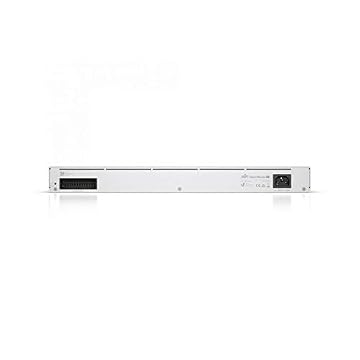

Photographs published on the Amazon listing.
The retail package provides an enterprise gateway built to serve as the central backbone for your network. According to the manufacturer listing, the unit includes the core hardware needed for a managed setup.
- Ubiquiti UniFi Dream Machine Pro central gateway console
- Integrated 8-port managed PoE network switch
- Dual interface setup with RJ45 and high-speed SFP connectivity
- Internal Linux operating platform for desktop or rack deployment
- Two-year manufacturer warranty for hardware protection
Key Specifications
Specification Attribute
Product Detail
- Brand
- Ubiquiti Networks
- Number of Ports
- 8
- Interface Types
- RJ45, SFP
- Data Transfer Rate
- 10000 megabits_per_second
- Switch Type
- Managed, PoE
- Platform
- Linux
- Operating Voltage
- 240 volts
- Item Dimensions
- 11.4"L x 17.42"W x 1.72"H
- Item Weight
- 0.3 kg
- Warranty Description
- 2 year Manufacturer
Copied from the Amazon listing. These figures were not measured here.
Switching Capacity and Port Architecture
Port availability is a critical factor when designing an advanced local network, and the dream machine pro built in switch provides an 8-port managed array right on the front face. Having eight dedicated copper ports allows you to connect desktop computers, network storage units, and printers directly without adding a separate tabletop switch. Because the listing specifies managed PoE capabilities, users can also power compatible peripherals over standard Ethernet cables, cutting down on wall adapters and streamlining power management across local equipment clusters.
Beyond standard RJ45 connections, the unifi dream machine pro sfp ports offer high-speed interface options for demanding environments. SFP connectivity allows administrators to run direct-attach copper or optical fiber links to downstream aggregation switches or high-speed fiber modems. This dual-interface design ensures that your primary gateway does not become an operational choke point when handling heavy data transfers, multi-gigabit broadband service, or high-volume inter-VLAN communications across your local infrastructure.
When building a structured wireless installation, pairing this wired backbone with wall-mounted units like the u7 pro wall creates an efficient distribution model throughout multi-room layouts. The managed switch allows you to isolate guest traffic, set up virtual local area networks, and apply specific port profiles across the installation. This configuration ensures that each connected device stays secure while maintaining consistent local connectivity without requiring standalone power injectors at each endpoint.
Data Throughput and System Performance
Examining the ubiquiti unifi dream machine pro specs shows a maximum data transfer rate of 10000 megabits_per_second. This 10 Gbps unifi dream machine pro throughput capability provides substantial headroom for local file transfers, media streaming servers, and high-volume data backups between connected endpoints. In demanding home labs or multi-user office environments, this capacity prevents the gateway from slowing down during concurrent file transfers and intensive network backups.
Real-world unifi dream machine pro performance ensures sustained stability across multiple users. Enterprise routing rules and managed packet handling keep latency low during video calls even while large downloads run concurrently on separate ports. Pairing the console with high-capacity access points like the unifi u7 pro max allows wireless clients to access the high-bandwidth backbone without encountering gateway bottlenecks during peak hours of network operation.
Reaching the full 10000 megabits_per_second transfer rate requires compatible client network cards, properly rated cabling, and matching SFP modules. Standard 1 Gbps desktop ports will operate at their individual speed limits, meaning the console’s top-tier capacity serves primarily as an aggregation backbone for multi-gigabit broadband connections and future network expansions rather than speeding up older client hardware.
Physical Dimensions and Hardware Setup
Physical planning is essential because the console features a rackmount form factor measuring 11.4 inches long, 17.42 inches wide, and 1.72 inches high. While the listing notes desktop placement compatibility, the 17.42-inch width matches standard 19-inch equipment racks when mounting brackets are attached. Placing a console of this size on a standard home desk or shelf requires adequate flat surface area and proper airflow to maintain stable operating temperatures during prolonged operation.
The ubiquiti unifi dream machine pro setup process requires attention to your electrical environment, as the listing indicates a 240-volt operating voltage. Initial system configuration is handled through the underlying Linux platform, which allows administrators to establish the primary internet connection, assign subnets, and configure network rules via a desktop web browser or mobile application without needing command-line syntax.
Deciding to deploy the ubiquiti dream machine pro for home use requires a dedicated location for the hardware. Because the unit does not emit wireless signals directly, placing the console in a basement utility room or network closet alongside a compact access point like the ubiquiti unifi u6+ keeps the central hardware out of the way while providing reliable Wi-Fi across living spaces through structured cabling runs.
Operating Platform and Network Security Management
The system operates on an embedded Linux platform engineered for continuous uptime and active traffic inspection. Central unifi dream machine pro security features run directly on the gateway, evaluating incoming and outgoing traffic to protect connected hardware from unauthorized access and malicious network requests. Handling security inspection at the perimeter protects all downstream clients automatically without requiring software installations on each individual computer.
The combination of managed switching and internal security rules allows users to isolate sensitive equipment. By establishing distinct virtual local area networks, smart home accessories can be kept completely separate from private computers or local storage drives. The console’s managed PoE ports also simplify physical security deployments by powering compatible surveillance cameras directly through network cabling without extra power supplies.
System maintenance is streamlined by the Linux platform, which runs system tasks and traffic monitoring without requiring regular reboots. The management dashboard offers clear visibility into client usage, active connections, and firewall performance, giving administrators full control over their network health from a single interface while maintaining long-term software stability.
Ubiquiti UniFi Dream Machine Pro Pros and Cons
Pros
- Eight built-in managed network ports
- High-speed 10 Gbps data transfer rate
- Versatile RJ45 and SFP interface support
- Integrated PoE power delivery on switch
- Two-year manufacturer warranty coverage
Cons
- Rackmount dimensions require substantial installation space
- Requires external access points for wireless connectivity
- Specified for 240-volt power input environments
Check Ubiquiti UniFi Dream Machine Pro on Amazon
Is the Ubiquiti UniFi Dream Machine Pro Worth It
Deciding whether is ubiquiti unifi dream machine pro worth it depends on your networking experience and system requirements. For advanced home users, technical hobbyists, and small businesses needing 10 Gbps throughput potential, an 8-port managed PoE switch, and SFP connectivity, this console offers exceptional utility. It consolidates multiple separate network devices into a clean 1U chassis while delivering plenty of headroom for growing local networks.
Casual home users looking for a straightforward, plug-and-play wireless router for streaming and light browsing may find this unit overly complex. Because the gateway does not feature internal Wi-Fi radios, buyers must install separate access points to enable wireless coverage. Without structured Ethernet wiring or rack space, a traditional consumer router is often a more practical choice for basic domestic connectivity.
For those building a dedicated network installation, the included 2-year manufacturer warranty provides long-term hardware reassurance. The console is built for continuous operation, making it a dependable central foundation for any environment that values managed switching, high bandwidth, and granular network control across all connected devices.
Other Options to Consider
Dual Band Wireless Internet fits home users looking for an all-in-one wireless router rather than a rackmount gateway. Featuring the TP-Link AX1800 WiFi 6 Router (Archer AX21 V5), it offers gigabit speeds, Easy Mesh compatibility, and Alexa integration, providing wireless coverage directly without external access points or network cabinets.

MU-MIMO Wireless Internet Router is better suited for budget-conscious buyers needing basic wireless connectivity in smaller spaces. Represented by the TP-Link AC1200 Gigabit Dual Band WiFi Router (Archer A6), it includes four external antennas, OneMesh support, and an access point mode for straightforward dual-band coverage across smaller apartments.
Reliable Performance is designed for households wanting advanced wireless performance in a standard tabletop unit. The NETGEAR Nighthawk WiFi 7 Router RS90 (BE3600) covers up to 2,000 square feet for up to 50 devices, providing speeds up to 3.6 Gbps with one 2.5G port and three gigabit ports without requiring rack mounting or separate managed switches.

FAQ
Does the Ubiquiti UniFi Dream Machine Pro include built-in Wi-Fi?
No, the Ubiquiti UniFi Dream Machine Pro does not feature built-in wireless antennas. It functions as a gateway, router, and managed switch console. Delivering Wi-Fi coverage across your property requires connecting external access points to its network ports.
What data transfer rate does the console support?
The console supports a maximum data transfer rate of 10000 megabits_per_second (10 Gbps) according to the listing specifications. This bandwidth is handled through its RJ45 and SFP interfaces, supporting multi-gigabit connections and high-speed local data exchanges.
Does the integrated switch support Power over Ethernet?
Yes, the product data specifies that the 8-port switch is a managed unit with PoE support. This feature allows you to power compatible network hardware directly through Ethernet cables without separate power adapters.
What are the dimensions and mounting options for this unit?
The unit measures 11.4 inches long, 17.42 inches wide, and 1.72 inches high, weighing 0.3 kg. These dimensions match standard 1U rackmount enclosures, though the listing also lists desktop compatibility if adequate surface space is available.
What operating system does the console run?
The hardware runs on an embedded Linux platform that manages routing, security features, and network administration through a centralized interface without requiring manual command-line configuration.