As Amazon Associates, we earn from qualifying purchases. This means we may receive a small commission at no extra cost to you if you click through and make a purchase.
For 3D printing enthusiasts managing long build cycles, adding dedicated vision hardware is the fastest way to avoid wasted filament and catch print errors early. The Creality K2 SE Camera provides a straightforward monitoring upgrade engineered specifically to bridge the camera connection between the K2 SE and compatible K1 series machines. If your goal is to check print jobs from your phone or desktop without setting up third-party streaming servers, this official accessory offers the high-definition video feed and software pairing you need right out of the box.
In this comprehensive Creality K2 SE camera review, we explore everything you should consider before adding this accessory to your 3D printing setup. We break down the hardware connection process, evaluate how the Creality Cloud remote monitoring ecosystem handles live video streams, analyze the automatic time-lapse capture tool, and address the exact Creality K1 AI camera compatibility boundaries. Read on to determine whether this dedicated monitoring module is the best camera for Creality K2 SE owners looking to enhance their printing workflow.
What You Get With the Creality K2 SE Camera
Creality K2 SE Camera




Photographs published on the Amazon listing.
The Creality K2 SE Camera is packaged as an official modular add-on designed for quick deployment inside compatible printer enclosures. The manufacturer listing identifies the core hardware components and software services supplied to get your video feed running:
- Creality 1080p 3D printer camera module with integrated sensor housing
- Dedicated connection cable for linking the camera to the printer mainboard port
- Native software compatibility with Creality Cloud and Creality Print platforms
- Automated time-lapse photography generation linked to user cloud accounts
- Direct technical assistance backed by 24/7 Creality Store customer service
Key Specifications
Understanding the published technical capabilities helps set clear expectations for visual fidelity, connectivity, and printer matching. The table below outlines the core Creality K2 SE camera specs provided by the official manufacturer listing.
Feature Attribute
Specification Detail
- Video Resolution
- 1080P High Definition
- Supported 3D Printers
- Creality K2 SE, K1, K1 SE, K1 Max
- Supported Software
- Creality Cloud, Creality Print
- Included Accessories
- Dedicated connection cable
- Installation Method
- Reserved printer camera interface slot
- Video Features
- Real-time streaming and automatic time-lapse generation
- Customer Support
- 24/7 technical assistance via Creality Store
- Field of View and Frame Rate
- The listing does not specify
- Night Vision Capability
- The listing does not specify
Copied from the Amazon listing. These figures were not measured here.
Hardware Compatibility Across K-Series Printers
One of the primary concerns for 3D printer operators is whether an accessory fits their exact model without requiring custom brackets or firmware modifications. The Creality K2 SE Camera is officially designated to work across several modern CoreXY enclosures from the brand, specifically the K2 SE, K1, K1 SE, and K1 Max. Because these printers share a modernized motherboard layout and structural architecture, the camera mounts directly into the chamber without requiring aftermarket mounting adaptors or structural frame drilling.
This cross-generation compatibility is particularly valuable for makers who operate multi-machine print farms containing both earlier K1 variants and newer machines like the K2 SE. Rather than managing distinct webcam accessories or experimenting with generic webcams that clutter external desk space, users gain a unified visual accessory designed around Creality hardware standards. If you are comparing different enclosed systems or upgrading alongside high-end options like the creality k2 pro, sticking with native camera solutions eliminates firmware communication hurdles.
The manufacturer listing explicitly documents connectivity between the K1 camera module and the K2 SE chassis using the bundled connection cable. This direct link ensures that machine operating systems recognize the video sensor immediately upon boot. However, the listing does not specify compatibility with legacy bedslinger models like the Ender series, meaning this camera is strictly intended for owners of compatible K-series enclosures.
Installation and Physical Connection Process
Setting up third-party webcams inside a compact 3D printer chamber often involves complex cable routing, loose wires, and printable mounting arms that risk collision with the moving toolhead. In contrast, the Creality K2 SE camera installation leverages a factory-reserved mounting area inside the printer frame. Having a designated location keeps the sensor stationary, protecting it from vibration while maintaining a clean, professional aesthetic inside your work area.
The included connection cable provides the necessary electrical and data link between the camera board and the printer internal mainboard interface. Users do not need to splice wires, install external power bricks, or consume external USB ports on personal computers. Following standard Creality K2 SE camera setup procedures, the cable tucks neatly into the designated channels, preventing any snagging along the gantry as the print head moves at rapid CoreXY travel speeds.
While the physical mounting is engineered to be straightforward, makers should handle the connection ribbon and pins carefully during assembly. The listing notes that the printer features a reserved interface designed for effortless connection, although specific mounting hardware details such as screw sizes or snap clips are not individually itemized in the product description. The listing does not specify whether extra mounting screws are included, but the reserved slot ensures standard alignment.
Remote Monitoring and Creality Cloud Integration
The primary reason to equip a 3D printer with vision capabilities is remote supervision. The Creality K2 SE Camera integrates natively into the manufacturer digital ecosystem, operating through both the Creality Print slicing software and the Creality Cloud mobile application. This dual-platform connectivity means you can monitor an active print whether you are sitting at your CAD workstation or running errands miles away from your workshop.
When connected to the local network and paired with your account, the camera streams live footage directly to your dashboard. This visibility is vital for identifying common 3D printing failures, such as prints detaching from the build plate or filament tangling at the spool holder. Instead of allowing a failed job to waste an entire roll of filament or cause catastrophic hotend damage, you can verify your first layer and pause or abort the print remotely. For workshops utilizing networking tools like the creality wi-fi box across diverse equipment, native internal monitoring on K-series machines offers a streamlined and integrated experience.
The software interface also allows multi-device access, meaning you can check progress from a smartphone, tablet, or web browser. Because the processing is coordinated through the printer firmware and cloud servers, you avoid the tedious process of configuring port forwarding or setting up private virtual private networks. For busy makers, this real-time monitoring transforms unattended overnight printing from an anxious gamble into a dependable, trackable process.
High Definition Video and Time-Lapse Generation
Visual clarity is essential when inspecting fine layer lines and nozzle extrusion, and this Creality 1080p 3D printer camera delivers crisp high-definition streaming. The 1080P resolution provides adequate sharpness to observe small geometric features, support structures, and surface finishes while your project builds. This optical resolution prevents the blocky, low-resolution artifacts commonly seen on standard definition monitoring webcams.
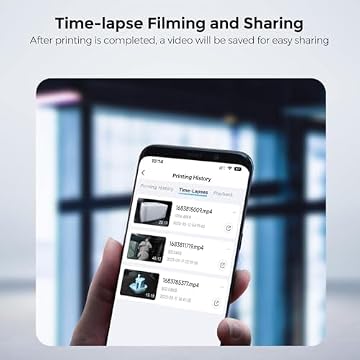
Beyond live monitoring, one of the most popular features of this add-on is automated video capture. Once you log into your active Creality Cloud account, the Creality AI camera time lapse system automatically records and compiles a stabilized time-lapse video when your print finishes. These videos are generated without requiring external video editing software or manual snapshot triggers, making them convenient to share with clients, colleagues, or social media followers.
It is important to note certain technical boundaries based on the listing specifications. The manufacturer highlights 1080P high-definition capture, but the listing does not specify the exact video frame rate, lens aperture, or degrees of diagonal field of view. Additionally, the listing does not specify built-in infrared night vision, meaning users will achieve the best image quality and time-lapse recordings when operating the printer with internal chamber lighting or adequate ambient room illumination. For enthusiasts managing broader equipment rosters alongside tools like the creality sparkx i7 combo 3d printer, maintaining proper workspace illumination ensures every camera capture remains sharp and useful.
Creality K2 SE Camera Pros and Cons
Pros
- Native 1080p high-definition video stream
- Dedicated connection cable and reserved interface support
- Automatic time-lapse generation via Creality Cloud
- Compatible across K2 SE and K1 printer series
- Backed by 24/7 technical assistance and customer service
Cons
- Listing does not specify night vision capability
- Mounting limited to supported Creality printer enclosures
- Frame rate and field of view specs not listed
Check Creality K2 SE Camera on Amazon
Is the Creality K2 SE Camera Worth It
Deciding if the Creality K2 SE camera is worth it depends largely on your printing habits and how heavily you rely on remote machine supervision. For everyday makers who frequently run multi-hour prints while working away from their 3D printer, this camera provides immense peace of mind. The ability to verify first-layer adhesion and remotely abort failing jobs through Creality Cloud saves substantial time, power, and expensive filament over the lifespan of the printer.
For makers invested in Creality K-series hardware, the camera offers seamless integration that aftermarket USB cameras cannot easily duplicate. Because it is engineered to plug directly into the reserved internal port of the K2 SE, K1, K1 SE, and K1 Max, you bypass the headache of custom firmware flashing, clunky external brackets, and third-party streaming configurations. Content creators will also appreciate the automatic compilation of time-lapse videos ready for export immediately after the job finishes.
However, if your workshop exclusively features open-frame bedslingers or equipment from other manufacturers, this specialized module is not the right choice. Similarly, if you always monitor prints sitting directly beside your machine and never require remote alerts or video recordings, the upgrade may be an unnecessary accessory. But for anyone seeking an official, clean, and factory-supported monitoring setup for a K-series CoreXY machine, this camera represents a highly practical enhancement.
Other Options to Consider
Ultra Clear Resolution suits Anycubic owners rather than Creality users, specifically catering to Kobra 3, Kobra 3 Combo, Kobra 3 Max, Kobra 3 Max Combo, and Kobra 2 Series printers with ultra clear resolution, real-time remote monitoring, and an easy-to-assemble DIY frame design.

Motion Detection suits users seeking a standalone household security or workshop camera rather than an internal printer add-on, offering 1080P video, motion detection, two-way audio, a built-in siren, night vision, local SD card and cloud storage, and compatibility with Alexa and Google Home.
Fits Kobra 3,Kobra 3 Combo,Kobra suits 3D printer operators running Anycubic hardware who want an easy-to-assemble DIY frame camera providing ultra clear resolution and real-time remote monitoring across the Kobra 3 and Kobra 2 printer lineups.
FAQ
Which 3D printers are compatible with the Creality K2 SE Camera?
According to the official product listing, the camera is compatible with the Creality K2 SE, K1, K1 SE, and K1 Max 3D printers, utilizing a reserved camera interface on the machine for connection.
Can the Creality K2 SE Camera generate time-lapse videos automatically?
Yes, when you log into your Creality Cloud account, the system automatically creates and compiles time-lapse videos once your 3D print job is completed, allowing you to share the finished build easily.
What software do you use to view the live camera feed?
The camera stream can be accessed in real time using either the Creality Cloud mobile application or the Creality Print desktop software, providing monitoring capabilities across multiple devices.
Does the listing specify night vision or infrared lighting?
No, the product listing does not specify infrared night vision capabilities, so operating the printer with internal chamber lighting or ambient room light will yield the clearest video results.
What is included in the package with the camera?
The listing highlights the 1080P high-definition camera module along with the dedicated connection cable required to link the camera to the printer reserved interface.
What customer support is available for the camera?
Creality offers 24/7 customer service and technical assistance through the Creality Store, enabling buyers to ask questions directly if they encounter setup or operation issues.