
As Amazon Associates, we earn from qualifying purchases. This means we may receive a small commission at no extra cost to you if you click through and make a purchase.
Shoppers evaluating the Creality Falcon2 Pro S 22W usually want to know whether a mid-tier diode wattage inside a protective housing can truly handle serious workshop fabrication. Many desktop laser owners start with open-frame setups, only to run into issues with smoke containment, stray optical reflection, and messy ash dispersal across their desks. The Falcon2 Pro S 22W directly answers those concerns by encasing a capable 22-watt optical diode head inside a fully integrated, Class 1 certified body. This machine targets hobbyists, craft businesses, and prototyping studios that require dependable wood and acrylic cutting without dedicating an entire outbuilding to safety barriers and high-volume industrial ventilation.
Choosing the 22W configuration over smaller entry-level diodes means gaining enough optical density to slice through thick decorative lumber and dense dark plastics in fewer passes, while saving workbench space compared to massive standalone CO2 setups. Throughout this review, we examine the practical cutting capability, the real-world value of its automated Z-axis and camera alignment, workspace safety mechanisms, and overall mechanical assembly. By exploring the full Creality Falcon2 Pro S 22W specs and operational trade-offs, this guide helps you determine whether this enclosed unit matches your production expectations or if an alternative configuration suits your workflow better.
What You Get With the Creality Falcon2 Pro S 22W
Creality Falcon2 Pro S 22W



Photographs published on the Amazon listing.
Creality supplies the Falcon2 Pro S 22W as a substantially pre-built desktop cutting station engineered to minimize the tedious rail calibration and wiring runs typical of DIY kit cutters.
- Fully integrated protective enclosure with transparent laser-filtering cover
- 22W optical output diode laser module with machine power rated up to 120000mW
- Integrated motorized Z-axis with automated focusing and cut-through path compensation
- Top-mounted central alignment camera connected via USB
- Integrated air assist system designed to clear cut channels and suppress charring
- Slide-out metal debris drawer for catching waste particles and residue
- Multi-sensor safety package with flame detector, limit switches, and safety interlock
- Emergency stop switch and dedicated laser detection cover sensor
- Pre-assembled chassis framework arriving roughly 80 percent built
Key Specifications
Attribute
Detail
- Laser Optical Output
- 22W
- Total Machine Power
- Up to 120000mW (120W)
- Item Model Number
- Falcon2 pro 22W
- Safety Classification
- Class 1 Certified Enclosure
- Maximum Engraving Speed
- Up to 600mm/s
- Maximum Cutting Speed
- Up to 500mm/s
- Focusing Mechanism
- Z-Axis Auto Focus with Path Compensation
- Positioning System
- Built-in Center Shield Overhead Camera
- Product Dimensions
- 26 x 22 x 12.9 inches
- Item Weight
- 49.3 pounds
Copied from the Amazon listing. These figures were not measured here.
Enclosure Safety and Workspace Protection
The primary draw of the creality falcon2 pro s enclosed laser is its Class 1 safety architecture. In an open-frame diode environment, anyone in the room must wear protective goggles at all times because accidental reflections off honeycomb beds or metal clamps can cause permanent eye damage. The Falcon2 Pro S solves this hazard by placing the entire gantry behind an integrated, laser-attenuating transparent shield. Users can watch jobs progress without exposing their eyes to direct beam reflections, making the tool significantly more suitable for shared family workshops, home offices, and educational environments.
Beyond light containment, the machine incorporates a multi-tiered active monitoring suite. The chassis features an internal flame detector that halts movement and cuts diode power if sustained combustion occurs on the cutting bed. A safety interlock sensor halts laser firing immediately if the top hood is opened mid-job, while dual-wire limit switches prevent the print head from slamming into the aluminum frame rails. In case of unexpected operator error or material shift, a prominent red emergency stop button sits right on the outer shell for instantaneous system shutdown. Shoppers who previously looked at open units like the creality falcon pro 10w will appreciate this complete step toward enclosed peace of mind.
Cleanliness and residue management also benefit directly from the enclosed enclosure design. Laser cutting wood and plastics generates sticky condensates, fine ash, and combustion gases that settle across work tables. Creality includes a full-width, pull-out bottom debris drawer beneath the cutting area. Ash, fallen offcuts, and soot fall directly into this tray rather than scattering across your desk. When a long production run finishes, you simply slide the drawer out, dump the waste into a bin, and slide it back into place, keeping the internal optics and your workspace substantially cleaner.
Cutting Performance and Material Thickness
When assessing a laser engraver creality 22w unit, raw optical density dictates what you can realistically manufacture. The 22W optical beam on this model delivers strong material penetration, operating at an overall machine power rating of up to 120000mW. When tested against standard maker supplies, the Falcon2 Pro S demonstrates a verified single-pass creality 22w cutting capacity capable of severing up to 15mm basswood boards and slicing 10mm opaque black acrylic sheets without stalling. It is also rated to slice thin 0.1mm metal foils, expanding potential project types beyond simple surface scoring.
Using the creality falcon2 pro 22w for wood cutting showcases the practical benefits of the included air assist hardware. Cutting thick pine, birch plywood, or basswood generates heavy wood smoke and localized flare-ups along the laser kerf. The integrated air assist forces high-pressure air directly over the focal spot, clearing away combusted particulate matter before it can char the surrounding timber edges. This process keeps cuts clean, minimizes scorched halos on decorative veneers, and allows the beam to penetrate deeper into the grain without losing energy through airborne smoke plumes. For users demanding even deeper cuts in structural timber in one pass, higher-wattage units like the creality falcon 2 40w offer greater optical punch, but the 22W diode remains a versatile sweet spot for ornamental fabrication.
Synthetics represent another area where beam density and proper optics matter. Deploying the creality 22w laser cutter acrylic functionality yields smooth, polished edges on cast and extruded black acrylic panels up to 10mm thick. Because diode lasers emit light in the visible 450nm blue wavelength band, transparent and translucent clear acrylics cannot absorb the beam; the listing explicitly highlights black acrylic cutting rather than clear glass-like sheets. For compatible colored sheets, however, the system reaches cutting travel speeds up to 500mm/s and movement speeds up to 600mm/s, letting you cut decorative badges, model parts, and signage without spending hours waiting on individual pieces.
Camera Alignment and Automated Focusing
Material alignment and focal calibration often cause the most wasted stock on manual machines. The Falcon2 Pro S eliminates guesswork by serving as a true creality 22w auto focus laser engraver. Instead of using a loose metal spacing block or manual thumb-screws to set the beam distance, the unit employs a motorized Z-axis. The system automatically reads the stock height and drives the laser carriage into the optimum focal position. Furthermore, it incorporates an Auto Cut Through compensation routine, which systematically micro-adjusts the Z-height across multi-pass jobs to maintain the focal point at the cutting front as the groove deepens.
Batch production and accurate graphic positioning are handled by an overhead camera mounted in the central housing shield. Connecting directly to your computer via USB, the camera captures a top-down view of the internal workbed and transmits the live visual into your control software. This feature lets you lay odd-shaped scraps, blank coasters, or irregular leather pieces onto the tray and drag graphics directly over the previewed objects. You can engrave multiple distinct items simultaneously without measuring manual zero points or running dry-burn framing boundaries over each separate piece.
The combination of visual alignment and automated focal depth dramatically lowers the barrier to entry for complex decorative engraving. Rather than running trial-and-error prints to check whether text is centered on a pre-cut gift box, the live camera feed lets you align vectors with millimeter precision. When paired with smart positioning setups like those seen on advanced machines such as the creality falcon a1c, this level of computer-assisted layout turns custom batch fabrication into a fast, repeatable desktop process.
Machine Dimensions and Initial Assembly
One major hurdle for desktop laser adoption has historically been mechanical assembly. Many traditional kit cutters arrive as piles of aluminum extrusions, loose pulleys, and delicate stepper motor belts that take hours to square up correctly. The creality laser engraver setup for the Falcon2 Pro S avoids this friction entirely. The manufacturer ships the machine roughly 80 percent pre-assembled inside protective packaging. Preparing the device for its maiden cut requires bolting the main framework sections together, seating the laser module, routing the internal umbilical cables, and connecting the exhaust duct, a process that takes 10 minutes or less for most users.
Despite its streamlined assembly, prospective buyers must budget sufficient physical counter space for the chassis. Measuring 26 inches wide, 22 inches deep, and 12.9 inches tall, the machine demands a substantial, dedicated footprint on your workbench. It is not an ultra-compact tool you casually store inside a shallow bookshelf when finished. The robust metal build and enclosed protective shields contribute to a total weight of 49.3 pounds, making it a heavy desktop fixture best placed on a rigid, vibration-resistant table rather than a flimsy folding card desk.
Workspace logistics also require planning for ventilation access. While the enclosure seals against accidental light leaks and holds back escaping ash, burning wood, leather, and synthetic polymers creates fumes that must leave your living quarters. The integrated exhaust port allows you to direct smoke through flexible tubing out an open window or into an auxiliary filtration system. The heavy metal casing helps damp stepper motor resonance during high-speed 600mm/s engraving passes, ensuring that table vibration does not distort fine lettering or photographic engraving passes.
Creality Falcon2 Pro S 22W Pros and Cons
Pros
- Class 1 fully enclosed safety design
- Motorized Z-axis auto focus with cut compensation
- One-pass cutting on 15mm basswood
- Built-in alignment camera in protective shield
- Integrated pull-out debris drawer for cleaning
- Pre-assembled chassis installs in 10 minutes
Cons
- Substantial 49.3-pound machine weight
- Large physical desktop footprint
- Cannot cut clear transparent acrylic
Check Creality Falcon2 Pro S 22W on Amazon
Is the Creality Falcon2 Pro S 22W Worth It
Determining whether the Falcon2 Pro S 22W represents the right purchase depends heavily on your production goals and workspace constraints. If you operate out of a spare bedroom, a shared garage, or an active home studio, the enclosed Class 1 safety rating, built-in camera, and automated Z-axis make it vastly superior to open-gantry frames. You get genuine 22W diode cutting capacity without needing to build your own acrylic hood, rig an aftermarket air assist pump, or install auxiliary safety shut-offs.
For craft business owners producing layered wooden signs, custom leather wallets, rubber stamps, and acrylic desk displays, the machine offers an excellent blend of throughput and automated precision. The motorized focus and cut-through compensation take the trial-and-error out of working with varying lumber thicknesses, while the pull-out debris drawer makes high-volume cleanup remarkably painless. The optical output is robust enough to handle 15mm wood slabs when needed, eliminating the need to upgrade immediately to bulkier industrial machinery.
However, if your primary goal is slicing through clear, transparent plastics, or if you regularly process 20mm thick structural hardwood in single rapid passes, a diode cutter will eventually show its wavelength and wattage limits. Similarly, hobbyists who only want to engrave simple line drawings onto small soft-wood blanks might find the 49-pound footprint and extensive safety framework more than their occasional projects demand. For serious makers who prioritize enclosed indoor safety alongside versatile 22W cutting power, the Falcon2 Pro S 22W delivers exceptional functional harmony.
Other Options to Consider
xTool M2 10W Laser Engraver provides an enclosed Class 1 desktop chassis with built-in dual cameras, making it an appealing alternative for crafters who focus primarily on delicate paper, fabric, felt, and lightweight leather crafting rather than slicing through thick 15mm timber boards.

130 x 130mm Working Area ACMER S1 suits buyers with severe desk space limitations who only need a compact 2500mW desktop engraver for small DIY craft tokens and light surface detailing, rather than a heavy production machine with motorized focusing.
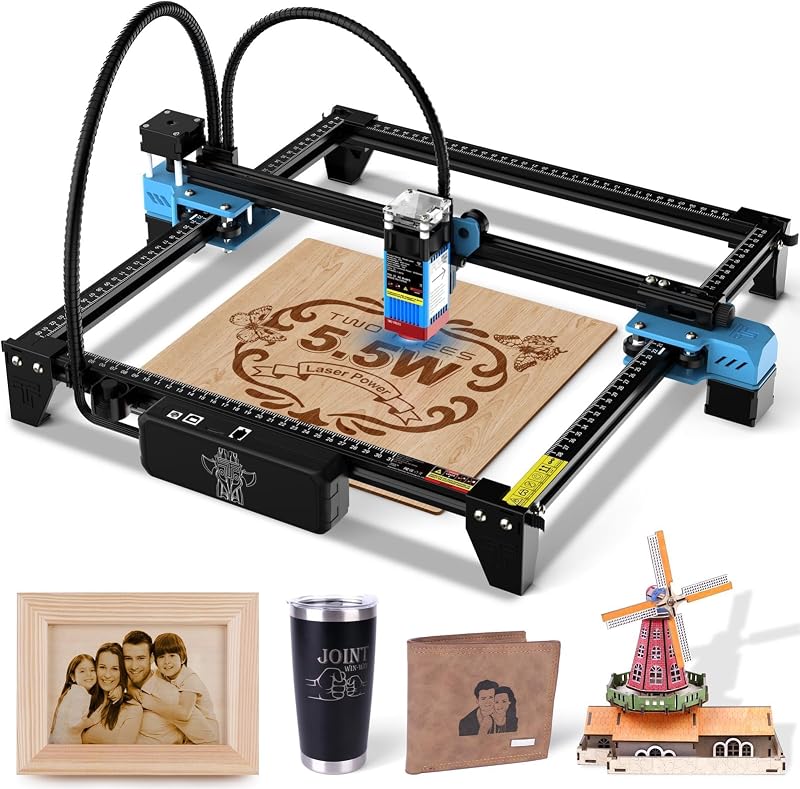
Laser Cutter Twotrees TTS-55 Pro offers an open-frame 300 x 300 mm workspace with a 5500mW laser spot for hobbyists working on wood, glass, and stainless steel engraving who do not require a full safety enclosure or integrated debris collection drawers.
FAQ
Can the Creality Falcon2 Pro S 22W cut clear acrylic?
No, the 22W diode module operates on a 450nm visible blue wavelength that passes straight through transparent and clear acrylic without transferring sufficient heat to vaporize the material. The listing specifies that cutting capability applies to 10mm black acrylic and opaque synthetic sheets.
How fast does the Creality Falcon2 Pro S 22W cut materials?
The machine can move at vector travel speeds up to 600mm/s and achieves cutting feed rates up to 500mm/s depending on material density. Dense materials like 15mm basswood or 10mm black acrylic will require slower controlled passes to achieve complete optical cut-through.
What safety sensors are included on this machine?
Creality integrates five core safety protections into the Falcon2 Pro S: an optical flame detector to alert on combustion flare-ups, dual wire limit switches along the mechanical axes, an electronic safety lock, an external emergency stop push-button, and a laser detection cover interlock that pauses operation if the protective shield opens.
How long does the setup process take out of the box?
Because the unit ships 80 percent pre-assembled from the factory, basic mechanical installation, cable connection, and initial testing can be completed in 10 minutes or less following the manufacturer guidelines.
Does the machine require manual focal height adjustments?
No, the Falcon2 Pro S 22W features a motorized Z-axis with intelligent auto-focusing capabilities. It automatically adjusts beam clearance relative to your workpiece and includes Auto Cut Through compensation to shift focal depth as deep cuts progress.


