As Amazon Associates, we earn from qualifying purchases. This means we may receive a small commission at no extra cost to you if you click through and make a purchase.
Finding a reliable security camera for an Apple-centric household often involves navigating proprietary software, forced account creations, and cloud subscriptions that operate outside your preferred smart home platform. The Logitech Circle View provides an alternative built exclusively around Apple HomeKit, eliminating external apps and keeping control directly within the native Home interface. Designed as a wired surveillance camera with an ultra-wide lens, this hardware targets homeowners who prioritize tight software integration, dependable motion detection, and dedicated physical privacy mechanisms over generic cross-platform functionality.
Before bringing this device into your property, it is vital to recognize how its hardware and operating system interact in daily use. Because this logitech circle view security camera operates solely through Apple HomeKit Secure Video, it skips continuous 24/7 video recording in favor of motion-triggered clips and requires an Apple ecosystem to function at all. In this guide, we analyze the circle view camera specs, verify its indoor and outdoor durability, evaluate daytime and low-light visual clarity, and explore whether its specialized focus makes it the right security hardware for your living space.
What You Get With the Logitech Circle View
Logitech Circle View

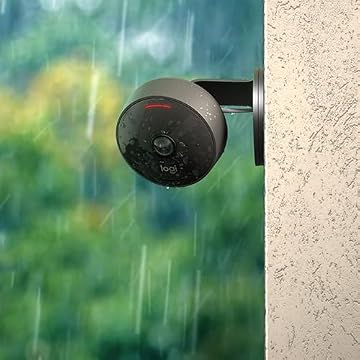
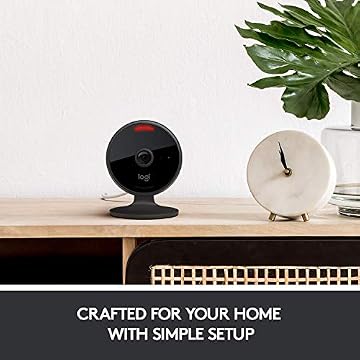

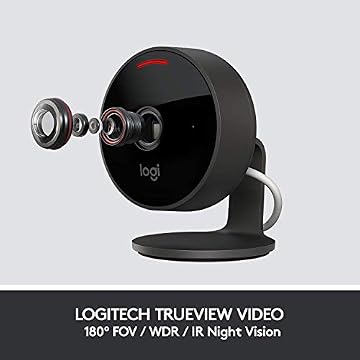

Photographs published on the Amazon listing.
Unboxing the unit reveals a compact, thoughtfully styled piece of surveillance hardware accompanied by the mounting accessories needed for versatile positioning around your property. The package focuses strictly on essential equipment designed to get the camera wired and synced directly to your Apple setup without unnecessary clutter.
- Logitech Circle View camera with integrated power cable
- Indoor USB power supply adapter
- Wall mounting bracket with accompanying installation hardware
- Weatherproof IP64-rated camera enclosure with sturdy metal base
- TrueView optical system delivering 1080p HD video
- Infrared night vision sensors capable of illumination up to 15 feet
- Quick-start documentation for Apple HomeKit pairing
Key Specifications
Feature
Specification
- Brand
- Logitech
- Model Name
- Circle View Camera
- Video Resolution
- 1080p HD TrueView Video
- Field of View
- 180-degree diagonal field of view
- Night Vision
- Infrared illumination up to 15 feet
- Weatherproofing
- IP64-rated body
- Connectivity
- 2.4 GHz Wi-Fi (802.11 b/g/n)
- Power Type
- Indoor USB power supply with attached lead
- Controller Platform
- Apple HomeKit exclusively
- Recording Method
- Motion detection based (non-continuous)
Copied from the Amazon listing. These figures were not measured here.
Hardware Design and Circle View Camera Privacy Features
The external structure of the camera stands apart from generic plastic surveillance units through its refined construction and sensible materials. Featuring an all-black matte finish anchored by an integrated metal base, the unit sits securely on flat surfaces like entryway tables, bookshelves, and window ledges without shifting when touched. The attached power cable blends smoothly with the housing, preserving a discreet visual profile that looks deliberate inside living areas rather than industrial or intrusive.
Physical security is where the camera truly distinguishes itself from competitors that depend exclusively on software toggles. Logitech implemented physical circle view camera privacy features directly into the frame, allowing you to tilt the camera head downward so the lens faces the metal base when you do not want visual monitoring active. Additionally, a dedicated physical button on the back of the camera allows you to cut off video and audio streams instantly with a single press, providing absolute visual confirmation that your private spaces are unmonitored without needing to open your smartphone.
This dual-layer approach solves a significant barrier for indoor surveillance. Software toggles in third-party companion apps can occasionally fail, reboot unexpectedly, or trigger false states during firmware updates. Having an undeniable mechanical privacy solution built directly into the housing gives residents peace of mind when relaxing at home, making it practical to place surveillance in shared living areas without creating discomfort for family members or visitors.
Video Clarity and Sensor Performance
Optics on this camera utilize Logitech TrueView technology, pairing a 1080p high-definition video sensor with an exceptionally expansive 180-degree field of view. The ultra-wide circle view camera field of view allows a single unit to monitor an entire patio, large living room, or sprawling garage entryway without requiring motorized pan-and-tilt hardware. The wide dynamic range sensor compensates effectively for high-contrast lighting scenarios, keeping human subjects recognizable even when standing in dark porch shadows against harsh, direct midday sunlight.
While panoramic security options like the reolink duo 2 poe achieve broad coverage through dual-lens architectures, Logitech achieves wide-angle monitoring using a single, high-grade optical glass assembly. Edge-to-edge clarity remains steady across the entire frame, avoiding the severe distortion and muddy corners that often plague budget wide-angle sensors. Motion detection activates promptly across the visual zone, ensuring passing visitors or vehicles are identified before they reach the center of the frame.

Low-light performance relies on specialized infrared emitters designed to illuminate the immediate surveillance area without washing out moving targets. The integrated logitech circle view night vision reaches up to 15 feet in complete darkness, maintaining full-field visibility so that movement along front steps or across an unlit room is captured clearly. The camera transitions smoothly between daytime color and monochrome night vision as ambient light recedes, delivering reliable imaging around the clock.
Placement Options and Circle View Camera Outdoor Use
Evaluating this device for exterior monitoring requires an understanding of its mixed ingress protection ratings. The camera body itself carries an IP64 weatherproof certification, ensuring the optical head and internal circuitry resist dust infiltration and splashing water from rainstorms. This level of protection makes circle view camera outdoor use entirely viable under roof eaves, along covered porches, or mounted beside exterior garage doors where standard exposure to wind and ambient precipitation occurs.
However, the power architecture introduces a practical installation constraint that homeowners must consider during planning. While the camera body is weatherproof, the included USB power supply is explicitly rated for indoor use only. Because this is a logitech circle view wired camera with a permanently attached power cable, you cannot plug the adapter into an exposed, unshielded outdoor receptacle. Homeowners must either route the thin power cable through an exterior wall into an indoor outlet or plug it into an approved, completely weatherproof electrical enclosure that protects the power brick.
The included wall mounting bracket simplifies securing the device to siding, brickwork, or interior drywall. Once the bracket is fixed in place, the articulating arm permits fine adjustments to viewing angles, letting you align the 180-degree optical cone with driveways, gates, or entry hallways. For homeowners who manage integrated entryways using devices like the myq 3 in 1 smart lock, mounting this camera overlooking the threshold provides an effective visual counterpart to door status sensors.
Apple HomeKit and Circle View Camera HomeKit Secure Video
Unlike standard wireless cameras that require manufacturer-specific utilities for initial onboarding, the logitech circle view apple homekit integration is completely native. The listing explicitly confirms that the camera is not compatible with the older Logi Circle app; everything from pairing to daily monitoring occurs exclusively within the Apple Home app on iPhone, iPad, Mac, or Apple TV. You simply scan the HomeKit setup code using your mobile device, connect the camera to your 2.4 GHz Wi-Fi network, and name the camera location within your smart home configuration.
Adopting circle view camera homekit secure video provides considerable data protection benefits for security-conscious households. When motion triggers a recording, the analysis of video data—including facial recognition and detection of people, pets, or vehicles—happens locally inside your home on your designated Apple HomeKit hub, such as an Apple TV or HomePod. The recorded footage is encrypted end-to-end before being uploaded to your personal iCloud storage, preventing anyone outside your authorized Apple family sharing group from viewing your video feeds.
This native architecture eliminates third-party account requirements and removes brand-specific subscription tiers from your monthly bills. For users who monitor smart home notifications on personal screens, the camera streams live video instantly with minimal latency. While dedicated smart assistants like the eufy smart display e10 serve alternative ecosystems, Apple users enjoy automatic video picture-in-picture alerts across Mac desktops and Apple TV screens whenever movement occurs at the front door.
Logitech Circle View Pros and Cons
Pros
- Expansive 180-degree diagonal field of view
- End-to-end encrypted Apple HomeKit Secure Video
- Physical tilt-down hinge and instant mute button
- Weatherproof IP64-rated body for outdoor placement
- High dynamic range sensor balances bright sunlight
Cons
- Included USB power brick rated for indoors only
- Operates exclusively with Apple devices
- Captures motion clips without continuous recording
Check Logitech Circle View on Amazon
Is the Logitech Circle View Worth It
Determining whether this hardware makes sense for your property depends directly on your mobile device ecosystem and recording preferences. If you are deeply invested in Apple devices and value strict data encryption without managing multiple third-party accounts, the camera represents one of the cleanest, most hassle-free surveillance solutions available. The combination of local HomeKit hub processing, dependable 180-degree optical coverage, and mechanical privacy controls delivers exceptional utility for indoor rooms and covered exterior perimeters.
Conversely, this hardware will not satisfy shoppers looking for continuous 24/7 video capture or multi-platform compatibility. The camera relies exclusively on motion-triggered video clips, meaning it does not record continuously to local hard drives or network storage servers. Furthermore, if anyone in your household relies on Android devices or wants direct integration with Amazon Alexa or Google Home displays, the camera’s strict Apple-only protocol renders it completely unusable for those household members.
For Apple-only households willing to route an indoor USB power supply to their exterior mounting locations, the camera delivers dependable performance without subscription overhead from third-party manufacturers. If your primary goal is clean, private, motion-based surveillance that operates seamlessly within the iOS ecosystem, the investment pays dividends through daily operational convenience.
Other Options to Consider
Motion Detection suits shoppers who need broad cross-platform compatibility across both Amazon Alexa and Google Home environments, providing two-way audio, an integrated siren, and flexible storage via microSD cards or cloud subscriptions for dedicated indoor monitoring.
VicoHome Cam serves homeowners seeking a multi-camera exterior system with sharper 2K video resolution, color night vision, and an IP65 waterproof housing that operates completely wirelessly on 2.4 GHz Wi-Fi networks.

Blink Video Doorbell is better matched for residents wanting dedicated head-to-toe threshold surveillance paired with an Outdoor 4 camera that features an impressive two-year battery life and the Sync Module Core for wire-free perimeter protection.
FAQ
Does the Logitech Circle View require an Apple Home hub?
To view live streams away from home and take advantage of Apple HomeKit Secure Video recording, facial recognition, and event notifications, you need an active Apple Home hub, such as a HomePod or an Apple TV, connected to your local network.
Can I use the Logitech Circle View with Android phones?
No, the camera is developed exclusively for Apple HomeKit and does not support Android devices. It cannot be configured or operated using third-party apps, Google Home, or Amazon Alexa.
Can the camera record continuously 24/7?
The camera is a motion-detection-based security camera that captures clips when activity is recognized. The listing confirms that it does not offer continuous non-stop video recording.
Is the Logitech Circle View battery operated?
No, this model is a wired security camera that requires continuous power through its attached cable and the included indoor USB power adapter.
Can I mount the camera outdoors in direct rain?
The camera body has an IP64 weatherproof rating that protects against rain and dust, making it suitable for outdoor positions like under eaves. However, the USB power plug is indoor-rated and must be connected inside or within a fully weatherproof enclosure.