
As Amazon Associates, we earn from qualifying purchases. This means we may receive a small commission at no extra cost to you if you click through and make a purchase.
Investing in a home 3D printer often presents a steep learning curve, forcing parents to decide between complex hobbyist assembly kits and streamlined consumer appliances. The Toybox 3D Printer aims directly at families, packaging an upgraded Alpha Three platform with a generous supply of material to eliminate initial setup frustration. In this toybox 3d printer deluxe bundle review, we examine whether this eight-spool package delivers true plug-and-play simplicity for young creators. Shoppers can expect an emphasis on rapid setup, child-safe operation, and companion software packed with ready-to-print models.
This guide provides a straightforward assessment of the printer’s core features, included accessories, and daily operational trade-offs based on the manufacturer’s published data. We evaluate the tool-free calibration system, companion app catalog, material compatibility, and overall kid-safe hardware design to help you determine if this model fits your household. Subsequent sections outline full technical specifications, practical usability concerns, direct comparisons with alternative machines, and answers to common buyer questions.
What You Get With the Toybox 3D Printer
Toybox 3D Printer

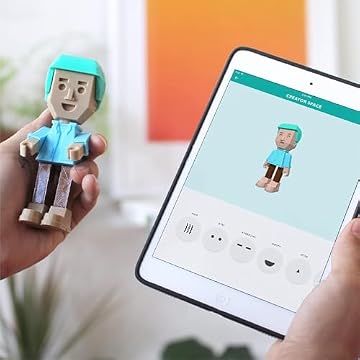


Photographs published on the Amazon listing.
The Alpha Three iteration of this creative platform arrives as a complete starter package designed to prevent the need for immediate accessory purchases. By bundling raw printing materials directly with the hardware and software ecosystem, the package focuses on immediate usability right out of the box.
- The Toybox 3D Printer Alpha Three unit featuring an upgraded print head engineered to print up to two times faster with fifty percent more detail than the Alpha Two generation.
- A toybox filament bundle providing eight multi-colored spools of non-toxic PLA material suitable for home creation.
- Integrated tool-free calibration system designed for one-touch automated printing without manual leveling adjustments.
- Comprehensive access to the proprietary Toybox companion application for iOS, Android, and web browsers.
- A digital cloud catalog containing over 10,000 ready-to-print designs, including officially licensed characters from major entertainment franchises.
- Direct file import capabilities supporting custom creations via STL, OBJ, and GCODE file uploads.
- Multi-printer household management software allowing multiple machines to run simultaneously from a single central account.
Key Specifications
Specification Attribute
Manufacturer Detail
- Brand
- Toybox
- Hardware Generation
- Alpha Three
- Material Compatibility
- Non-toxic PLA filament
- Bundled Material
- 8 multi-colored PLA filament spools
- Compatible Devices
- Laptop, Personal Computer, Smartphone
- Supported File Formats
- STL, OBJ, GCODE
- Supported Operating Systems
- Windows, macOS
- Software Ecosystem
- Toybox App (iOS, Android, Web)
- Performance Benchmark
- Up to 2x faster with 50% more detail than Alpha Two
- Calibration Method
- Tool-free calibration with one-touch printing
Copied from the Amazon listing. These figures were not measured here.
Tool-Free Calibration and Setup Speed
A frequent stumbling block for families entering 3D printing is the mechanical precision required to achieve a clean first layer. Traditional entry-level machines often demand manual bed leveling with paper shims and hex wrenches, creating an intimidating hurdle for beginners. When setting up an open-frame hobby machine like the creality ender 3 3d printer, users frequently encounter a steep mechanical learning curve before achieving consistent prints. In contrast, the Toybox 3D printer setup is engineered specifically around tool-free calibration, removing the necessity for manual wrench adjustments or delicate thumbscrew leveling.
The Alpha Three architecture emphasizes a streamlined one-touch printing workflow. Rather than requiring children or parents to master nozzle offsets or bed tramming, the unit relies on automated internal calibration to align the platform. Users can initiate builds straight from a smartphone or computer without checking physical tolerances. The listing highlights an upgraded internal motion system that achieves up to double the speed of the earlier Alpha Two while delivering fifty percent greater surface detail, ensuring that model production starts promptly after unboxing.
While the tool-free system eliminates mechanical headaches, prospective buyers should recognize the intentional simplicity of this platform. The listing does not specify manual override options for bed tilt or nozzle height, meaning users rely entirely on the factory-calibrated automation. For households seeking an appliance-style experience where pressing a single button initiates the project, this automated design provides an exceptionally low barrier to entry.
Kid Safety and Hardware Enclosure
Thermal dynamics and moving mechanical parts make safety a primary consideration for any parent evaluating fabrication tools for young creators. The manufacturer positions this model as a toybox safe 3d printer built specifically with family spaces in mind. Central to this approach is the exclusive use of non-toxic PLA material across all printing activities. Unlike advanced polymers that emit unpleasant fumes and require active ventilation, the included PLA spools melt cleanly at standard temperatures without producing harsh odors.
Physical structural design also plays an essential role in how families interact with a toybox 3d printer for kids. The listing highlights a lightweight, durable frame engineered to withstand standard household handling while remaining portable enough to move between desks or storage shelves. While the durable frame provides structural stability, parents should note that the listing does not specify a fully enclosed interlocking door or physical safety enclosure. Hot-end components still reach elevated operational temperatures to melt filament, so younger children must be supervised while the machine is actively extruding.
The focus on non-toxic materials combined with a sturdy structural shell makes the platform well suited for domestic playrooms and supervised classroom settings. By restricting the hardware exclusively to PLA filament, the printer avoids the high-temperature hazards associated with advanced thermoplastic extrusion. The open-frame format also provides educational value by giving young creators an unobstructed view of the additive manufacturing process in real time.
Toy Catalog and Digital File Compatibility
Software accessibility often dictates whether a creative gadget remains an everyday staple or ends up collecting dust. The companion software addresses this through expansive toybox 3d printer app features accessible across iOS, Android, and web platforms. The standout draw for young audiences is access to a digital catalog containing over 10,000 ready-to-print toys. Unlike generic open-source repositories where models require complex slicing configuration, every item in this digital library is pre-formatted to build reliably with the tap of a screen, including officially licensed figures from SpongeBob, Batman, and How to Train Your Dragon.
Beyond static catalog selections, the software ecosystem bridges entertainment with early design education. Children can use intuitive drawing tools within the app to create original two-dimensional sketches that the platform automatically transforms into three-dimensional printable objects. For users who outgrow the built-in library, the ecosystem does not lock creators into a closed garden. The software natively accepts custom STL, OBJ, and GCODE files uploaded from Windows or macOS computers, giving older kids an easy stepping stone toward beginner CAD modeling without needing third-party slicing programs.
When compared against high-speed multi-material platforms like the bambu lab a1 combo 3d printer, which uses automated material switching systems for multi-color layers, the Toybox handles color through spool swapping. The deluxe bundle includes eight separate multi-colored PLA spools, allowing young builders to pick vibrant hues for individual toys or swap materials between projects. While prints remain single-color per job unless filament is paused and swapped manually, the vast model library and seamless file handling keep children invested.
Multi-Printer Management Across Household Devices
Modern households frequently juggle an array of smart devices, from shared family tablets to individual student laptops. The Toybox software suite accommodates this dynamic by supporting connections across smartphones, personal computers, and laptops running macOS or Windows. This cross-platform integration ensures that kids can design a toy on a tablet during playtime, while parents monitor print queues or approve new models from a laptop or desktop computer across the room.
For families with multiple young makers or educational clubs running collaborative workshops, the app includes multi-printer support. This functionality lets a single user account manage and monitor multiple Toybox machines simultaneously across local networks. Rather than tying one machine to a solitary tablet via tethered cables, the software distributes print jobs wirelessly, allowing multiple units to produce parts for larger builds or let siblings print their chosen projects side by side without scheduling conflicts.
This networked approach reinforces the appliance-like utility of the Alpha Three generation. Setup requires simple digital pairing rather than manually configuring IP ports or flashing firmware over serial cables. While the listing does not specify internal storage capacities or onboard memory sizes for the printer hardware, the reliance on web and cloud-enabled app processing ensures that print jobs stream smoothly from your preferred device directly to the printer motion controller.
Toybox 3D Printer Pros and Cons
Pros
- Tool-free calibration and one-touch printing
- Includes eight multi-colored PLA filament spools
- Access to over 10,000 digital toy designs
- Compatible with custom STL, OBJ, and GCODE files
- Officially licensed Batman and SpongeBob models
Cons
- Compatible exclusively with PLA filament
- Physical build dimensions not specified in listing
- Advanced mechanical slicer adjustments not available
Check Toybox 3D Printer on Amazon
Is the Toybox 3D Printer Worth It
Determining whether this hardware makes sense comes down to identifying who will be operating the machine and what expectations they have for output complexity. When asking is toybox 3d printer worth it, families prioritizing zero-friction usability, immediate engagement, and child-safe materials will find immense value in this package. The inclusion of the toybox alpha three bundle with eight full spools of PLA filament means families avoid immediate add-on purchases and can start generating recognizable toys, figurines, and household novelties within minutes of opening the shipping box.
However, serious makers and technical hobbyists looking for expansive build volumes, heated print beds, or technical filament support should look elsewhere. The listing does not specify large build dimensions, high-temperature nozzles, or compatibility with advanced filaments like ABS, PETG, or TPU. If your goal is engineering functional mechanical parts, printing large-scale models, or tweaking granular slicer settings like retraction distance and acceleration curves, this machine will feel restrictive. Its hardware and software are purposely locked down to guarantee reliable toy fabrication rather than technical experimentation.
For parents, grandparents, and elementary educators seeking a reliable gateway into digital creation, this machine strikes an outstanding balance. The combination of licensed pop-culture models, robust tool-free calibration, cross-device accessibility, and a plentiful supply of starter plastic makes the machine an engaging creative appliance for young minds that eliminates the steep learning curve traditionally associated with additive manufacturing.
Other Options to Consider
MakerWorld Model Library caters to makers who want high-speed multi-color fabrication backed by an enclosed CoreXY architecture and automated bed leveling, making it a stronger match for advanced users seeking the P1S 3D printer and AMS combo for multicolor engineering projects.

FLASHFORGE Adventurer 5M 3D Printer suits makers who require a dedicated 220x220x220mm print volume, a 280°C direct extruder with a rapid three-second detachable nozzle, and ultra-fast printing speeds up to 600mm/s built on a coreXY all-metal structure.
Beginner-Friendly Ecosystem with MakerWorld Model is better suited for creators seeking an enclosed CoreXY FDM machine with high-speed precision and model library access who want professional-grade enclosed printing capabilities right out of the box.
FAQ
What materials can the Toybox 3D Printer use?
According to the product specifications, the machine is designed exclusively for non-toxic PLA filament. The deluxe starter package includes eight multi-colored PLA spools to support a wide variety of colorful builds. The listing does not specify compatibility with engineering filaments such as ABS, PETG, or nylon, as the platform focuses strictly on safe, odor-free printing for household and youth use.
Does the Toybox Alpha Three bundle require manual bed leveling?
No, the hardware features a tool-free calibration system designed to eliminate manual adjustments. Unlike traditional hobbyist machines that require wrenches, thumbwheels, and paper shims to balance the build surface, this model utilizes automated calibration and one-touch printing controls to ensure hassle-free operation straight out of the box.
Can you upload custom 3D files to the Toybox app?
Yes, the companion software supports custom model uploads in STL, OBJ, and GCODE file formats. In addition to accessing the built-in library of over 10,000 ready-to-print toys, users can import their own external designs via web browsers, Windows computers, or macOS devices, as well as generate original models using simple in-app drawing tools.
What devices work with the Toybox 3D Printer?
The companion app and printing ecosystem are compatible with a wide range of devices, including smartphones, laptops, and personal computers. The software runs natively across iOS and Android operating systems as well as desktop web environments on Windows and macOS, allowing family members to initiate and monitor prints from their preferred screen.
Are licensed character prints included with the digital toy catalog?
The companion application grants access to over 10,000 ready-to-print designs, which include officially licensed models from popular entertainment properties such as SpongeBob SquarePants, Batman, and How to Train Your Dragon. These licensed designs are formatted specifically to print seamlessly using the machine’s automated one-touch system and included PLA spools.


