
As Amazon Associates, we earn from qualifying purchases. This means we may receive a small commission at no extra cost to you if you click through and make a purchase.
The Cricut Joy 2 compact machine is engineered for hobbyists and organizers who need a precise digital cutter without dedicating an entire room or large tabletop to a massive crafting plotter. If you want to know whether this lightweight craft cutter is capable enough for your day-to-day creative goals, the short answer depends on project scale: it is an exceptional solution for greeting cards, vinyl decals, personalized labels, and full-color stickers, but its 4.5-inch active width strictly limits large-format cutting. Crafters looking to produce quick custom gifts, school projects, or pantry labels will appreciate its small profile and automated features, while apparel makers needing broad chest transfers will need a wider machine.
This review explores the Cricut Joy 2 cutting machine in depth, examining its hardware design, technical specifications, and real-world capabilities. We evaluate how the printer-assisted cutting process works for homemade stickers, explore the dedicated card-making workflow, outline setup requirements, and assess whether the bundled starter supplies justify the investment. By looking closely at the machine’s physical limits alongside its creative strengths, you can easily determine whether this compact unit matches your crafting routine.
What You Get With the Cricut Joy 2
Cricut Joy 2



Photographs published on the Amazon listing.
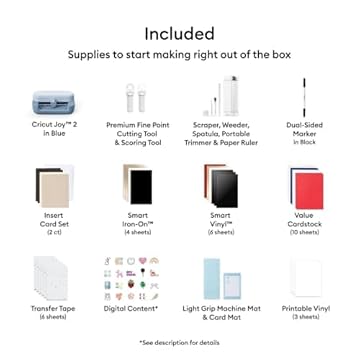
The Cricut Joy 2 Essential Bundle comes packaged with a curated selection of materials and accessories, providing enough supplies to create dozens of projects straight out of the box without requiring an immediate trip to the craft store.
- Cricut Joy 2 smart cutting machine
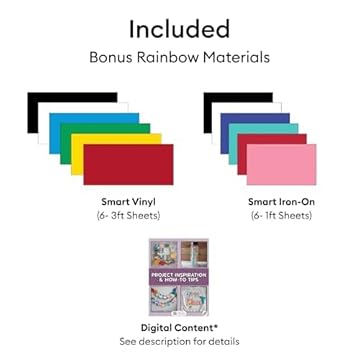
- Smart Vinyl sample rolls for matless cutting
- Smart Iron-On material for heat transfer projects
- Value Cardstock pack for paper crafting
- Insert Card sets designed for fast greeting cards
- Cricut Joy 2 printable vinyl sheets for color stickers
- Access to over 400 guided projects and step-by-step instructions
- 1-year limited manufacturer warranty coverage
Key Specifications
Feature
Specification
- Brand
- Cricut
- Model Number
- 8003182
- Active Surface Width
- 4.5 inches
- Dimensions
- 8.75"D x 16.3"W x 7.25"H
- Weight
- Just over 2 lbs (0.91 kg)
- Material Compatibility
- 75+ materials (vinyl, iron-on, cardstock, printable media)
- Functional Modes
- Cuts, writes, draws, foils, and scores
- Operation Mode
- Automatic
- Connectivity
- Bluetooth wireless to desktop and mobile devices
- Warranty
- 1-year limited manufacturer warranty
Copied from the Amazon listing. These figures were not measured here.
Full-Color Sticker Workflow and Print Then Cut
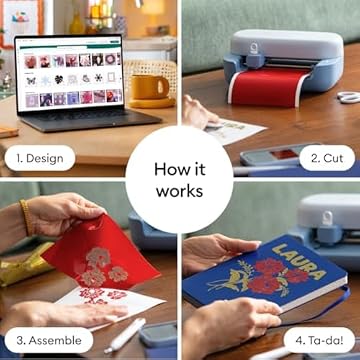
One of the most notable features of the Cricut Joy 2 is its ability to handle full-color graphic decals when paired with your existing home equipment. Using the cricut joy 2 for stickers involves a two-step process: you design your artwork or select an existing graphic inside the companion app, output that artwork through your home inkjet printer onto compatible media, and then feed the printed sheet into the cutter. The machine uses built-in optical alignment to scan the printed page and automatically cuts with precision around the exact outlines of your designs.
This automated cricut joy 2 print then cut capability represents a significant practical upgrade over previous ultra-compact craft plotters. When comparing the cricut joy 2 vs joy, the earlier generation machine lacked the sensor hardware required to detect registration marks from inkjet printouts, which forced sticker makers to align cuts manually or step up to a heavier studio model like the cricut maker machine bundle 1. By bringing optical alignment to a 2-pound chassis, this version lets sticker enthusiasts produce custom illustrated sheets, glossy planner icons, and branding labels directly on a small desk without requiring a commercial studio plotter.
It is important to remember that the cutter itself does not contain ink cartridges or print heads. You must supply your own color inkjet printer to lay down the ink before feeding the material into the machine. Furthermore, because the cutter has a 4.5-inch active surface width, standard letter-size sticker paper must be trimmed to fit the channel, or you must load specialty cricut joy 2 printable vinyl designed for compact feeders. For crafters who already own a reliable inkjet printer, this workflow makes producing custom die-cut and kiss-cut stickers remarkably straightforward.
Card Making and Quick Paper Crafts
Custom stationery is another area where this compact platform delivers noticeable efficiency. The cricut joy 2 card making workflow relies on specialized insert card sets included in the bundle. Rather than cutting, folding, and scoring a card entirely from scratch, you insert a pre-folded card blank into the machine. The precision blade cuts intricate filigree, personalized names, or decorative silhouettes into the top flap without cutting through the back of the card, allowing a contrasting backing sheet to show through the cutouts.
In addition to basic slicing, the machine carriage supports tools that write, draw, foil, and score. This flexibility allows you to pen heartfelt messages with metallic gel pens, draw detailed line art, or score clean fold lines for small gift boxes and table place cards. Crafters who previously relied on manual crank machines like an old cricut cuttlebug machine will find that digital vector control eliminates the need to store physical metal cutting dies, giving you unlimited font choices and graphic styles inside digital software.
The unit supports over 75 different media types, ranging from light copy paper to heavy cardstock and adhesive vinyl. However, because the physical clearance of the machine is built around quick everyday crafts, the thickness and width of the paper stock must remain within manufacturer limits. Crafters looking to build large, multi-tiered paper models or oversize scrapbook layouts will need to cut their elements in smaller pieces and assemble them manually on a workspace.
Machine Setup and Design Space App Connectivity
The initial cricut joy 2 setup is engineered for fast onboarding, catering to users who want to avoid complicated cable routing and technical drivers. The hardware connects wirelessly via Bluetooth to your desktop computer or mobile device, supporting both Windows and Mac operating systems, as well as iOS and Android phones and tablets. The lack of a required USB data cable keeps your work area clear and makes it easy to position the cutter on a shelf, counter, or desk corner.
All project layout is handled through Cricut Design Space, a free software suite that provides step-by-step design flows, customizable templates, and AI-assisted image generation tools. For beginners, the bundled access to over 400 guided projects removes the guesswork from selecting blade pressure and material settings. Much like setting up a compact appliance such as a nespresso citiz and milk coffee machine, getting the cutter ready to use simply requires plugging in the power cord, pairing your phone or laptop over Bluetooth, and following the initial on-screen calibration prompts.
While the wireless workflow is convenient, it relies entirely on a stable Bluetooth connection and consistent app performance. Crafters who prefer a hardwired USB cable for data transfer will find that the listing does not specify an auxiliary wired port for local cutting. Additionally, accessing the project library, cloud-stored designs, and firmware updates requires an active internet connection, so you will want a dependable Wi-Fi network in your workspace to ensure smooth operation.
Working Within the 4.5-Inch Cutting Width
An honest evaluation of the cricut joy 2 specs requires looking closely at its physical footprint and cutting boundaries. The unit measures 8.75 inches deep, 16.3 inches wide, and 7.25 inches high, weighing just over 2 lbs (0.91 kg). This tiny footprint makes it one of the most portable electronic cutting machines on the market, easily slipping into a tote bag for classroom use, dorm rooms, or crafting meetups.
The trade-off for this extreme portability is the 4.5-inch active surface width limit. While the machine supports long, continuous cuts on roll-fed Smart Materials without requiring an adhesive cutting mat, the lateral width of any single graphic cannot exceed four and a half inches. This restriction makes the unit ideal for water bottle decals, monogram lettering, luggage tags, and pantry labels, but challenging for expansive projects like large chest graphics on adult sweatshirts or wide vehicle window signs.
If your creative ambitions center on small, high-detail items, this width restriction is rarely an inconvenience. In fact, working with narrower material rolls often reduces material waste compared to loading a full 12-inch vinyl sheet for a tiny two-inch decal. However, if your regular workflow requires cutting wide banners or multi-layer graphics that exceed five inches across, understanding this mechanical ceiling will prevent unexpected frustration.
Cricut Joy 2 Pros and Cons
Pros
- Full-color sticker cutting with inkjet alignment
- Lightweight chassis weighing just over 2 lbs
- Works with over 75 craft materials
- Cuts, writes, draws, foils, and scores
- Comprehensive bundle with vinyl and cardstock
Cons
- Strict 4.5-inch cutting width limit
- Requires separate inkjet printer for stickers
- Relies entirely on wireless Bluetooth connection
Is the Cricut Joy 2 Worth It
Determining whether the cricut joy 2 is worth it comes down to matching your intended project types with the machine’s physical proportions. If you are an apartment dweller, teacher, event planner, or hobbyist who primarily makes greeting cards, organizing labels, personalized tumblers, and full-color stickers, this compact machine offers unmatched convenience. Its fast setup, lightweight frame, and inkjet-assisted sticker cutting workflow provide serious creative utility without monopolizing your living space.
Conversely, makers who run small apparel businesses or frequently produce large-scale home decor will quickly outgrow the 4.5-inch cutting channel. While you can tile designs across multiple vinyl strips, assembling large multi-piece graphics requires extra patience and manual alignment. If you require standard 12-inch cutting widths for large t-shirt transfers or complex architectural paper crafts, investing in a full-sized desktop cutter is the more practical route.
For the everyday crafter who wants a clean, automated digital cutter that stows neatly inside a bookshelf or cabinet, the Cricut Joy 2 strikes an impressive balance. The bundled assortment of Smart Vinyl, Smart Iron-On, cardstock, and printable vinyl provides enough material to complete up to 50 to 65 projects right out of the package, delivering solid practical value for anyone focused on small custom crafts.
Other Options to Consider
VEVOR Vinyl Cutting Machine provides a broader 12-inch cutting width and button-controlled operation, making it a better option for crafters who need to cut larger home decor signs, broad apparel heat transfers, and wide decals that exceed the Joy 2’s narrow feed area.

Brother SDX125E ScanNCut Electronic Cutting features an integrated built-in scanner, suiting crafters who want to scan hand-drawn illustrations or fabric patterns directly on the machine without relying on a smartphone app or separate computer connection.
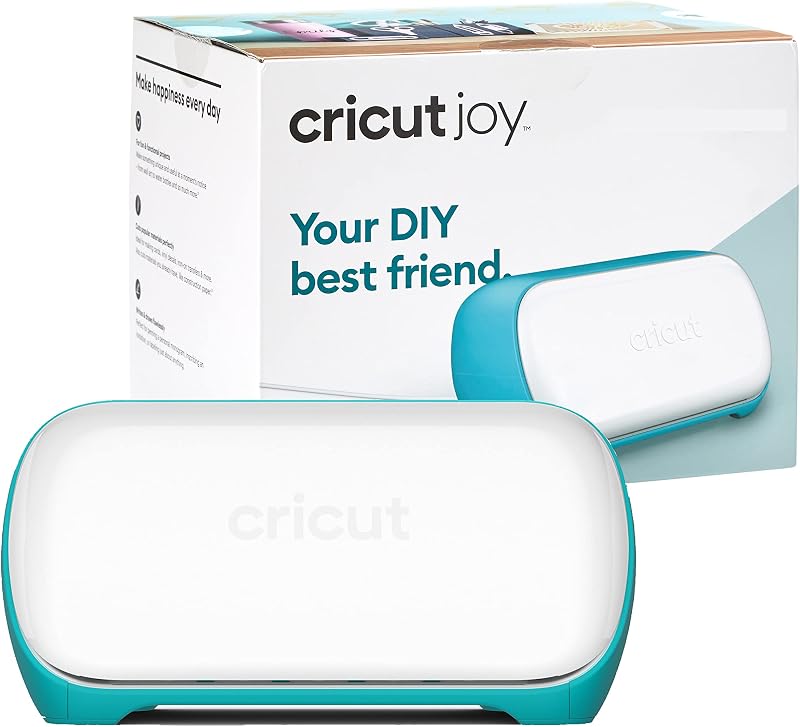
CricutIncludes 30 images in Design offers the original portable blue Joy machine bundle with an included digital content library, providing a focused solution for shoppers who want basic card making and vinyl labeling without needing the newer inkjet sticker alignment workflow.
FAQ
Can the Cricut Joy 2 print color stickers by itself?
No, the machine does not have built-in ink tanks or print heads. It relies on your home inkjet printer to print your artwork onto printable vinyl, then uses its internal optical sensors to scan the sheet and cut precisely around your designs.
What materials can the Cricut Joy 2 cut?
The machine is compatible with over 75 materials, including standard cardstock, Smart Vinyl, Smart Iron-On, insert card sets, and printable vinyl sheets.
What devices work with the Cricut Joy 2?
The cutter connects via Bluetooth to desktop computers running Windows or Mac, as well as mobile devices including iOS and Android smartphones and tablets using the Cricut Design Space app.
What is the maximum cutting width on the Cricut Joy 2?
The active surface area width is 4.5 inches. Designs must fit within this lateral width, although the machine can cut longer lengths when using continuous Smart Materials.
What comes inside the Cricut Joy 2 Essential Bundle?
The bundle includes the Cricut Joy 2 cutting machine, Smart Vinyl, Smart Iron-On, Value Cardstock, Insert Card Sets, Printable Vinyl sheets, and access to over 400 guided projects in Design Space.


