As Amazon Associates, we earn from qualifying purchases. This means we may receive a small commission at no extra cost to you if you click through and make a purchase.
As an Amazon Associate we earn from qualifying purchases. Links on this page are affiliate links.
Evaluating a novation vs akai professional midi controller comes down to host dependence and workflow. Both units offer USB-C connectivity, 16 velocity pads, and bundled creative software. The Novation Launchkey 61 MK4 serves as a dedicated DAW controller with 61 semi-weighted keys and faders. The Akai Professional MPC Key 37 functions as a standalone production keyboard with an internal processor, 37 synth-action keys, and a seven-inch touchscreen.
Number of keys
61
37
Key action
Semi-weighted with polyphonic aftertouch
Synth-action
Standalone operation
Not listed
Standalone MPC3 OS with 8-core processor
Display
Not listed
7-inch touchscreen
Hardware faders
9 faders
Not listed
Weight
10.5 pounds
9.7 pounds
Choose the first if
- You need a five-octave range with 61 semi-weighted keys and polyphonic aftertouch.
- You want physical faders and dedicated control mapped to your computer DAW.
Choose the second if
- You produce tracks standalone without connecting to a computer.
- You prefer a 7-inch touchscreen interface with integrated sampling workflows.
Verdict
Pick the Novation Launchkey 61 MK4 if you want extended keyboard range, physical faders, and deep integration with computer DAWs. Select the Akai Professional MPC Key 37 if you require an all-in-one standalone workstation with onboard processing and sampling. Your workspace size and computer reliance determine the match.
Novation vs Akai MIDI Controller Comparison
Number of Keys and Key Action
Edge: Novation Launchkey 61 MK4 with Polyphonic Aftertouch
The Novation Launchkey 61 MK4 provides 61 semi-weighted keys equipped with polyphonic aftertouch. This extended range allows you to play two-handed arrangements across five octaves, while polyphonic aftertouch lets you modulate individual notes by varying finger pressure. In contrast, the Akai Professional MPC Key 37 features 37 synth-action keys paired with pitch and modulation wheels. The 37-key layout covers three octaves, suiting lead lines, basslines, or compact studio setups. It does not list aftertouch specifications. If your playing style demands a wider keyboard reach and independent pressure control per key, the Novation Launchkey 61 MK4 delivers the more versatile keybed.
Standalone Operation and Processing
Edge: Akai Professional MPC Key 37 Standalone Keyboard
The Akai Professional MPC Key 37 operates as a completely standalone production unit. It runs MPC3 OS on an internal 8-core processor, letting you sample, sequence, and arrange full tracks without a computer. It includes a 7-inch touchscreen, a linear arranger, direct USB-C sampling, and supports up to 16 stereo audio tracks alongside 32 plugin instruments. Conversely, the Novation Launchkey 61 MK4 does not feature standalone computing or internal sound generation. It functions strictly as a controller for external digital audio workstations on a connected computer. For musicians seeking an all-in-one instrument capable of independent track creation away from a computer screen, the Akai Professional MPC Key 37 holds a definitive advantage.
Performance Pads and Hardware Controls
Edge: Novation Launchkey 61 MK4 with Polyphonic Aftertouch
Both keyboards provide 16 velocity-sensitive pads, but their secondary control features differ. The Novation Launchkey 61 MK4 includes 16 FSR pads with polyphonic aftertouch, 9 physical faders, and dedicated Scale, Chord, and Arpeggio modes. The faders give you immediate tactile control over DAW mixer channels. The Akai Professional MPC Key 37 features 16 classic MPC pads alongside dedicated pitch and modulation wheels, but its data does not list hardware faders. Instead, parameter editing and sequencing rely heavily on its 7-inch touchscreen interface. If you prefer physical mixer faders and drum pads that transmit individual pressure variations for nuanced dynamic control, the Novation Launchkey 61 MK4 offers broader tactile control.
Form Factor and Studio Footprint
Edge: Akai Professional MPC Key 37 Standalone Keyboard
Your choice between these units directly impacts available desk space. The Novation Launchkey 61 MK4 measures 35.2 inches long, 10.3 inches wide, and 3.6 inches high, weighing 10.5 pounds. Its elongated frame accommodates the 61 full-sized keys but requires a wide studio desk. The Akai Professional MPC Key 37 measures 22.9 inches wide, 12.3 inches long, and 4.09 inches high, with a weight of 9.7 pounds. The Akai unit takes up over 12 inches less horizontal desk width than the Novation model and weighs slightly less, making it easier to position in tight home studio spaces or small workstations where horizontal surface space remains limited.
Connectivity and Studio Integration
Edge: Akai Professional MPC Key 37 Standalone Keyboard
Both keyboards utilize USB-C ports to interface with production environments, but the depth of that connection varies. The Novation Launchkey 61 MK4 uses USB-C for MIDI connectivity to control major DAWs like Ableton Live, Logic, and Cubase, and supports the Native Kontrol Standard. The Akai Professional MPC Key 37 expands USB-C capabilities into a complete studio hub. Its single-cable USB-C connection delivers 24×24 multichannel audio streaming, 32 channels of expanded MIDI, direct audio sampling from mobile devices, and both host and device support. It also features Ableton Live Control Mode. The extensive multichannel audio streaming and external sampling support make the Akai Professional MPC Key 37 more versatile for complex studio routing.
Included Software and Sound Libraries
Edge: Tie
Both manufacturers package substantial sound resources to expand your music production setup. The Novation Launchkey 61 MK4 comes bundled with DAW licenses for Ableton Live Lite and Cubase LE, the Novation Play software, free Melodics lessons, and virtual instrument sounds from GForce, Klevgrand, Orchestral Tools, and Native Instruments. The Akai Professional MPC Key 37 ships with more than 20GB of factory content, bundled instrument plugins including MPC Editions from Spitfire Audio and Native Instruments, and two months of Splice access. Novation gives you entry-level DAW licenses and educational lessons, while Akai provides a vast 20GB library of factory sounds and synthesizer plugins. Each package offers balanced utility depending on your current software toolkit.
Which MIDI Controller Should You Buy?
Producers who work without a computer
Our pick: Akai Professional MPC Key 37 Standalone Keyboard
You get a fully standalone workstation powered by an 8-core processor and the MPC3 OS. The unit includes a 7-inch touchscreen, 16 MPC pads, and direct USB-C sampling. With support for 16 stereo audio tracks, 32 plugin instruments, and 20GB of factory content, you can produce complete tracks without connecting a computer.
Studio musicians controlling software mixing consoles
Our pick: Novation Launchkey 61 MK4 with Polyphonic Aftertouch
This controller provides 9 faders and creative tools such as Scale Mode, chord triggers, and mutating arpeggiators. It offers integration across major software like Logic, Cubase, FL Studio, Reason, Reaper, and Ardour. Built-in NKS compatibility links your controls to Native Instruments software, while bundled packages include Ableton Live Lite and Cubase LE.
Mobile producers needing multi-channel audio streaming
Our pick: Akai Professional MPC Key 37 Standalone Keyboard
At 22.9 inches wide and 9.7 pounds, this keyboard fits into smaller workspaces than 61-key models. Its single USB-C connection delivers 24×24 multichannel audio streaming and 32 channels of MIDI. You can also sample external devices directly through USB-C, use Ableton Live Control Mode, and export projects directly into your primary computer setup.

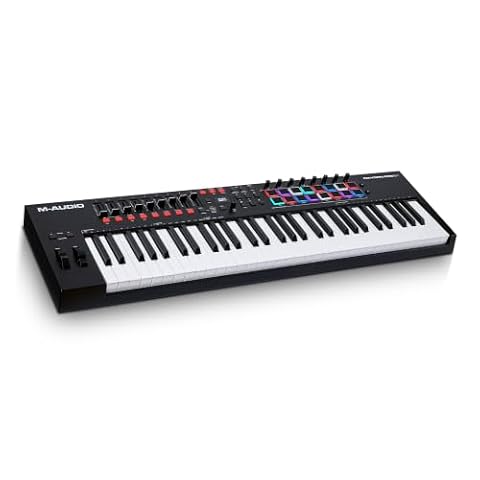
Novation Launchkey 61 MK4 with Polyphonic Aftertouch
Best for: DAW producers needing full-size keys and faders
- Number of Keys
- 61
- Key Action
- Semi-weighted
- Performance Pads
- 16 responsive FSR pads
- Aftertouch
- Polyphonic aftertouch
- Faders and Knobs
- 9 faders
- Connectivity
- USB-C
The Novation Launchkey 61 MK4 is a full-size USB-C MIDI controller with 61 semi-weighted keys and 16 FSR pads featuring polyphonic aftertouch. You get nine physical faders alongside dedicated creative modes like Scale Mode and chord triggers. It suits producers who need broad DAW control across five octaves without carrying standalone sound generation.
- 61 semi-weighted keys paired with 16 FSR pads offering polyphonic aftertouch
- Nine hardware faders with dedicated scale, chord, and arpeggiator modes
- USB-C connectivity with native NKS integration for software control
- Lacks standalone sound generation, requiring a connected host computer running a DAW
- Large 35.2-inch chassis demands substantial studio desk space
- You need a 61-key semi-weighted layout for five-octave DAW sequencing.
- You use polyphonic aftertouch for expressive pad performance.
- You control track levels directly using nine integrated faders.
- You need standalone production hardware that works without a computer.
- You lack desk clearance for a 35.2-inch wide controller.
Verdict: Novation Launchkey 61 MK4 MIDI Controller gives computer-based producers an expansive five-octave keybed, nine physical faders, and polyphonic aftertouch pads for direct DAW workflows.

Akai Professional MPC Key 37 Standalone Keyboard
Best for: standalone beatmaking and hardware music production
- Number of Keys
- 37
- Key Action
- Synth-action
- Performance Pads
- 16 MPC pads
- Connectivity
- USB-C
- Standalone Operation
- Standalone
- Skill Level
- Professionals
This standalone production keyboard combines a 37-key synth-action keybed with 16 MPC pads, a 7-inch touchscreen, and an 8-core processor running MPC3 OS. You can sequence up to 16 stereo audio tracks and 32 plugin instruments per project without a computer. It suits producers and beatmakers who need hardware sampling, onboard sequencing, and 24×24 multichannel USB-C audio streaming in one compact desktop instrument.
- Standalone operation with MPC3 OS and an 8-core processor
- 37-key synth-action keybed with pitch and modulation wheels
- USB-C connectivity delivering 24×24 audio streaming and 32 MIDI channels
- 7-inch touchscreen with 16 MPC performance pads
- Includes over 20GB of factory content and bundled instrument plugins
- 37-key layout limits two-handed playing range compared to 61-key models
- Weighs 9.7 pounds, making it heavier than typical pure MIDI controllers
- You want to produce, sample, and arrange complete tracks without a computer.
- You need MPC pads and synth-action keys integrated into a single workstation.
- You stream multi-channel audio directly into external hardware or DAWs over USB-C.
- You need a 61-key range for wide two-handed playing.
- You prefer a lightweight, simple MIDI controller solely to trigger computer software.
Verdict: Akai Professional MPC Key 37 Standalone Keyboard fits producers who want a self-contained workstation for sampling, sequencing, and sound design without needing a computer.
Specifications side by side
Spec Novation Launchkey 61 MK4 with Polyphonic Aftertouch Akai Professional MPC Key 37 Standalone Keyboard
- Number of Keys
- 61
- Key Action
- Semi-weighted
- Performance Pads
- 16 responsive FSR pads
- Aftertouch
- Polyphonic aftertouch
- Faders and Knobs
- 9 faders
- Connectivity
- USB-C
- Creative Modes
- Scale Mode, chord triggers, arpeggios
- Standalone Operation
- –
- Skill Level
- –
- Color
- Black
- Built-In Features
- Aftertouch
- Features
- MIDI
- Dimensions
- 35.2 × 10.3 × 3.6 inches
- Weight
- 10.5 pounds
- Size
- 61-Key
- Model
- AMS-LAUNCHKEY-61-MK4
Copied from the Amazon listing. These figures were not measured here.
Frequently asked questions
Which controller takes up less desk space?
The Akai Professional MPC Key 37 requires less desk width. It measures 22.9 inches wide and 12.3 inches deep, weighing 9.7 pounds. In comparison, the Novation Launchkey 61 MK4 spans 35.2 inches in length and 10.3 inches in width, making it better suited for larger studio desks.
Can you use these keyboards without a computer connected?
Only the Akai Professional MPC Key 37 functions completely without a computer. It is built as a self-contained standalone production keyboard. The Novation Launchkey 61 MK4 operates as a dedicated MIDI controller designed to drive digital audio workstations on your computer via USB or USB-C connections.
How do the keybed sizes compare between Novation and Akai?
You receive different playing ranges on each model. The Novation Launchkey 61 MK4 provides a 61-key layout with aftertouch, giving you ample room for wide chord voicings. The Akai Professional MPC Key 37 features a compact 37-key configuration tailored for basslines, leads, and quick phrase sequencing.
Which keyboard is lighter for travel between studio spaces?
The Akai Professional MPC Key 37 is the lighter and more compact unit. It weighs 9.7 pounds and measures 22.9 inches across. The Novation Launchkey 61 MK4 weighs 10.5 pounds and extends to 35.2 inches, requiring a substantially longer carrying bag or flight case when you travel.
What USB connection options do these MIDI keyboards feature?
Both units offer modern USB-C connectivity for interfacing with modern hardware. The Novation Launchkey 61 MK4 lists USB-MIDI, USB, and USB-C connectivity for computer links. The Akai Professional MPC Key 37 includes USB and USB-C ports to handle data transmission and external gear connections.
Which controller suits professional hardware beatmakers best?
The Akai Professional MPC Key 37 directly targets professional producers focused on hardware-centric sampling and sequencing. If your primary goal involves software production inside a computer DAW, the Novation Launchkey 61 MK4 serves computer-based setups with its dedicated faders, expansive keybed, and polyphonic aftertouch capabilities.
What color finishes do these controllers offer?
Each model features a distinct chassis color. The Novation Launchkey 61 MK4 comes in a black finish. The Akai Professional MPC Key 37 arrives in a grey casing. Both maintain standard studio aesthetics, allowing you to match the visual styling of your existing gear setup.