
As Amazon Associates, we earn from qualifying purchases. This means we may receive a small commission at no extra cost to you if you click through and make a purchase.
As an Amazon Associate we earn from qualifying purchases. Links on this page are affiliate links.
This midi controller buying guide helps you choose the right hardware for your studio or live setup. You will learn how to evaluate key count, action type, and connectivity options based on your specific workflow needs. We compare eight models ranked by their published specifications, so you can make an informed decision without guesswork.
You will decide between full-size 88-key pianos, compact 61-key workstations, or standalone pad controllers. The selection includes weighted keys for expressive playing, aftertouch for dynamic control, and standalone units for computer-free production. Each recommendation is based strictly on technical data like weight, dimensions, and built-in features. Use this guide to match your technical requirements with the correct controller type.
Key Specs for MIDI Controllers
Number of Keys
The key count determines your range and portability. Eighty-eight keys offer full piano range but require significant desk space and add substantial weight. Sixty-one keys provide a compact five-octave layout ideal for producers with limited room. Thirty-seven keys balance portability with enough range for melody and bass lines. Fewer keys mean easier transport but limit complex chord voicings. Choose based on whether you prioritize playing classical repertoire or triggering virtual instruments. The Arturia KeyLab Essential 88-Key MIDI Controller delivers a full seven-octave reach for those needing maximum range. Conversely, the Akai Professional MPC Key 37 Standalone Keyboard suits those needing a smaller footprint.
Look for
- Check total key count
- Verify desk space needs
- Assess portability requirements
Key Action Type
Action type defines the physical resistance and feel of the keys. Weighted actions mimic acoustic pianos, offering heavy resistance for expressive dynamics. Semi-weighted or synth-action keys are lighter and faster for rapid note repetition. Some models feature polyphonic aftertouch, allowing you to modulate sound by pressing harder on individual keys. This adds expressive control for pads and keys. The Novation Launchkey 61 MK4 includes weighted keys with polyphonic aftertouch for detailed control. The M-Audio Oxygen Pro 61-Key MIDI Controller uses semi-weighted keys for a lighter touch. Select the action that matches your playing style and genre.
Look for
- Identify weighted or semi-weighted action
- Check for aftertouch support
- Test key resistance feel
Form Factor and Portability
Form factor dictates how the controller fits into your workflow. Standalone units operate independently without a computer, featuring built-in screens, sequencers, and speakers. Pad-only controllers focus on finger drumming and are highly portable. Full-size keyboards offer comprehensive control but are less mobile. Weight and dimensions are critical for travel. The Akai Professional MPC Live III Pad Controller is a portable, standalone unit with built-in speakers. The Fender Motion 32-Pad MIDI Controller is slim and lightweight for easy transport. Consider your need for hardware independence versus computer integration when choosing.
Look for
- Determine standalone or computer-dependent use
- Check weight and dimensions
- Assess portability for travel
Connectivity Options
Connectivity determines how the controller links to your devices. USB-MIDI is standard for computer integration. USB-C offers modern, reversible connections. Bluetooth enables wireless control, reducing cable clutter. Some units offer multiple ports for peripherals. The Akai Professional MPC Live III Pad Controller supports Bluetooth for wireless operation. The Novation Launchkey 61 MK4 features USB-MIDI and USB-C connections. Ensure your computer or mobile device has compatible ports. Wireless connectivity adds convenience but may introduce latency. Wired connections remain the most reliable for studio work.
Look for
- Verify USB or USB-C ports
- Check for Bluetooth support
- Confirm computer compatibility
Included Controls and Features
Controls like pads, faders, and encoders allow direct hardware manipulation of software. Pads are essential for drum programming and finger drumming. Faders and knobs adjust volume, pan, and effects in real time. The Arturia KeyLab mk3 61-Key MIDI Controller includes 12 pads and 9 encoders for detailed control. The Novation Launchkey 61 MK4 offers faders for DAW parameter access. More controls provide deeper integration but increase complexity and cost. Choose based on how much hardware tweaking you perform during production.
Look for
- Count number of pads and knobs
- Check for faders or encoders
- Assess control layout usability
Skill Level and Suitability
Controllers are often designed for specific user levels and workflows. Professional-grade units offer advanced routing and standalone features. Beginner models focus on simplicity and education. The Akai Professional MPC Key 37 Standalone Keyboard targets professionals seeking a hardware-centric workflow. The Arturia KeyLab Essential 88-Key MIDI Controller suits studio producers and keyboard players. The Nektar Impact LX 88-Key MIDI Controller is ideal for stationary studio production. Match the controller's complexity to your experience level and intended use case.
Look for
- Check recommended skill level
- Verify suitable use cases
- Assess feature complexity
Types of MIDI Controllers
Weighted Hammer Action
These controllers feature weighted keys that mimic the resistance of an acoustic piano. The Novation Launchkey 61 MK4 offers 61 weighted keys with polyphonic aftertouch, allowing you to express dynamics and nuance in your playing. This action type suits keyboardists who need realistic touch response. The trade-off is increased weight and size. At 10.5 pounds, it is less portable than lighter alternatives. You gain musical expressiveness but sacrifice some desk space and transport ease.
Semi-Weighted Synthesizer Action
Semi-weighted keys provide a middle ground between spring-loaded and fully weighted actions. The M-Audio Oxygen Pro 61 uses this action type to balance speed and feel. It includes 61 keys with aftertouch for expressive control. This setup fits producers who play both chords and lead lines rapidly. The lighter touch allows for faster note repetition compared to heavy hammers. You get a versatile feel suitable for various genres without the bulk of full hammer mechanisms.
Unweighted Spring-Loaded
Unweighted keys use simple springs for quick, light actuation. The Arturia KeyLab Essential 88 mk3 provides 88 unweighted keys for a full piano range without the weight of hammers. It weighs 17.6 pounds, which is manageable but still large. This type suits studio composers who prioritize range over piano simulation. The trade-off is a lack of dynamic resistance. You get extensive range and easier transport than weighted models, but miss the tactile feedback of acoustic instruments.
Compact Stage Keyboards
Compact keyboards offer reduced key counts for portability and space efficiency. The Akai MPC Key 37 provides 37 keys in a standalone unit. It weighs only 9.7 pounds, making it easy to move. This size suits beatmakers and producers with limited desk space. You sacrifice range for a smaller footprint. The reduced octave count limits low-end bass lines but allows for a denser control surface. It is ideal for mobile setups or tight workspaces.
Pad-Only Controllers
Pad-only controllers omit keys entirely to focus on finger drumming and trigger-based control. The Fender Motion 32-Pad offers 32 polyphonic aftertouch pads in a slim 2.5-pound form factor. This design suits electronic producers and beatmakers who rely on samples and loops. You gain maximum portability and a large grid for triggering. The trade-off is the absence of melodic input. You must use a separate keyboard for playing notes, but you get a dedicated, highly expressive performance surface.
Common Mistakes To Avoid
Ignoring key weight and action type
Selecting a controller with light, unweighted keys can hinder your development as a pianist. Weighted hammer actions provide the resistance needed to build proper finger strength and dynamics. If you plan to play piano repertoire, prioritize controllers with fully weighted keys to ensure realistic feel and response.
Overlooking portability and desk space
A sixty-one or eighty-eight key controller requires significant physical space and adds substantial weight to your setup. Measure your desk area before purchasing. Compact thirty-seven key models offer five-octave range and easier transport. Ensure your workspace can accommodate the footprint and weight of the instrument you choose.
Assuming all controllers include software
Many MIDI controllers do not bundle DAW software or virtual instruments. Check the specifications to see if any software packages are included. Relying on bundled apps can limit your workflow if they are incompatible with your computer. Plan your budget and software needs separately from the hardware purchase decision.
Neglecting connectivity and power options
Verify whether the controller requires external power or runs via USB bus power. Some units need a dedicated power adapter, while others draw power directly from your computer. Check the connectivity ports to ensure compatibility with your computer. Proper power management prevents unexpected disconnections during your sessions.
Choosing too few keys for your needs
Thirty-seven keys limit your range to two octaves plus a few notes, which may restrict complex compositions. Sixty-one keys provide five octaves, offering more flexibility. Eighty-eight keys deliver the full piano range. Assess your typical playing style and the genres you produce to determine the appropriate key count for your workflow.
| # | Product | Best for | Price |
|---|---|---|---|
| 1 | Novation Launchkey 61 MK4 with Polyphonic Aftertouch | DAW producers wanting aftertouch pads and faders | |
| 2 | Arturia KeyLab Essential 88-Key MIDI Controller | full-range DAW composition and hybrid key playing | |
| 3 | Arturia KeyLab mk3 61-Key MIDI Controller | Studio players needing aftertouch and rotary encoders | |
| 4 | Akai Professional MPC Key 37 Standalone Keyboard | Standalone beatmaking and computer-free music production | |
| 5 | Akai Professional MPC Live III Pad Controller | standalone mobile beatmaking and hardware sequencing | |
| 6 | Nektar Impact LX 88-Key MIDI Controller | stationary studio production with full piano range | |
| 7 | M-Audio Oxygen Pro 61-Key MIDI Controller | tactile DAW mixing and instrument control | |
| 8 | Fender Motion 32-Pad MIDI Controller | Pad-based beatmaking and expressive finger drumming |

Novation Launchkey 61 MK4 with Polyphonic Aftertouch
Best for: DAW producers wanting aftertouch pads and faders
- Number of Keys
- 61
- Key Action
- Semi-weighted
- Performance Pads
- 16 responsive FSR pads
- Aftertouch
- Polyphonic aftertouch
- Faders and Knobs
- 9 faders
- Connectivity
- USB-C
The Novation Launchkey 61 MK4 gives you 61 semi-weighted keys, 16 FSR drum pads with polyphonic aftertouch, and nine faders. It connects via USB-C and includes onboard chord, scale, and arpeggiator modes. You get integration for Ableton Live, Logic, and Cubase. This layout fits you if you need full-size synth-action playing with physical mix faders.
- 16 FSR drum pads featuring polyphonic aftertouch
- 61 semi-weighted keys with onboard scale and chord modes
- Nine physical faders for DAW mixer management
- USB-C connectivity with native NKS and DAW integration
- Semi-weighted key action lacks the resistance of hammer-weighted keybeds
- 35.2-inch length and 10.5-pound weight require substantial desk room
- You produce tracks across DAWs like Ableton Live, Logic, or Cubase.
- You want polyphonic aftertouch on drum pads for expressive sample control.
- You need 61 keys paired with dedicated physical mixing faders.
- You require fully weighted hammer-action keys for acoustic piano pieces.
- You have a compact desk that cannot fit a 35.2-inch frame.
Verdict: Novation Launchkey 61 MK4 Keyboard Controller serves studio producers who want deep DAW parameter access alongside polyphonic aftertouch pads and full 61-key coverage.

Arturia KeyLab Essential 88-Key MIDI Controller
Best for: full-range DAW composition and hybrid key playing
- Number of Keys
- 88
- Key Action
- Hybrid synth-piano feel, waterfall
- Performance Pads
- RGB-backlit velocity and pressure pads
- Connectivity
- USB
- Creative Modes
- Scale Mode, Chord Mode, Arpeggiator
- Color
- White
The Arturia KeyLab Essential mk3 88-Key Controller gives you a full 88-note range with hybrid synth-piano waterfall keys. It features built-in Scale, Chord, and Arpeggiator modes alongside RGB-backlit velocity and pressure pads and a 2.5-inch LCD screen. It suits players who need full keyboard reach for production and composition across major DAWs without traditional weighted hammer action.
- Full 88-key waterfall keybed with hybrid synth-piano feel
- Creative controls including Scale Mode, Chord Mode, and Arpeggiator
- RGB-backlit pads with velocity and pressure sensitivity
- 2.5-inch LCD screen for real-time visual feedback
- Wide footprint at 54.3 inches across your desk
- Waterfall hybrid keys lack fully weighted hammer action
- You need a full 88-key span for wide-register playing and recording
- You want built-in Scale, Chord, and Arpeggiator performance tools
- You use DAWs such as Ableton Live, Logic Pro X, or FL Studio
- You require traditional hammer-action keys for acoustic piano resistance
- You have tight desk space that cannot fit a 54.3-inch keyboard
Verdict: Arturia KeyLab Essential mk3 88-Key Controller delivers a full seven-octave reach with dedicated DAW scripts and creative performance modes. It suits studio producers and keyboard players who prioritize full range over heavy hammer-action keys.

Arturia KeyLab mk3 61-Key MIDI Controller
Best for: Studio players needing aftertouch and rotary encoders
- Number of Keys
- 61
- Performance Pads
- 12 pressure-sensitive pads
- Aftertouch
- Aftertouch
- Faders and Knobs
- 9 assignable encoders
- Connectivity
- USB-C, sustain/auxiliary pedal inputs
- Color
- Black
The Arturia KeyLab mk3 is a 61-key USB-MIDI controller designed for studio production and stage performance. It features keys equipped with aftertouch, 12 pressure-sensitive performance pads, and 9 assignable encoders for software adjustment. Powered via USB-C, it includes sustain and auxiliary pedal inputs. This setup suits you if you need expressive key control in a five-octave desk format.
- Full 61-key keybed equipped with aftertouch
- 12 pressure-sensitive performance pads
- Modern USB-C connectivity and power
- Dedicated sustain and auxiliary pedal inputs
- Weighs 18.7 pounds, limiting portable use
- Features 12 performance pads instead of a standard 16-pad grid
- You want aftertouch response across a 61-key layout for dynamic playing.
- You use rotary encoders to control virtual instruments and DAW parameters.
- You have dedicated studio desk space for an 18.7-pound controller.
- You require a lightweight controller for frequent travel.
- You prefer a 4×4 grid of 16 pads for drum sequencing.
Verdict: Arturia KeyLab mk3 61-Key MIDI Controller pairs aftertouch-enabled keys with 12 pads and 9 encoders for detailed instrument control. It fits producers seeking an expressive five-octave layout for a permanent desktop setup.

Akai Professional MPC Key 37 Standalone Keyboard
Best for: Standalone beatmaking and computer-free music production
- Number of Keys
- 37
- Key Action
- Synth-action
- Performance Pads
- 16 MPC pads
- Connectivity
- USB-C
- Standalone Operation
- Standalone
- Skill Level
- Professionals
The Akai Professional MPC Key 37 Standalone Keyboard merges a 37-key synth-action keybed with an 8-core processor and a 7-inch touchscreen. It operates completely standalone with MPC3 OS or integrates with your computer over USB-C. With 16 MPC pads and 24×24 multichannel audio, it suits producers who want full track-making capability without a dedicated computer.
- Fully standalone operation with MPC3 OS and an 8-core processor
- Built-in 7-inch touchscreen alongside 16 MPC pads
- USB-C connection carries 24×24 multichannel audio and 32 MIDI channels
- Ships with over 20GB of onboard sound content and virtual instruments
- Compact 37-key layout restricts two-handed piano playing
- Synth-action keys lack semi-weighted or hammer resistance
- Weighs 9.7 pounds, heavier than most basic 37-key controllers
- You want to produce, sample, and finish songs without using a computer.
- You need both a 37-key keyboard and 16 performance pads in one unit.
- You require multi-channel USB-C audio streaming to sample external gear directly.
- You need a 61-key or 88-key keybed for traditional piano pieces.
- You prefer hammer-action or semi-weighted keys over synth action.
- You only want a simple, lightweight bus-powered controller for software plugins.
Verdict: Akai Professional MPC Key 37 Standalone Keyboard provides a self-contained production environment with onboard sequencing, sound libraries, and deep routing. It directly serves producers who want a hardware-centric studio centerpiece without relying on a laptop.

Akai Professional MPC Live III Pad Controller
Best for: standalone mobile beatmaking and hardware sequencing
- Performance Pads
- 3D-sensing MPCe pads
- Aftertouch
- Pad pressure
- Connectivity
- USB-C, MIDI, CV/Gate, Bluetooth, Wi-Fi
- Standalone Operation
- Standalone
- Form Factor
- Portable
- Skill Level
- Professionals
The Akai Professional MPC Live III is a standalone production center and controller featuring an 8-core processor, 8GB of RAM, and 128GB of internal storage. You get 3D-sensing velocity- and pressure-sensitive MPCe pads, a 7-inch multi-touch display, and a rechargeable battery. It suits producers needing full standalone beatmaking, extensive CV/Gate and audio connectivity, and portable operation without relying on a computer.
- Standalone operation with an 8-core processor and 8GB RAM
- Rechargeable battery, integrated microphone, and built-in stereo speakers
- 3D-sensing MPCe pads supporting velocity, pressure, and X/Y control
- 128GB internal storage expandable via SD card or SSD
- Comprehensive I/O with CV/Gate, 2 XLR/TRS combo inputs, and 6 TRS outputs
- Does not include a standard piano-style keybed
- Substantial 9.48-pound weight makes it heavy for mobile setups
- You produce music without a computer using standalone sequencing and sampling.
- You want 3D pad control for multi-axis velocity, pressure, and X/Y modulation.
- You need portable standalone gear with a built-in battery and audio I/O.
- You require traditional black-and-white piano keys for your workflow.
- You want an ultra-lightweight USB-powered MIDI controller strictly for desktop DAW work.
Verdict: Akai Professional MPC Live III Standalone Controller suits electronic producers and beatmakers who need an all-in-one hardware production platform with built-in power, sampling, and hardware synth control.

Nektar Impact LX 88-Key MIDI Controller
Best for: stationary studio production with full piano range
- Number of Keys
- 88
- Key Action
- Semi-weighted
- Performance Pads
- 8 dynamic pads
- Creative Modes
- Scale, chord, hold
- Color
- Black
- Dimensions
- 10.8 × 50.4 × 3 inches
The Nektar LX88mk3 is an 88-key semi-weighted MIDI controller designed for studio production. It features a velocity-sensitive keybed, eight full-resolution encoders, eight faders, and eight dynamic pads. The unit includes Scale, Chord, and Hold performance modes, along with custom DAW integration. Weighing 17 pounds, it offers a substantial build for users needing a full-size keyboard layout with extensive control options.
- 88 semi-weighted velocity-sensitive keys
- 8 full-resolution encoders and 8 faders
- 8 dynamic pads with looper button
- Scale, Chord, and Hold performance modes
- NKS compatible with NI Komplete Select license
- 88-key size measures 50.4 inches wide
- 17 pounds weight is heavier than compact controllers
- Only 8 dynamic pads included
- You need a full 88-key range for piano repertoire
- You require extensive hardware controls like faders and encoders
- You work within a DAW that supports Nektar integration
- You need a portable controller for travel
- You prefer a lightweight setup under 10 pounds
- You only need a small 25-key layout
Verdict: Nektar LX88mk3 88-Key MIDI Controller suits producers who need a full-sized keyboard with deep hardware control integration. It is ideal for stationary studio setups where weight and size are not primary constraints.
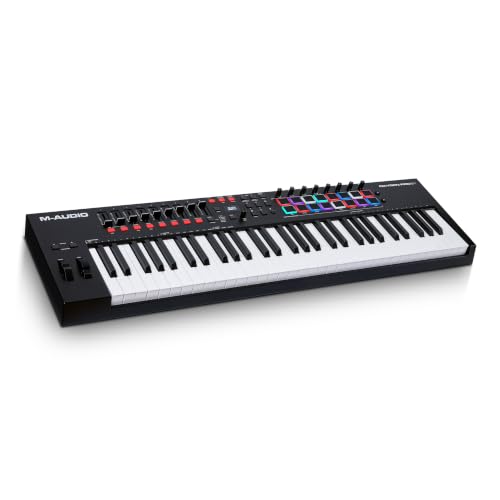
M-Audio Oxygen Pro 61-Key MIDI Controller
Best for: tactile DAW mixing and instrument control
- Number of Keys
- 61
- Key Action
- semi weighted
- Performance Pads
- 16 RGB backlit velocity sensitive pads
- Aftertouch
- aftertouch
- Faders and Knobs
- 8 knobs, 9 faders
- Connectivity
- USB
The M-Audio Oxygen Pro 61 gives you 61 semi-weighted keys with aftertouch, 16 velocity-sensitive RGB pads, and dedicated mixing hardware. You get nine faders, eight assignable knobs, and built-in Smart Chord and Scale modes. It connects over USB and includes a standard 5-pin MIDI output. This layout fits producers who want tactile control over both virtual instruments and external hardware.
- 61 semi-weighted keys with assignable zones and aftertouch
- 16 RGB backlit velocity-sensitive pads with Note Repeat
- 9 assignable faders and 8 assignable knobs
- 5-pin MIDI output for controlling outboard gear
- Pedal connectivity is limited to a single sustain input
- Footprint measures 40.5 inches long and weighs 10.6 pounds
- You want aftertouch and semi-weighted key action on a 61-key deck.
- You need 16 dedicated drum pads alongside nine faders for DAW control.
- You plan to sequence external synth modules through a 5-pin MIDI jack.
- You need an expression pedal input for continuous dynamic control.
- You require a full 88-key hammer-action keybed.
Verdict: M-Audio Oxygen Pro 61 Semi-Weighted MIDI Controller provides comprehensive tactile controls, aftertouch, and direct MIDI hardware routing for studio beatmakers and DAW producers.

Fender Motion 32-Pad MIDI Controller
Best for: Pad-based beatmaking and expressive finger drumming
- Performance Pads
- 32 RGB FATAR pads
- Aftertouch
- Polyphonic
- Faders and Knobs
- Illuminated encoders
- Connectivity
- USB
- Dimensions
- 15 × 7 × 1 inches
- Weight
- 2.5 pounds
The Fender Motion 32-Pad MIDI Controller replaces traditional piano keys with 32 RGB FATAR pads featuring polyphonic aftertouch and illuminated encoders. Measuring 15 by 7 inches and weighing 2.5 pounds, it connects via USB and works with any DAW. You get context-aware controls for chords, scales, and sequencing, plus a perpetual Fender Studio Pro license, fitting beatmakers and producers.
- 32 RGB FATAR pads with polyphonic aftertouch
- Illuminated rotary encoders for parameter control
- Lightweight 2.5-pound, 1-inch-thin profile
- Includes perpetual license for Fender Studio Pro
- Pad grid layout with no traditional piano keys
- Lacks physical faders for mixing
- You focus on finger drumming, sequencing, and pad-based chord performance.
- You want polyphonic aftertouch on responsive pads in a lightweight chassis.
- You produce music in tight spaces requiring a slim, 15-inch USB device.
- You need standard full-size keyboard keys to play two-handed piano parts.
- You require dedicated faders for multi-track level adjustments.
Verdict: Fender Motion 32-Pad MIDI Controller provides electronic producers and finger drummers with polyphonic aftertouch pads in a slim, highly portable format.
Specifications side by side
Spec Novation Launchkey 61 MK4 with Polyphonic Aftertouch Arturia KeyLab Essential 88-Key MIDI Controller Arturia KeyLab mk3 61-Key MIDI Controller Akai Professional MPC Key 37 Standalone Keyboard Akai Professional MPC Live III Pad Controller Nektar Impact LX 88-Key MIDI Controller M-Audio Oxygen Pro 61-Key MIDI Controller Fender Motion 32-Pad MIDI Controller
- Number of Keys
- 61
- Key Action
- Semi-weighted
- Performance Pads
- 16 responsive FSR pads
- Aftertouch
- Polyphonic aftertouch
- Faders and Knobs
- 9 faders
- Connectivity
- USB-C
- Creative Modes
- Scale Mode, chord triggers, arpeggios
- Standalone Operation
- –
- Form Factor
- –
- Skill Level
- –
- Suitable For
- –
- Color
- Black
- Built-In Features
- Aftertouch
- Features
- MIDI
- Dimensions
- 35.2 × 10.3 × 3.6 inches
- Weight
- 10.5 pounds
- Size
- 61-Key
- Model
- AMS-LAUNCHKEY-61-MK4
Copied from the Amazon listing. These figures were not measured here.
If you need jog wheels and mixer channels instead of keys, consult the dj controller buying guide for hardware specifications.
Frequently asked questions
Should I choose a weighted or unweighted key action?
Choose weighted keys if you prioritize piano technique and dynamic expression. The Novation Launchkey 61 MK4 features weighted keys with polyphonic aftertouch, allowing nuanced control. Unweighted options like the Arturia KeyLab Essential 88-Key suit producers who value full range over heavy hammer resistance. Select based on whether you need physical resistance for playing or compact flexibility for production.
How does polyphonic aftertouch improve my MIDI workflow?
Polyphonic aftertouch lets you adjust volume or timbre per note rather than for the entire chord. The Novation Launchkey 61 MK4 and Arturia KeyLab mk3 61-Key both include this feature. This control adds expressive depth to your performances. It allows you to shape individual notes within a held chord, providing greater detail in your sound design.
Can a MIDI controller work without a computer?
Yes, standalone units operate independently of a laptop. The Akai Professional MPC Key 37 provides onboard sequencing and sound libraries for computer-free production. The MPC Live III offers built-in power and sampling capabilities. These devices serve as self-contained production centers. They allow you to create music using hardware controls without relying on external software or connections.
What connectivity options do MIDI controllers typically offer?
Most models connect via USB or USB-C to transmit data. The Novation Launchkey 61 MK4 includes USB-MIDI and USB-C ports. The Arturia KeyLab Essential 88-Key uses USB-MIDI and USB connections. The Akai Professional MPC Live III adds Bluetooth support. These options ensure compatibility with computers and mobile devices. They facilitate seamless integration into your existing studio setup.
Is a 61-key or 88-key controller better for producers?
A 61-key layout offers a compact five-octave range ideal for limited desk space. The Arturia KeyLab mk3 61-Key fits permanent desktop setups well. An 88-key controller provides full piano range but requires more room. The Nektar Impact LX 88-Key suits stationary studios. Choose 61 keys for portability and 88 keys for comprehensive piano coverage.
Which MIDI controller is best for beatmaking and finger drumming?
Pad-based controllers excel at beatmaking and expressive finger drumming. The Fender Motion 32-Pad features polyphonic aftertouch pads in a slim, portable format. The Akai Professional MPC Live III includes dedicated pads for standalone mobile beatmaking. These devices prioritize tactile response for rhythm creation. They allow precise triggering of samples and sequences without needing a full keyboard layout.
How do rotary encoders and faders help in production?
Rotary encoders and faders provide direct hardware control over software parameters. The Arturia KeyLab mk3 61-Key includes 9 encoders for detailed instrument control. The Novation Launchkey 61 MK4 offers faders for DAW parameter access. These controls allow you to adjust volume, effects, and filters in real time. They streamline your workflow by reducing reliance on mouse and keyboard shortcuts.


