
As Amazon Associates, we earn from qualifying purchases. This means we may receive a small commission at no extra cost to you if you click through and make a purchase.
As an Amazon Associate we earn from qualifying purchases. Links on this page are affiliate links.
This fender audiobox go USB audio review covers a compact bus-powered interface designed for direct recording on macOS and Windows. The hardware is defined by its 2×2 I/O configuration and 24-bit/96 kHz audio resolution. You get one XLR mic/line combo input equipped with switchable +48V phantom power alongside a dedicated TS instrument input for guitar or bass. Measuring 4.25 inches wide, 3.3 inches long, and weighing 8.16 ounces, this unit connects via USB-C. It also provides two balanced 1/4-inch TRS main outputs and zero-latency headphone monitoring with mix control.
- 24-bit/96 kHz audio resolution with bus-powered USB-C connectivity
- One XLR mic/line combo input with switchable +48V phantom power
- Dedicated TS instrument input optimized for guitar and bass
- Two balanced 1/4-inch TRS main outputs and zero-latency monitoring with mix control
Good fit for
This interface suits solo musicians, podcasters, and mobile creators who record one microphone and one instrument simultaneously. If you play guitar or bass and sing, the combination of an XLR input with +48V phantom power and a dedicated TS instrument input handles your signal path directly. Its 8.16-ounce bus-powered design also fits you if you travel and need a compact USB-C setup for macOS or Windows.
Who can skip it
You should skip this model if you need to record two or more microphones at the same time. With only a single XLR mic preamp and a 2×2 I/O count, it cannot accommodate multi-host podcasts, stereo mic arrays, or multi-mic drum recording. Producers and ensembles who require more than two simultaneous inputs or extra monitor routing options will need an interface with higher channel counts.
Verdict
The Fender AudioBox GO delivers standard 24-bit/96 kHz audio in an ultra-compact 2×2 USB-C format built for basic vocal and guitar tracking. It gives solo creators essential inputs and zero-latency monitoring without unnecessary bulk.
AudioBox GO Key Specs Explained
Dedicated TS instrument input
This jack lets you plug an electric guitar, bass, or unbalanced mono keyboard output straight into the unit. You do not need an external direct box to record your instrument tracks. This benefits keyboard players capturing line-level synthesizers or mono stage pianos. When you compare recording gear for digital pianos, look at whether an interface has dedicated instrument inputs or only shared microphone channels.
Two balanced ¼-inch TRS main outputs
These dual jacks send balanced audio signals to powered studio monitors or desktop speakers. Balanced connections reject electrical hum and interference over long cable runs. This benefits home studio producers who connect active monitors alongside their digital pianos. When shopping for digital keyboard gear, compare these balanced TRS outputs against consumer RCA jacks, which offer less noise protection.
Zero-latency headphone monitoring with mix control
Direct hardware monitoring lets you hear your live performance in your headphones without computer processing delay. The mix control balances live inputs against playback tracks from your recording software. This feature benefits keyboardists and vocalists who need accurate timing while tracking parts. When choosing equipment for digital pianos, compare this direct monitoring control with software-only monitoring systems that introduce audible lag.
weight: 8.16 ounces
Weighing around half a pound, this interface adds minimal bulk to a mobile workstation. You can slip it into an instrument case or laptop bag for rehearsals and mobile sessions. Touring keyboard players who travel light benefit most from this portable frame. When browsing audio gear for digital pianos, compare this lightweight footprint against heavier desktop units that stay permanently stationed in studios.
AudioBox GO Compact Design and Layout
The Fender AudioBox GO features a black finish, according to the listing. The chassis measures 4.25 inches wide, 3.3 inches long, and 1.73 inches high, with a specified weight of 8.16 ounces. These compact measurements and low physical weight mean you can easily pack the interface into a gig bag. On a studio desk, the small footprint leaves ample room for your keyboard controller, mouse, and other tabletop gear without creating clutter.
Physical connections are built directly into the compact layout. The hardware provides an XLR mic/line combo input alongside a dedicated TS instrument jack. On the output side, you get a headphone port and two balanced 1/4-inch TRS main outputs for powered studio monitors or speakers. The interface connects via a USB-C port that draws bus power, which eliminates the need to carry an external power adapter.
For hardware adjustments, the unit includes a switchable +48V phantom power toggle and an onboard mix control dial. According to the listing, this mix control provides zero-latency headphone monitoring during tracking sessions. Having dedicated physical controls on the chassis lets you balance your direct monitor blend and engage condenser microphone power quickly without opening software setup menus.
AudioBox GO Setup and Daily Operation
Setting up the interface involves connecting its USB-C host port directly to your computer. Because the unit uses a bus-powered design, you do not need an external electrical outlet or a separate power cable. The hardware supports both macOS and Windows operating systems. To prepare your recording workflow, you register the device at my.fender.com. This registration unlocks the Complete Fender Amp & FX Pack inside the free Fender Studio app. You also gain access to a Fender Studio Pro six-month trial to record and craft your tones.
In everyday operation, you route audio to your listening environment through two balanced 1/4-inch TRS main outputs, which connect to powered speakers or studio monitors. For tracking sessions, you listen through headphones using the zero-latency monitoring system. A built-in mix control lets you blend direct input signals with computer playback for real-time tracking without delay. When recording vocals or line sources, you plug into the XLR mic/line combo input and switch on +48V phantom power if your microphone requires it. Guitarists and bassists can record simultaneously through the dedicated TS instrument input. Throughout daily use, the 24-bit/96 kHz converters handle audio processing for music, podcasts, and mobile recording.
AudioBox GO Considerations Before You Buy
Before you buy this interface, consider the gear needed to complete your recording setup. You will need balanced 1/4-inch TRS cables if you plan to connect external studio monitors or powered speakers to the main outputs. You also need headphones to use the zero-latency mix monitoring feature. Accessing the included software requires registering the hardware at my.fender.com. This registration unlocks the Fender Studio app, the Complete Fender Amp & FX Pack, and a six-month trial of Fender Studio Pro. Confirm your computer runs a compatible macOS or Windows operating system with a USB-C host connection. Basic care involves keeping the compact black chassis clean and dry. Among the 1 options in digital pianos and keyboards gear, this 2×2 interface suits single-track recording. If you need more simultaneous inputs for stereo hardware, consider larger options such as the Quantum LT series.
Check before you buy
- Check that your computer runs macOS or Windows with an available USB-C port.
- Verify you have balanced 1/4-inch TRS cables for powered speakers or studio monitors.
- Confirm you have headphones for tracking audio with zero-latency mix monitoring.
- Create an account at my.fender.com to claim the Fender Studio app and software trial.
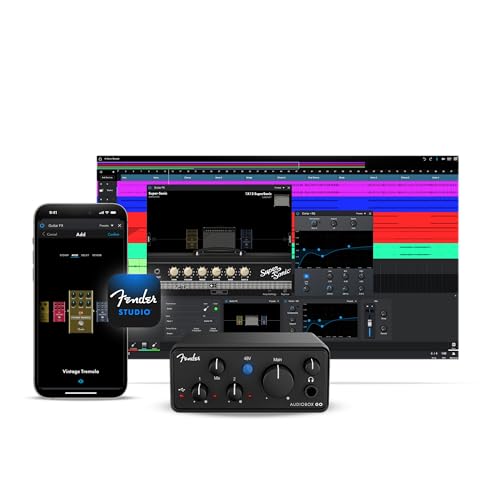
Fender AudioBox GO 2×2 USB-C Interface
Best for: mobile solo musicians and podcasters
- Total I/O
- 2×2
- Mic Preamps
- 1
- Host Connection
- USB-C
- Audio Resolution
- 24-bit/96 kHz
- Color
- Black
- Dimensions
- 3.3 × 4.25 × 1.73 inches
The Fender AudioBox GO is a 2×2 USB-C audio interface designed for basic tracking and portable setups. It captures audio at up to 24-bit/96 kHz resolution through one combo XLR input with switchable +48V phantom power and one dedicated TS instrument input. Weighing 8.16 ounces and powered entirely over USB-C, it gives you balanced TRS monitor outputs and direct hardware monitoring.
- Compact footprint measuring 4.25 by 3.3 inches and weighing 8.16 ounces
- 24-bit/96 kHz recording resolution with bus-powered USB-C connectivity
- XLR combo input with switchable +48V phantom power plus dedicated TS input
- Zero-latency direct headphone monitoring with dedicated mix control
- Provides only one XLR microphone preamp
- Sample rate caps at 96 kHz rather than 192 kHz
- You need a lightweight, bus-powered interface for mobile recording.
- You record solo vocals alongside a single guitar or bass.
- You want balanced 1/4-inch TRS outputs for studio monitors.
- You need to record two microphones simultaneously.
- You require sample rates above 96 kHz.
Verdict: Fender AudioBox GO 2×2 USB-C Interface provides compact, bus-powered 24-bit/96 kHz conversion for solo musicians tracking one microphone and one instrument.
Specifications side by side
| Spec | Fender AudioBox GO 2×2 USB-C Interface |
|---|---|
| Total I/O | 2×2 |
| Mic Preamps | 1 |
| Host Connection | USB-C |
| Audio Resolution | 24-bit/96 kHz |
| Connectivity | USB |
| Color | Black |
| Dimensions | 3.3 × 4.25 × 1.73 inches |
| Weight | 8.16 ounces |
| Size | AudioBox GO |
| Model | 2777700712 |
Frequently asked questions
Who is the Fender AudioBox GO best suited for?
The Fender AudioBox GO is designed specifically for mobile solo musicians and podcasters. Its compact 2×2 layout accommodates tracking one microphone and one instrument simultaneously. If you create vocal content, record solo acoustic demos, or track solo instruments on the go, the hardware fits your basic audio capture needs without unnecessary extra channels.
Can you record a stereo keyboard with the Fender AudioBox GO?
You can only track a keyboard in mono using the single dedicated instrument input. Because the 2×2 configuration pairs one microphone input with one instrument jack, the interface cannot take two line-level instrument plugs simultaneously. You must record your digital piano in mono or choose multi-input hardware.
What recording resolution does the AudioBox GO provide?
The interface delivers up to 24-bit/96 kHz digital audio conversion. This specification ensures your analog microphone and instrument signals convert into high-fidelity digital audio on your computer. A 24-bit dynamic range provides ample recording headroom, while the 96 kHz sample rate captures audio details cleanly during your tracking sessions.
How much does the Fender AudioBox GO weigh?
The unit weighs 8.16 ounces. Combined with dimensions of 4.25 inches in width, 3.3 inches in length, and 1.73 inches in height, this low weight makes the device straightforward to slip into a gig bag. You can carry it to mobile recording sessions or rehearsals without adding noticeable physical bulk.
What is the official manufacturer model number for this interface?
The official Fender model number for the AudioBox GO is 2777700712. This specific reference code confirms you are selecting the standard black edition with USB connectivity. Checking the exact manufacturer part number helps you verify hardware specifications and ensures you get the intended 2×2 audio interface configuration.
Does the Fender AudioBox GO require an external power supply?
No, the interface does not need an external power brick. The unit draws power directly over its USB connection from your host computer. This bus-powered architecture simplifies your recording station by eliminating wall adapters and allows you to record anywhere your laptop can travel without needing an electrical wall outlet.


