
As Amazon Associates, we earn from qualifying purchases. This means we may receive a small commission at no extra cost to you if you click through and make a purchase.
As an Amazon Associate we earn from qualifying purchases. Links on this page are affiliate links.
This elgato wave xlr pro review covers a desktop audio interface and mixer designed for multi-device setups. Two defining specifications anchor this model: dual XLR inputs with 80 dB of preamp gain and dual USB-C ports for connecting two hosts at once. Measuring 7.28 inches wide and weighing 13.4 ounces, the unit handles microphones without requiring external gain boosters. You can manage internal processing using onboard DSP through the Wave FX Processor. It routes signals across your connected gear without relying entirely on host software.
- Dual XLR preamps providing 80 dB of gain each
- Dual USB-C connectivity for simultaneous dual-system routing
- Onboard Wave FX Processor running DSP effects and Clipguard 2.0
- Five independent hardware mixes with analog line I/O integration
- Wave Link matrix mixing compatible with Stream Deck control
Good fit for
This interface fits content creators and broadcasters running a dual-PC streaming setup or pairing a console with a computer. The dual USB-C connections let you route audio between two separate machines without extra splitters. If you use low-output dynamic microphones, the 80 dB preamps supply ample gain. It also suits users needing up to five separate hardware monitor mixes for guests, streams, and personal listening feeds.
Who can skip it
Skip this unit if your recording sessions require three or more microphone inputs, as the hardware includes only two XLR preamps. Bands, drum tracking, and panel podcasts needing multiple analog inputs will exceed its physical capacity. You should also pass if you work on a single machine with basic routing needs, because the dual USB-C ports and five hardware mix matrices will exceed your setup requirements.
Verdict
The Elgato Wave XLR Pro provides high-gain preamps and dual USB-C routing for dual-system broadcast desks. It consolidates two microphones and complex sub-mixes into a compact hardware unit.
Key Specs Explained and Compared
Preamp Gain: 80 dB
This unit delivers 80 dB of clean boost across both mic channels. You can run low-output dynamic microphones without an external inline booster. Keyboard players who sing while performing save desk space and avoid extra hardware. When shopping gear for your digital piano setup, compare this against standard interfaces offering 50 to 60 dB to ensure sufficient mic volume.
Mic Preamps: 2
Two XLR inputs let you track two separate microphone signals at once. You can mic your acoustic singing voice alongside a secondary room mic or a collaborator. Digital piano players running a stereo vocal or dual-performer stream benefit from this setup. Compare this with single-preamp boxes if you only play keys or four-preamp units if tracking full acoustic piano ensembles.
Host Connection: Dual USB-C
Two USB-C ports let you hook up two separate host machines simultaneously, such as a streaming PC and a music workstation. You can send audio directly between both platforms without swapping cables. Keyboard players recording piano tracks on one computer while streaming on another gain direct workflow benefits. Compare this against single USB interfaces that demand external patch bays or mixers.
5 Hardware Mixes
Five independent hardware mixes allow you to send distinct audio balances to different outputs, including headphones and stream feeds. You control exactly what you hear versus what your audience hears. Digital piano players balancing live keyboard accompaniment, backings, and vocal monitoring gain clear control. Compare this against basic stereo interfaces that lock every output to one shared master monitor mix.
Physical Dimensions and Hardware Layout Details
The Elgato Wave XLR Pro, model 20MAM9901, measures 7.28 inches wide, 3.82 inches long, and 1.5 inches high. For comparison, the standard Wave XLR variation is 2.87 inches tall. This low 1.5-inch profile creates a flat desktop footprint that fits easily under displays or next to music gear. At 13.4 ounces, the interface is lightweight. You can move it freely across your desk or stow it in a bag without adding excess bulk.
According to the listing, the physical housing provides two XLR microphone preamps alongside analog input and output jacks for line-level hardware. The rear panel features dual USB-C ports, allowing you to link two host systems at once, including computers, consoles, or phones. These connections let you patch any physical input directly to any output without extra external adapters cluttering your work surface.
The enclosure also houses the Wave FX processor for onboard DSP tasks like Clipguard 2.0. This internal architecture supports ultra-low latency headphone monitoring and up to five separate hardware mixes. Because processing takes place directly inside the hardware, the unit maintains a clean physical structure while managing complex routing between your analog instruments and digital hosts.
Setup Process and Daily Hardware Routing
Setting up the Elgato Wave XLR Pro centers on dual USB-C host connections and analog I/O ports. You connect your primary computer to one USB-C port, while the second USB-C port links to a secondary PC, console, or phone. Dual XLR inputs connect two microphones to preamps providing up to 80 dB of gain each. Line-level gear routes into the hardware using analog I/O, letting you integrate external line-level devices alongside microphones.
Daily audio management relies on Wave Link software using a matrix workflow. This matrix mixing structure enables flexible routing, allowing you to patch any input directly to any output. The hardware supports up to five independent hardware mixes simultaneously. You can configure separate audio feeds across your different outputs. Ultra-low latency monitoring provides direct audio tracking so you hear every detail.
Signal processing runs directly on the device using the integrated Wave FX processor. This onboard DSP engine runs effects and VST plugins within one signal chain. Clipguard 2.0 operates continuously to make distortion virtually impossible. For physical control during daily use, the system pairs with Stream Deck, letting you control your whole setup directly from hardware buttons.
What to Check Before You Buy
Before adding this interface to your digital piano or keyboard setup, evaluate your accessory needs. The hardware provides dual XLR inputs and analog I/O, so you must supply your own XLR microphones and line-level audio cables. Check that your host computers, gaming console, or mobile phone connect over USB-C. If you plan to customize your processing chain, ensure your operating environment supports Wave Link and VST plugins. You can also add an optional Stream Deck controller for matrix mixing adjustments.
Upkeep is simple for the 13.4-ounce enclosure; periodically clear dust from the dual USB-C connections and analog jacks. Among digital piano and keyboard gear, this unit fits performers who combine vocal microphones and instrument audio into multi-device broadcasts. It replaces traditional analog mixers with onboard DSP, Clipguard 2.0 protection, and five distinct hardware mixes.
Check before you buy
- Verify you have XLR microphones and line-level cables ready for the analog I/O ports.
- Confirm your computers, consoles, or phones support audio over USB-C connections.
- Check that your audio software or system accommodates VST plugins and Wave Link matrix routing.
- Assess whether you plan to integrate a Stream Deck for external physical control.
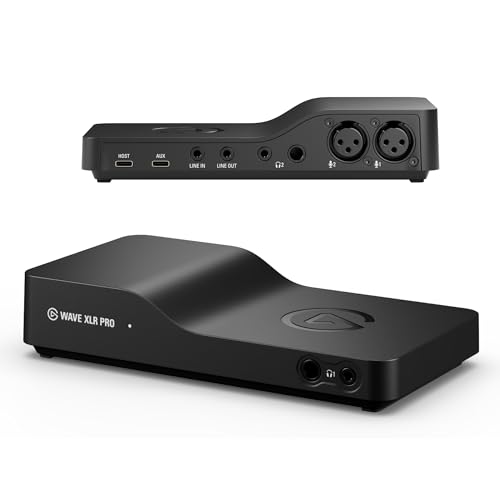
Elgato Wave XLR Pro Dual USB-C Audio Interface
Best for: dual-PC streamers needing high-gain mic preamps
- Mic Preamps
- 2
- Host Connection
- Dual USB-C
- Preamp Gain
- 80 dB
- Features
- DSP
- Dimensions
- 3.82 × 7.28 × 1.5 inches
- Weight
- 13.4 ounces
The Elgato Wave XLR Pro is a dual-microphone audio interface designed for desktop production. You get two XLR preamps delivering up to 80 dB of gain, dual USB-C ports to connect two host devices simultaneously, and onboard DSP running Clipguard 2.0. It suits you if you run a dual-host streaming setup or record two-person podcasts without external boosters.
- 80 dB of preamp gain drives low-output microphones directly
- Dual USB-C connections link two computers or devices at once
- Onboard DSP handles real-time effects and Clipguard 2.0
- Five independent hardware mixes with analog line routing
- Limits analog microphone inputs to two XLR channels
- Does not include dedicated MIDI input or output ports
- You want to run two dynamic microphones that require substantial preamp gain.
- You stream using two separate PCs or a PC and mobile console setup.
- You need up to five discrete hardware audio mixes for different monitoring outputs.
- You need more than two XLR microphone inputs for group recordings.
- You require traditional 5-pin MIDI connections for hardware instruments.
Verdict: Elgato Wave XLR Pro Dual Audio Interface gives dual-PC streamers and two-person podcasters high preamp gain and hardware mix routing without requiring separate inline mic boosters.
Specifications side by side
Spec Elgato Wave XLR Pro Dual USB-C Audio Interface
- Mic Preamps
- 2
- Host Connection
- Dual USB-C
- Preamp Gain
- 80 dB
- Connectivity
- USB, USB-C
- Features
- DSP
- Dimensions
- 3.82 × 7.28 × 1.5 inches
- Weight
- 13.4 ounces
- Model
- 20MAM9901
Copied from the Amazon listing. These figures were not measured here.
Frequently asked questions
Does the Elgato Wave XLR Pro feature onboard DSP?
Yes, the Elgato Wave XLR Pro includes integrated digital signal processing features. This onboard DSP handles audio processing tasks directly on the hardware instead of burdening your host computer CPU. You get responsive vocal processing and clean monitor routing during live broadcasts or digital piano practice sessions.
How much does the Elgato Wave XLR Pro weigh?
The Elgato Wave XLR Pro weighs 13.4 ounces. This weight gives the interface enough balance to remain grounded on your desk when connected to thick XLR wiring. At under one pound, the unit also remains portable if you travel between different rehearsal spaces or recording desks.
What is the official model number for the Elgato Wave XLR Pro?
The hardware model number is 20MAM9901. You can use this designation to verify technical documentation, check mount dimensions, or source manufacturer-approved accessories. Checking the 20MAM9901 identifier ensures you select the correct dual-connection Pro model rather than standard single-channel hardware.
Who is the Elgato Wave XLR Pro best for?
The device is best for dual-PC streamers and two-person podcasters needing high-gain mic preamps. The hardware architecture supplies sufficient gain for dynamic microphones without requiring separate inline mic boosters. If you manage simultaneous computer audio streams while capturing vocals and keyboards, this unit fits your workflow.
What connectivity options does the Elgato Wave XLR Pro provide?
The unit features standard USB and USB-C connectivity. These connections let you link the interface directly to modern computing setups and digital audio workstations. The USB-C architecture provides reliable data transfer speeds when sending multichannel audio streams from your microphones and digital instruments into your software.
Who should skip the Elgato Wave XLR Pro?
Solo creators who use a single microphone or simple USB keyboard setup should skip this model. The dual-host routing and twin preamp architecture target complex multi-device environments. If you work from one computer without external microphone booster requirements, a basic single-channel audio interface serves you better.


