
As Amazon Associates, we earn from qualifying purchases. This means we may receive a small commission at no extra cost to you if you click through and make a purchase.
As an Amazon Associate we earn from qualifying purchases. Links on this page are affiliate links.
Finding the right gear starts with understanding your input needs, and this audio interface buying guide helps you select the best hardware for your setup. You will be able to decide which model matches your recording workflow, computer connections, and channel count without buying unnecessary features. The guide walks through key technical choices, including USB-C versus Thunderbolt connectivity, analog preamp counts, onboard DSP processing, and digital expansion options like ADAT.
Every studio space demands different hardware limits, whether you track a single microphone or route modular synthesizers. The 8 recommended audio interfaces were chosen strictly from their published specifications, comparing verified details like connection protocols, hardware DSP support, and physical dimensions. This comparison gives you the factual data needed to choose the right interface for your desktop in 2026.
Key Factors in Choosing an Audio Interface
Computer connectivity type
The data connection between your interface and computer sets host compatibility and system flexibility. Standard USB and USB-C connections work across common recording computers for standard audio production. Certain models feature dual USB-C ports to link two separate computers at the same time, which serves multi-machine streaming setups. Other units utilize Thunderbolt 3 connections, which cater to dedicated tracking systems that require specialized bus protocols. When you pick a connection type, confirm that your computer ports match the interface hardware requirements directly. Opting for specialized ports can limit where you connect your interface, while standard USB connectivity offers broad compatibility across varied desktop systems. For example, the Elgato Wave XLR Pro provides dual USB-C connections for multi-host computer streaming.
Look for
- USB or USB-C connectivity for broad computer compatibility across home recording environments.
- Dual USB-C ports if you need to route audio simultaneously to two separate host computers.
- Thunderbolt 3 connections if your setup utilizes dedicated host hardware protocols.
Form factor and chassis size
Physical size determines whether an audio interface sits on a desktop or mounts inside an equipment rack. Compact desktop units measure under eight inches wide and weigh around one to four pounds, saving surface area in small tracking spaces. Larger hardware measuring nineteen inches wide conforms to standard studio rack spaces. Rackmount interfaces suit fixed multi-channel installations where line inputs stay plugged in permanently. If you choose a rack unit, you sacrifice portability and desktop accessibility to controls. Conversely, smaller desktop units keep dials and meters within arm's reach but offer fewer panel jacks. Selecting the right chassis format depends on your available studio furniture and physical workspace layout. For example, the Fender Quantum LT 16 features a nineteen-inch rackmount chassis for studio installations.
Look for
- Standard nineteen-inch width if you mount your interface into a studio equipment rack.
- Compact desktop dimensions under eight inches wide if desk space is limited.
Onboard DSP and hardware processing
Onboard digital signal processing handles audio calculations directly on the interface instead of relying on computer processing power. Hardware DSP provides real-time effects such as compression, vintage preamp emulations, room correction, or monitor mixing without adding tracking delay. Units without DSP send all audio calculation tasks directly to your recording software, which can strain computer resources during large tracking sessions. Choosing an interface with integrated DSP gives you zero-latency hardware processing, but it adds internal operational complexity. Basic interfaces without onboard processing provide a simpler path for beginners who prefer applying plug-ins entirely inside their software. Consider hardware processing if you track dynamic vocals or need active room calibration. For example, the Universal Audio Apollo Twin X DUO Gen 2 includes hardware DSP and room correction.
Look for
- Hardware DSP for zero-latency monitoring and onboard compression or preamp emulations.
- Built-in room correction features to optimize sound output for your physical monitoring environment.
Digital input expansion options
Digital expansion connections determine whether you can expand your input count beyond the built-in analog jacks. Optical protocols such as ADAT allow an interface to receive additional digital channels from external multi-channel preamps using lightpipe cables. If you plan to record full drum kits or multi-musician ensembles later, digital inputs let your hardware adapt without replacing the interface. Interfaces lacking optical or digital connections keep your setup restricted strictly to their onboard analog inputs. However, using digital expansion requires purchasing and synchronizing external converters, which increases setup complexity compared to using standalone multi-channel interfaces. If your current tracking demands are small but expected to grow, digital connectivity provides an upgrade route. For example, the Universal Audio Volt 4 Max features ADAT input expansion.
Look for
- ADAT optical ports if you plan to connect external multi-channel microphone preamps.
- Direct analog inputs only if you do not plan to expand channel counts.
Analog line and instrument routing
The distribution between microphone preamps and dedicated line inputs dictates how many hardware instruments you can connect simultaneously. While basic units feature two preamps for vocals or guitars, advanced studio interfaces provide dense line-level inputs and outputs. Having multiple line inputs allows you to leave synthesizers, drum machines, and outboard gear patched without constantly swapping cables. Interfaces with extensive routing configurations, such as eighteen-by-twenty-two setups, suit electronic musicians and hardware producers. However, hardware with dozens of line channels often prioritizes line-level routing over microphone preamplifiers, limiting the number of simultaneous acoustic sources you can capture. Balance your mix of dynamic microphones against line instruments before deciding on a channel configuration. For example, the MOTU UltraLite-mk5 provides 18×22 routing for multi-channel hardware setups.
Look for
- Dense analog line inputs if you connect multiple synthesizers or outboard hardware units.
- Multi-channel routing options to send discrete audio mixes to outboard hardware.
Included accessories and package format
Audio interfaces are sold either as standalone units or bundled with essential tracking accessories. All-in-one studio packages include the interface alongside a vocal microphone, monitoring headphones, and cabling. These bundles cater to beginners and solo musicians who need a complete recording chain immediately without sourcing parts separately. In contrast, standalone interfaces provide only the core hardware, allowing you to select your own specialized microphones and studio monitors based on personal preference. Choosing a complete studio package simplifies setup, but the included components may not match the specific acoustic needs of experienced engineers. Evaluate whether you need an entry tracking kit or individual hardware tailored to an established audio setup. For example, the Focusrite Scarlett 2i2 Studio 4th Gen bundles an interface, microphone, and headphones together.
Look for
- Studio packages with included microphones and headphones for an immediate recording chain.
- Standalone units if you already own dedicated microphones, cables, and studio headphones.
MIDI and synthesizer integration
Connecting external hardware instruments requires dedicated interface connectivity beyond standard audio inputs. Some interfaces include 5-pin MIDI jacks or USB-MIDI support to transmit timing, note data, and parameter automation between your computer and hardware synthesizers. Advanced studio models even provide control voltage (CV) integration to interact directly with modular synthesizer gear. If your workflow relies purely on virtual software instruments or acoustic microphones, hardware MIDI ports may go unused. However, choosing an interface without MIDI ports means you must purchase separate USB converters if you add keyboard controllers or drum machines later. Deciding on MIDI capability ensures your hardware instruments stay tightly synchronized without extra adapters. For example, the Focusrite Scarlett 18i16 4th Gen includes onboard MIDI connectivity for external instrument tracking.
Look for
- Built-in MIDI or USB-MIDI ports to sync external synthesizers and drum machines.
- Modular synth CV integration if your production incorporates analog Eurorack modules.
Types of Audio Interfaces
Compact Desktop Interfaces
Compact desktop interfaces give you portable tracking with two preamps and stereo outputs. Units like the Focusrite Scarlett 2i2 Studio 4th Gen provide 24-bit/192kHz audio conversion and USB-C connectivity in a small desktop form factor. You can record a microphone and an instrument simultaneously while monitoring through headphones or speakers. This setup suits solo artists, singer-songwriters, and bedroom creators who need straightforward desktop tracking. The main trade-off is limited physical inputs. You cannot record acoustic drum kits or full live bands without swapping cables or adding outboard gear.
Streaming and Broadcast Interfaces
Streaming interfaces focus on speech routing and multi-machine connectivity. Hardware like the Elgato Wave XLR Pro Dual USB-C Audio Interface provides dedicated dynamic XLR microphone preamplification alongside onboard digital signal processing. Dual USB-C connections allow you to feed audio into two separate computers simultaneously without using analog splitters. This design suits live streamers, content creators, and podcasters managing dedicated gaming and streaming computers. The principal trade-off is specialized analog routing. These interfaces lack high-density line inputs and instrument preamps, making them less adaptable for recording multi-instrument musical performances.
DSP-Powered Desktop Interfaces
DSP-powered desktop units combine analog inputs with hardware-based processing chips. The Universal Audio Volt 4 Max features onboard DSP compression, 32-bit audio support, and ADAT digital input expansion alongside standard MIDI connections. These units run real-time hardware compression and preamp modeling directly on the interface, freeing your computer CPU from processing tasks during tracking. This category suits home studio producers and engineers who need clean low-latency processing and future channel expansion. The trade-off is digital format dependency. Expanding your input count beyond the onboard four channels requires compatible external optical preamps.
Rackmount Multi-Channel Interfaces
Rackmount interfaces prioritize dense connectivity across fixed studio racks. The Fender Quantum LT 16 provides multiple analog line inputs, high preamp gain, and modular synthesizer control voltage integration within a standard 19-inch rack enclosure. You can connect synthesizers, outboard equalizers, and multiple studio microphones simultaneously without unplugging gear. This type suits commercial project studios, multi-instrumentalists, and modular synth tracking environments needing high input density. The main trade-off is physical bulk. At 19 inches wide and 4.8 pounds, these interfaces require dedicated studio furniture and are impractical for portable recording tasks outside the studio.
Common Audio Interface Mistakes to Avoid
Recording stereo keyboards through a single mono input
Digital pianos generate stereo imaging through internal multi-sampling, reverbs, and chorus effects. Plugging your instrument into a single input sums the signal to mono, which cancels out stereo phasing and flattens sound. Choose an interface with paired quarter-inch line inputs to capture both left and right keyboard output channels accurately.
Plugging line-level keyboard outputs into high-impedance instrument inputs
Digital pianos output line-level signals with higher voltage than electric guitars. Connecting line cables into an active high-impedance input overloads the analog circuitry, causing harmonic distortion and clipped waveforms. Verify that your interface features dedicated line switches or balanced line-level jacks that bypass high-gain preamp stages for cleaner audio capture.
Ignoring hardware MIDI ports for legacy keyboard connections
Many stage pianos and older synthesizers transfer performance data only through standard five-pin DIN MIDI connections. An interface limited to audio inputs prevents you from recording MIDI performance data into your DAW. Check your keyboard rear panel and confirm the interface includes five-pin MIDI input and output ports before purchase.
Overlooking direct monitoring options when tracking live performance
Listening to keyboard audio routed through recording software introduces latency delay between key press and headphone output. This timing lag interferes with expressive piano technique and rhythmic accuracy. Choose an interface with zero-latency hardware direct monitoring or an analog mix knob so you hear keyboard signals instantaneously while tracking.
Overlooking headphone amplifier output impedance for high-impedance headphones
Keyboards feature dynamic range that demands clean monitoring headroom. If your interface headphone output has insufficient power for studio headphones with high impedance ratings, your monitor signal sounds thin and quiet. Check headphone amplifier output ratings on interface specification sheets to match the impedance of your monitoring gear.
| # | Product | Best for | Price |
|---|---|---|---|
| 1 | Focusrite Scarlett 2i2 Studio 4th Gen | solo musicians needing an all-in-one interface package | |
| 2 | Elgato Wave XLR Pro Dual USB-C Audio Interface | Dual-PC streamers using dynamic XLR microphones | |
| 3 | Universal Audio Volt 4-In/4-Out USB Interface | four-channel desktop recording with analog compression | |
| 4 | Universal Audio Volt 4 Max USB Interface | Producers wanting 32-bit audio with ADAT expansion | |
| 5 | Fender Quantum LT 16 USB-C Audio Interface | multi-mic tracking and modular synth studio setups | |
| 6 | Focusrite Scarlett 18i16 4th Gen USB-C Interface | Multi-instrument project studios needing line inputs | |
| 7 | Universal Audio Apollo Twin X DUO Gen 2 | Thunderbolt DSP tracking with Unison preamp emulations | |
| 8 | MOTU UltraLite-mk5 18×22 USB Interface | multi-channel hardware routing and line-level studio setups |

Focusrite Scarlett 2i2 Studio 4th Gen
Best for: solo musicians needing an all-in-one interface package
- Mic Preamps
- 2
- Host Connection
- USB-C
- Audio Resolution
- 24-Bit/192kHz
- Dynamic Range
- 120dB
- Color
- Red
- Dimensions
- 7.09 × 3.9 × 1.79 inches
This USB-C audio interface package includes the Scarlett 2i2 4th Gen, a CM25 MkIII microphone, and SH-450 headphones. You get two mic preamps, two Hi-Z instrument inputs, 24-bit/192kHz audio resolution, and 120dB dynamic range. Built-in Auto Gain and Clip Safe regulate levels automatically. It suits solo creators recording vocals and single instruments simultaneously.
- Includes CM25 MkIII microphone and SH-450 headphones
- 120dB dynamic range with 24-bit/192kHz conversion
- Hardware Auto Gain and Clip Safe level protection
- Two mic preamps alongside two Hi-Z instrument inputs
- Limited to two mic preamps for simultaneous tracking
- Bundle shipping weight reaches 3.53 pounds
- You need an all-in-one recording bundle with a microphone and headphones included.
- You record vocals and one instrument track at the same time.
- You want automatic gain staging via Auto Gain and Clip Safe.
- You require more than two analog inputs to mic full bands or drum kits.
- You already own studio-grade headphones and a condenser microphone.
Verdict: Focusrite Scarlett 2i2 Studio 4th Gen Bundle gives solo artists a turnkey 24-bit/192kHz tracking chain with two preamps and automatic level handling. It equips musicians who need an out-of-the-box mic, interface, and headphone setup for desktop tracking.
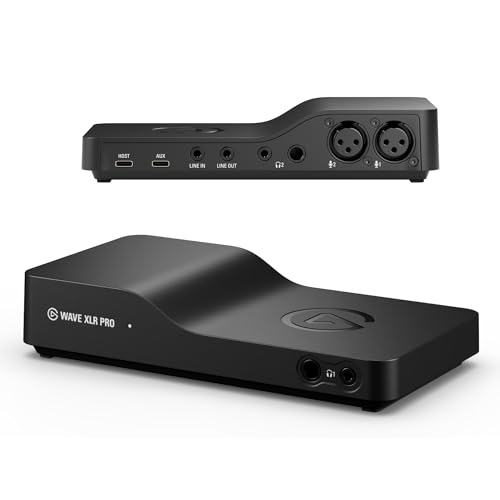
Elgato Wave XLR Pro Dual USB-C Audio Interface
Best for: Dual-PC streamers using dynamic XLR microphones
- Mic Preamps
- 2
- Host Connection
- Dual USB-C
- Preamp Gain
- 80 dB
- Features
- DSP
- Dimensions
- 3.82 × 7.28 × 1.5 inches
- Weight
- 13.4 ounces
The Elgato Wave XLR Pro is a dual-input audio interface and mixer designed for multi-device setups. You get two XLR preamps delivering up to 80 dB of gain, onboard DSP with Clipguard 2.0, and dual USB-C ports to connect two computers or mobile devices at once. It suits creators who need hardware mixing across multiple audio sources.
- 80 dB of gain on both XLR microphone inputs
- Dual USB-C ports for patching between two host devices
- Wave FX Processor with onboard DSP and Clipguard 2.0
- Hardware support for up to five independent mixes
- Limited to two mic preamps for multi-instrument recording
- No integrated MIDI connections mentioned in published specifications
- You run two computers or mix audio between a PC and a console.
- You use gain-hungry dynamic microphones that benefit from 80 dB of preamp headroom.
- You manage complex audio routes requiring up to five independent hardware mixes.
- You need more than two XLR microphone inputs simultaneously.
- You rely on dedicated 5-pin MIDI connections for hardware instruments.
Verdict: Elgato Wave XLR Pro Dual USB-C Audio Interface provides high-gain preamplification and dual-host connectivity for two-machine broadcast desks. It gives podcasters and live streamers onboard signal processing without relying on external preamps.

Universal Audio Volt 4-In/4-Out USB Interface
Best for: four-channel desktop recording with analog compression
- Total I/O
- 4×4
- Host Connection
- USB-C
- MIDI I/O
- MIDI
- Connectivity
- USB-MIDI, USB, USB-C
- Color
- Not Available
- Dimensions
- 9.49 × 6.89 × 5.24 inches
Universal Audio Volt 4-In/4-Out USB Interface is a desktop audio interface featuring built-in 1176-based analog compression and UA 610 preamp emulation. You get four inputs, four outputs, and compatibility with macOS, Windows, and iOS. It comes with the LUNA DAW and UAD plugins, making it practical for multi-instrument tracking at your desk.
- Built-in analog compressor modeled after the 1176
- Vintage mode based on the UA 610 tube preamp
- Four-input and four-output audio routing
- Includes LUNA Digital Audio Workstation and UAD plug-in bundle
- Requires external power supply and camera adapter for Lightning iOS devices
- Weighs 2.65 pounds with a 9.49-inch desktop depth
- You want onboard analog 1176-style compression on incoming signals.
- You record multiple instruments simultaneously using four line inputs.
- You produce music on macOS or Windows using the LUNA recording system.
- You need a mobile setup powered entirely by an iPhone without external power adapters.
- You require more than four inputs and four outputs for large ensemble recording.
Verdict: Universal Audio Volt 4-In/4-Out USB Interface provides hardware-based 1176 compression and vintage preamps for home studio tracking across four channels. It fits musicians who need multi-source desktop recording alongside bundled UAD software.

Universal Audio Volt 4 Max USB Interface
Best for: Producers wanting 32-bit audio with ADAT expansion
- Host Connection
- USB
- Audio Resolution
- 32-Bit
- Digital Expansion
- ADAT
- MIDI I/O
- MIDI
- Features
- DSP
- Dimensions
- 9.45 × 5.91 × 4.72 inches
The Universal Audio Volt 4 Max USB Interface is a desktop audio interface built for recording music and tracking instruments. It provides 32-bit audio resolution, onboard DSP with compressor presets for vocals and guitar, and an ADAT digital input for channel expansion. You also get built-in MIDI connections and a smart display for monitoring levels.
- Full 32-bit audio recording resolution
- ADAT input for external digital channel expansion
- Built-in DSP with vocal, guitar, and bass compressor presets
- Integrated display for channel selection and level feedback
- Measures 4.72 inches tall, making it bulkier than flatter desktop units
- Limits host connectivity to USB without Thunderbolt support
- You want 32-bit audio recording with onboard DSP compression.
- You plan to expand your input count via an ADAT optical connection.
- You need a low-profile interface under four inches tall for compact desks.
- You require high-speed Thunderbolt connectivity instead of USB.
Verdict: Universal Audio Volt 4 Max USB Interface fits recording musicians who need 32-bit audio quality, hardware DSP compression, and ADAT input expansion. Its built-in smart display and MIDI ports streamline tracking without extra outboard gear.

Fender Quantum LT 16 USB-C Audio Interface
Best for: multi-mic tracking and modular synth studio setups
- Total I/O
- 16-in, 8-out
- Mic Preamps
- 8
- Host Connection
- USB-C
- Preamp Gain
- +75 dB
- MIDI I/O
- 5-pin MIDI I/O
- Suitable For
- Music Production
The Fender Quantum LT 16 is a 16-in, 8-out USB-C audio interface designed for rack-based tracking setups. It gives you eight MAX-HD mic preamps with +75 dB of gain, fourteen line inputs, and 5-pin MIDI I/O. Standalone mixer and mic preamp modes let you operate hardware without a computer. It suits musicians running multi-mic drum sessions and outboard hardware rigs.
- Eight MAX-HD mic preamps with +75 dB gain
- 14 line inputs with selectable +4 dBu / -10 dBV levels
- DC-coupled outputs support control voltage for modular synths
- Standalone mixer and 8-channel mic preamp modes
- 19-inch width requires dedicated rack space or large desk
- Provides only 8 outputs for its 16 input channels
- No optical ADAT expansion ports listed in specifications
- You need eight onboard preamps with +75 dB gain for tracking drums or multi-mic setups.
- You route control signals to modular synths via DC-coupled outputs.
- You want standalone hardware mixing capability without connecting a host computer.
- You need a compact, portable interface for mobile recording.
- You require more than eight outputs for multi-speaker routing.
Verdict: Fender Quantum LT 16 USB-C Audio Interface fits studio engineers and multi-instrumentalists who need high preamp gain, dense analog line inputs, and modular synth CV integration in a rackmount chassis.

Focusrite Scarlett 18i16 4th Gen USB-C Interface
Best for: Multi-instrument project studios needing line inputs
- Total I/O
- 18-In 16-Out
- Mic Preamps
- 4
- Host Connection
- USB-C
- Audio Resolution
- 24-Bit/192kHz
- Dynamic Range
- 122dB
- Preamp Gain
- 69dB
The Focusrite Scarlett 18i16 4th Gen is an 18-in, 16-out USB-C audio interface designed for multi-instrument recording. It features four mic preamps with 69dB of gain, eight line inputs, and 24-bit/192kHz converters delivering 122dB dynamic range. You also get ADAT, S/PDIF, and MIDI ports, making it fit studios tracking hardware gear simultaneously.
- 18 inputs and 16 outputs with ADAT and S/PDIF digital expansion
- Four mic preamps delivering 69dB of gain range
- 24-bit/192kHz conversion with 122dB dynamic range
- Auto Gain and Clip Safe real-time level controls
- Only four built-in mic preamps among 18 total inputs
- Desk-bound 3.83-pound weight and 9.43-inch width
- You need to patch multiple line-level instruments alongside up to four microphones.
- You plan to expand your input count via external ADAT or S/PDIF hardware.
- You want automatic input calibration via Auto Gain and Clip Safe.
- You require more than four built-in XLR mic preamps on the unit itself.
- You need a compact, lightweight interface strictly for mobile field recording.
Verdict: Focusrite Scarlett 18i16 4th Gen USB-C Interface suits project studio producers who require extensive line connectivity, digital expandability, and 69dB of gain for multi-instrument sessions.

Universal Audio Apollo Twin X DUO Gen 2
Best for: Thunderbolt DSP tracking with Unison preamp emulations
- Host Connection
- Thunderbolt 3
- Color
- Not Available
- Dimensions
- 8 × 8 × 6 inches
- Weight
- 1 pounds
The Universal Audio Apollo Twin X DUO Gen 2 is a desktop audio interface running on a Thunderbolt 3 host connection. It provides Unison preamps for tracking through real-time analog emulations alongside onboard DSP for over 200 UAD plug-ins. Built-in Auto-Gain and Sonarworks monitor correction help you configure input levels and monitor profiles accurately in your studio.
- High-speed Thunderbolt 3 host connection
- Unison preamps enable real-time analog emulation tracking
- Onboard DSP supports library of over 200 UAD plug-ins
- Integrated Apollo Monitor Correction powered by Sonarworks
- Auto-Gain automatically sets input levels across channels
- Requires a Thunderbolt 3 connection and lacks standard USB support
- The specifications do not list integrated MIDI ports
- You have a computer equipped with a Thunderbolt 3 port.
- You want real-time DSP tracking with Unison preamp models.
- You use a studio subwoofer requiring dedicated bass management.
- You need a standard USB interface for a computer lacking Thunderbolt 3.
- You need built-in 5-pin MIDI connections for hardware synths.
Verdict: Universal Audio Apollo Twin X DUO Gen 2 delivers hardware DSP and Unison preamp modeling for recording musicians running Thunderbolt 3 systems. Its built-in Auto-Gain and room correction directly streamline tracking and monitoring workflows.

MOTU UltraLite-mk5 18×22 USB Interface
Best for: multi-channel hardware routing and line-level studio setups
- Total I/O
- 18 x 22
- Mic Preamps
- 2
- Host Connection
- USB 2.0
- Dynamic Range
- 125 dB
- Digital Expansion
- S/PDIF, 8-channel optical
- Color
- Black
The MOTU UltraLite-mk5 is an 18-in, 22-out audio interface running on USB 2.0. You get two combo XLR/TRS preamps alongside six line inputs, ten analog outputs, and 8-channel optical expansion. Its onboard DSP handles monitor mixing and effects with 125 dB output dynamic range, making it a capable hub if you route multi-channel outboard gear.
- 18 x 22 total I/O with 10 analog outputs and 8-channel optical expansion
- Onboard DSP with reverb, 4-band parametric EQ, and dynamics processing
- High-resolution OLED display with visual metering for all analog channels
- 125 dB dynamic range on the analog outputs
- Provides only two microphone preamps on the physical unit
- Relies on a USB 2.0 host connection rather than USB 3.0
- You need ten analog outputs and optical expansion for external routing.
- You want onboard DSP mixing and EQ without taxing your host computer.
- You require front-panel OLED metering for all analog inputs and outputs.
- You need more than two XLR microphone inputs for live multi-mic tracking.
- You want high-speed USB 3.0 bus connectivity.
Verdict: MOTU UltraLite-mk5 18×22 USB Interface gives producers extensive line-level routing, optical connectivity, and onboard DSP mixing in a compact unit. It fits engineers who manage outboard gear but only track one or two microphones at a time.
Specifications side by side
Spec Focusrite Scarlett 2i2 Studio 4th Gen Elgato Wave XLR Pro Dual USB-C Audio Interface Universal Audio Volt 4-In/4-Out USB Interface Universal Audio Volt 4 Max USB Interface Fender Quantum LT 16 USB-C Audio Interface Focusrite Scarlett 18i16 4th Gen USB-C Interface Universal Audio Apollo Twin X DUO Gen 2 MOTU UltraLite-mk5 18×22 USB Interface
- Total I/O
- –
- Mic Preamps
- 2
- Host Connection
- USB-C
- Audio Resolution
- 24-Bit/192kHz
- Dynamic Range
- 120dB
- Preamp Gain
- –
- Digital Expansion
- –
- MIDI I/O
- –
- Connectivity
- USB, USB-C
- Suitable For
- –
- Color
- Red
- Features
- –
- Dimensions
- 7.09 × 3.9 × 1.79 inches
- Weight
- 3.53 pounds
- Model
- AMS-SCARLETT-2I2-STU-4G
- Size
- –
Copied from the Amazon listing. These figures were not measured here.
If you need tactile faders for live performance, the audio mixer buying guide compares those hardware specifications.
Frequently asked questions
What does onboard DSP do on an audio interface?
Onboard DSP handles audio processing directly on the interface hardware instead of your computer processor. This allows you to run compression, equalization, or effects without software latency. Units like the Elgato Wave XLR Pro and Universal Audio Volt 4 Max use DSP to process signals directly during recording sessions.
Why would you need an audio interface with ADAT optical ports?
ADAT optical ports let you expand your physical input channel count by connecting external multi-channel preamps. Instead of replacing your interface as your studio expands, an ADAT-equipped unit like the Universal Audio Volt 4 Max receives extra digital audio channels over a single lightpipe cable from compatible external converters.
How much preamp gain do you need for low-output microphones?
Dynamic broadcast microphones require high preamp gain to achieve clean levels without introducing audible noise floor hiss. Interfaces like the Focusrite Scarlett 18i16 4th Gen provide 69dB of gain, giving you enough clean headroom to amplify quiet vocal sources and low-output microphones without external inline boosters.
What is the benefit of 32-bit audio recording on an interface?
Recording in 32-bit audio preserves massive dynamic range and prevents digital clipping at the converter stage. A device like the Universal Audio Volt 4 Max captures both quiet details and extreme volume spikes accurately, giving you extra headroom to adjust track levels in your software without distortion.
Can you connect modular synthesizers directly to an audio interface?
You can connect modular systems directly if your interface supports control voltage signals across its analog jacks. The rackmount Fender Quantum LT 16 features modular synth CV integration alongside line inputs, letting you route DC-coupled signals and control voltages between your software sequencer and external Eurorack hardware modules.
What is the advantage of built-in hardware compression on an interface?
Hardware compression controls signal dynamics before analog-to-digital conversion occurs, preventing unwanted converter clipping. Interfaces like the Universal Audio Volt 4-In/4-Out include built-in analog 1176 compression circuits directly in the preamp path, taming transient volume spikes before the audio reaches your recording software.
When should you choose a rackmount audio interface over a desktop model?
Choose a rackmount unit when you need dense input counts and permanent integration with studio gear racks. The 19-inch Fender Quantum LT 16 installs into standard studio racks, providing multiple line inputs and high preamp gain for multi-mic tracking in fixed studio desk setups.
