As Amazon Associates, we earn from qualifying purchases. This means we may receive a small commission at no extra cost to you if you click through and make a purchase.
If you are looking for an esports peripheral engineered to minimize input latency, the Attack Shark R82HE is built to deliver immediate physical feedback and extreme response speeds. This wired gaming keyboard pairs custom Hall effect magnetic switches with an aggressive 8000Hz polling rate in a compact 80-key footprint. Instead of relying on traditional mechanical contacts that require metal leaves to physically touch and separate, magnetic switches use internal sensors to detect actuation distance continuously. For competitive gamers who want snappy stops and immediate re-presses in fast-paced titles, this setup addresses input delay right out of the box.
Determining whether this model is the right addition to your battlestation depends on your gaming preferences, system setup, and typing habits. In this review, we researched the listing, the specifications and intended use of the keyboard to break down how its rapid trigger mechanics work in practice, what the 8000Hz polling rate demands from your computer, and how the browser-based configuration software performs. We also analyze its build quality and compare it against alternative mechanical keyboards to help you decide if it fits your everyday desktop needs.
What You Get With the Attack Shark R82HE
Attack Shark R82HE

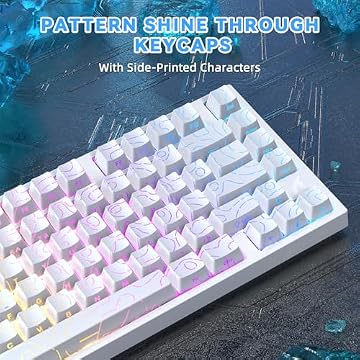


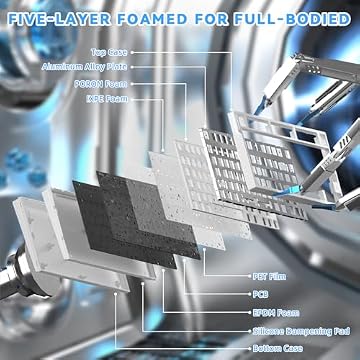

Photographs published on the Amazon listing.
Opening the package reveals a complete wired competitive keyboard setup equipped with dedicated magnetic hardware and custom lighting accessories designed for immediate play.
- Attack Shark R82HE 75 percent mechanical gaming keyboard in white contour styling
- Custom magnetic amber switches utilizing Hall effect sensing technology
- Integrated aluminum alloy plate providing structural support and typing rigidity
- C01 Ultra RGB coiled keyboard cable with standard USB-A connectivity
- Full per-key RGB backlighting supporting 16.8 million colors
- Integrated high-frequency processor supporting 256K scan sampling and 8000Hz polling
- Browser access to the programmable web driver for actuation and key mapping adjustments
Key Specifications
Specification Attribute
Listing Detail
- Keyboard Layout
- 75% Layout (80 Keys, QWERTY)
- Switch Type
- Hall Effect Magnetic Amber Switches
- Actuation Precision
- 0.005mm Rapid Trigger sensitivity
- Polling Rate
- 8000 Hz (0.08ms latency)
- Internal Scan Sampling
- 256K scan sampling frequency
- Connectivity
- Wired USB-A
- Plate Construction
- Aluminum alloy plate
- Compatible Devices
- Gaming Console and PC
- Included Cable
- C01 Ultra RGB coiled keyboard cable
Copied from the Amazon listing. These figures were not measured here.
Rapid Trigger and Hall Effect Precision
The foundation of the attack shark r82he switch design is its Hall effect magnetic architecture. Conventional mechanical switches rely on physical metal contacts that collide to complete an electrical circuit. Over time, physical contacts can suffer from debounce delay and mechanical wear. The attack shark r82he hall effect switches replace mechanical contact points with continuous magnetic distance tracking. Because the internal sensor monitors the magnet’s position without physical friction, the board registers initial key presses in as little as 0.1ms while eliminating debounce latency completely.
Where this technology truly transforms competitive gameplay is through attack shark r82he rapid trigger functionality. On standard mechanical keyboards, you must allow the keycap to travel upward past a fixed reset line before pressing it again. Rapid trigger dynamically resets the switch the instant your finger begins releasing upward pressure. With an adjustable sensitivity down to 0.005mm and zero dead zones, you can execute stutter-steps, rapid counter-strafing, and immediate directional changes without waiting for mechanical spring return. In tactical first-person shooters, stopping your character a fraction of a second sooner translates directly into accurate gunplay.
Compared to earlier magnetic implementations such as the Attack Shark X68 Pro HE, this model provides finer granularity across its actuation range. Whether executing rapid-fire rhythm inputs or chaining fighting game combos, inputs reset immediately. However, shoppers should note that using hyper-sensitive magnetic switches for standard typing tasks can lead to accidental inputs if your fingers rest heavily on the keys, meaning you will likely want to raise the actuation threshold for casual office work.
The Practical Impact of 8000Hz Polling
Most standard gaming keyboards operate at a 1000Hz polling rate, transmitting input status to your computer once every millisecond. The attack shark r82he 8khz polling configuration raises that reporting frequency to 8000 times per second, dropping transmission delay to a theoretical 0.08ms. Operating in tandem with an onboard high-frequency processing chip running 256K scan sampling, the board reads physical switch positions hundreds of thousands of times each second. This ensures that every keystroke is captured at the very microsecond physical movement occurs.
When assessing the attack shark r82he for gaming, the benefits of 8000Hz polling are most noticeable in fast-paced esports titles played on high-refresh-rate gaming monitors. When paired with a display operating at 240Hz, 360Hz, or beyond, the ultra-fast polling interval minimizes micro-stuttering between key actuation and on-screen rendering. Every strafe, slide, and skill activation synchronizes cleanly with the game engine, providing a fluid and highly responsive control feel.
There is, however, an important trade-off to consider with 8000Hz data streams. Transmitting 8,000 reports every second places a continuous processing load on your computer’s CPU. On modern multi-core gaming systems, this overhead remains negligible, but on older or entry-level processors, high-polling peripherals can occasionally contribute to CPU spikes or reduced frame rates in demanding multiplayer lobbies. Similar to dedicated competitive alternatives like the Attack Shark X82 Pro HE, the R82HE relies on a direct wired USB connection to maintain the signal stability required for true high-polling performance.
Web Driver Functionality and Key Customization
Managing competitive settings on this keyboard is handled through the attack shark r82he web driver. Instead of requiring users to download third-party desktop executable files that run background helper services and consume RAM, the configuration interface runs entirely within a supported web browser. Connecting the keyboard allows you to adjust actuation depths, remap key functions, and alter lighting modes on the fly without installing persistent software on your operating system.
The web platform unlocks several advanced magnetic switch functions designed specifically for competitive play. Among these is Dynamic Keystrokes, or DKS, which allows a single switch to execute up to four distinct actions based on press and release travel depth. For instance, a light press can trigger a walking movement, while bottoming out the key commands a full sprint. The software also provides Mod-Tap settings for assigning separate actions to tapping versus holding a key, as well as Toggle Key configurations for sustained actions.
Beyond competitive tuning, the browser utility oversees the 16.8 million color RGB illumination across the board. You can customize dynamic lighting patterns, adjust brightness levels, and coordinate the keyboard lighting with the included C01 Ultra RGB coiled cable. Having complete profile control stored directly within a browser interface makes it straightforward to transport your settings between different tournament machines or personal computers without configuration hassles.
Hardware Construction and the 75 Percent Form Factor
A closer look at the attack shark r82he specs highlights a 75 percent compact layout containing 80 keys. This form factor eliminates the bulky numeric keypad found on full-sized keyboards while preserving dedicated arrow keys and essential functional keys. For competitive gamers, this compact arrangement provides extensive physical clearance for wide mouse maneuvers across the desk, preventing accidental mouse collisions during low-DPI flick shots.
The attack shark r82he gaming keyboard is constructed around an aluminum alloy plate housed inside a white contour shell featuring an ATTACK SHARK emblem. This aluminum plate provides structural rigidity, preventing deck flex when pressing down aggressively during intense matches. The listing also notes a refined acoustic tuning aimed at producing HIFI sound, which helps minimize hollow vibrations within the enclosure. Keep in mind that while the board supports hot-swapping, the Hall effect circuitry is engineered exclusively for magnetic switches, so conventional mechanical switches with metal pins cannot be installed.
A distinctive physical inclusion is the bundled C01 Ultra RGB coiled keyboard cable, an accessory that players typically have to purchase separately. The coiled design keeps desk cables neat while adding coordinated RGB illumination to match the keyboard’s perimeter lighting. While specialized niche models like the Attack Shark RS3 Ultra cater to distinct form factor needs, the R82HE offers a balanced desktop layout ready for competitive play out of the box.
Attack Shark R82HE Pros and Cons
Pros
- True 8000Hz polling rate with 0.08ms input latency
- Rapid trigger precision adjustable down to 0.005mm
- Browser-based web driver requires no software download
- Includes bundled C01 Ultra RGB coiled keyboard cable
- Durable aluminum alloy top plate construction
Cons
- Wired USB connection only with no wireless support
- Hot-swap PCB only accepts compatible magnetic switches
- No dedicated physical number pad
Check Attack Shark R82HE on Amazon
Is the Attack Shark R82HE Worth It
Deciding if the Attack Shark R82HE is worth your investment comes down to whether your priority lies in competitive gaming or general-purpose computer use. For esports players and dedicated tactical shooter enthusiasts, the combination of 0.005mm rapid trigger sensitivity, Hall effect magnetic switches, and 8000Hz polling rate offers tangible performance benefits. The ability to stop movement on a dime and register instant keystroke resets provides a genuine physical advantage in competitive matches that traditional mechanical boards cannot replicate.
However, the keyboard may feel overly specialized for casual users or standard office workers. The ultra-light, continuous sensing of magnetic switches can result in accidental keystrokes while writing long documents unless you spend time dialing in deeper actuation points in the web driver. Furthermore, the lack of wireless functionality and the omission of a dedicated number pad make it less versatile for productivity-focused workstations or clean cable-free setups.
For shoppers seeking high-end magnetic switch performance paired with the convenience of driverless browser configuration and an included coiled RGB cable, the R82HE delivers substantial value. It strips away bulky desktop software and unnecessary desk bulk, delivering a focused, tournament-ready wired keyboard built specifically to maximize in-game reaction speeds.
Other Options to Consider
15-Zone RGB Illumination is better suited for budget-conscious buyers and casual users who want a quiet, durable daily keyboard without the complexity of magnetic switches. Featuring a whisper-quiet key design, IP32 water resistance for spill protection, 25 anti-ghosting keys, and an ergonomic metal panel, it offers a reliable, spill-resistant typing experience for general computing and relaxed gaming.

AULA F75 Pro Wireless Mechanical is the preferred choice for gamers who demand wireless freedom and a traditional acoustic typing feel. This 75 percent mechanical board features tri-mode connectivity via 2.4GHz wireless, Bluetooth 5.0, and USB-C, along with pre-lubed Reaper mechanical switches, side-printed PBT keycaps, an integrated media control knob, and hot-swappable mechanical sockets.
75% Compact,RGB Led Light,Bluetooth,2.4GHz&USB-C,Rechargeable,Tactile Switches,Clicky suits shoppers who prefer tactile acoustic feedback and multi-device portability. Equipped with clicky tactile switches, a physical control knob, rechargeable battery, and multi-device Bluetooth and 2.4GHz pairing, it is tailored for users who frequently switch between a PC, Mac, and laptop rather than remaining tethered to a single wired gaming rig.

FAQ
How does the rapid trigger feature work on the Attack Shark R82HE?
Rapid trigger works by continuously tracking the physical depth of the switch using Hall effect magnetic sensors rather than fixed electrical contacts. Instead of requiring the key to travel all the way back past a mechanical reset line, the switch resets the microsecond you begin lifting your finger, with sensitivity adjustable down to 0.005mm. This enables immediate re-actuation for faster in-game movements like counter-strafing.
Does the 8000Hz polling rate require special PC hardware?
The keyboard connects using a standard USB-A port, but operating at an 8000Hz polling rate means it transmits data 8,000 times per second to your computer. This high-frequency data transmission consumes more CPU cycles than standard 1000Hz keyboards. Modern multi-core gaming systems handle this easily, but older or entry-level processors may experience minor CPU strain during heavy gameplay.
Do I need to install background software to configure the keyboard?
No software installation is required. The keyboard uses a programmable web driver that opens in any supported web browser. You can configure rapid trigger sensitivity, actuation points, Dynamic Keystrokes, and RGB lighting modes directly from the browser without installing desktop software that consumes system memory.
Can I replace the switches with standard mechanical switches?
No, you cannot use standard 3-pin or 5-pin mechanical switches in this keyboard. Because the board uses Hall effect electromagnetic sensors rather than electrical pin sockets, it is only compatible with magnetic Hall effect switches, such as the custom magnetic amber switches included with the board.
Is the Attack Shark R82HE wireless?
No, this is strictly a wired gaming keyboard powered through a USB-A connection. It includes a specialized C01 Ultra RGB coiled cable designed to ensure stable power delivery and low-latency communication during competitive gameplay without the risk of wireless interference or battery depletion.